his tutorial [4] requires creation of extensible platform setup as described in TE0950, Vitis 2023.2.1, Extensible Platform [1].
Process of compilation models is similar to pytorch model. Change directory to:
This tutorial [4] requires installation of AMD DPUCZDX8G for Vitis 2023.2.1 as described in TE0950, Vitis 2023.2.1, Integration of DPUCZDX8G [2].
The target system isTE0950-02 (with Versal xcve2302 ES1 device) or TE0950-03 (with Versal xcve2302 device).
The TE0950 extensible bring up script are using Linux make utility.
The board configuration files are identical with [6], [7] for the Versal device.
The Artix device is using the bring up scripts and board configuration files [6], [8].
Description of the AMD DPUCZDX8G can be find in AMD product guide PG338 [9].
This tutorial [4] describes compilation and use of AI 3.0 models for inference acceleration on AMD DPUCZDX8G in Vitis 2023.2.1 . The AMD DPUCZDX8G engine has been introduced in Vitis 2022.2 . It is unchanged in Vitis 2023.2.1. It works with AI models present in the Vitis-AI 3.0 repository. The demo SW source code present in the Vitis-AI 3.5 repository works with Vitis 2023.2.1 AI SW runtime libraries present in the Petalinux 2023.2 filesystem installation.
Requirements
Download package TE0950_2023_2_1_dpuczdx8g_AI_3_0.zip accompanying this tutorial from:
Install Vitis AI 3.0
Download the Vitis-AI 3.0 repository.
In browser, open page:
https://github.com/Xilinx/Vitis-AI/tree/3.0
Click on green Code button and download Vitis-AI-3.0.zip file.
Unzip to
~/work/Vitis-AI-3.0
The directorymcontains the Vitis-AI 3.0 framework.
Download the Vitis-AI 3.5 repository.
In browser, open page:
https://github.com/Xilinx/Vitis-AI/tree/master
Click on green Code button and download Vitis-AI-master.zip file.
Unzip to
~/work/Vitis-AI-3.5
The directory contains the Vitis-AI 3.5 framework.
Starting point for exploration of these Vitis AI 3.0 examples is this Xilinx www page.
https://xilinx.github.io/Vitis-AI/3.0/html/index.html
Vitis AI 3.0 Images and Videos
Download the AI 3.0 support archive archive with images:
https://www.xilinx.com/bin/public/openDownload?filename=vitis_ai_library_r3.0.0_images.tar.gz
Download the AI 3.0 support archive with videos:
https://www.xilinx.com/bin/public/openDownload?filename=vitis_ai_library_r3.0.0_video.tar.gz
Unzip and untar content to:
~/apps
~/samples
~/samples_onnx
These directories contain support material for AI 3.0 examples. Move content to:
~/work/Vitis-AI-3.0/examples/vai_library/apps
~/work/Vitis-AI-3.0/examples/vai_library/samples
~/work/Vitis-AI-3.0/examples/vai_library/samples_onnx
Install Docker
In Ubuntu 20.04, install docker
sudo apt install docker.io
Test the docker instalation:
sudo docker run hello-world
Install Docker Images for Vitis AI 3.5
Install precompiled docker images
sudo docker pull xilinx/vitis-ai-tensorflow-cpu:latest
sudo docker pull xilinx/vitis-ai-tensorflow2-cpu:latest
sudo docker pull xilinx/vitis-ai-pytorch-cpu:latest
Vitis AI 3.0 Model Downloads
Python Downloader
Vitis AI 3.0 models can be downloaded with python tool downloader.py
cd ~/work/Vitis-AI-3.0/model_zoo
Example:
Select pytorch model framework
input: pt
Select model (pt_resnet50_imagenet_224_224_0.4_4.9G_3.0)
input num: 1
chose model (all)
Input num: 0
devel@ubuntu:~/work/Vitis-AI-3.0/model_zoo$ python3 downloader.py
Tip:
you need to input framework and model name, use space divide such as tf vgg16
tf:tensorflow1.x  tf2:tensorflow2.x  cf:caffe  dk:darknet  pt:pytorch  all: list all model
input:pt
chose model
0 : all
1 : pt_resnet50_imagenet_224_224_0.4_4.9G_3.0
2 : pt_face-mask-detection_512_512_0.67G_3.0
3 : pt_inceptionv3_imagenet_299_299_0.5_5.7G_3.0
4 : pt_yolov5-large_coco_640_640_109.6G_3.0
5 : pt_fadnet_sceneflow_576_960_0.65_154G_3.0
6 : pt_psmnet_sceneflow_576_960_0.68_696G_3.0
7 : pt_squeezenet_imagenet_224_224_1.12G_3.0
8 : pt_OFA-resnet50_imagenet_160_160_0.88_1.8G_3.0
9 : pt_yolov6m_coco_640_640_82.4G_3.0
10 : pt_resnet50_imagenet_224_224_0.3_5.8G_3.0
11 : pt_OFA-depthwise-res50_imagenet_176_176_1.29G_3.0
12 : pt_salsanext_semantic-kitti_64_2048_0.6_20.4G_3.0
13 : pt_SOLO_coco_640_640_214G_3.0
14 : pt_resnet50_imagenet_224_224_0.5_4.1G_3.0
15 : pt_vehicle-type-classification_CarBodyStyle_224_224_3.64G_3.0
16 : pt_pmg_grocerystore_224_224_2.28G_3.0
17 : pt_SemanticFPN-mobilenetv2_cityscapes_512_1024_10G_3.0
18 : pt_bert-large_SQuADv1.1_384_246.42G_3.0
19 : pt_salsanextv2_semantic-kitti_64_2048_0.75_33.27G_3.0
20 : pt_inceptionv3_imagenet_299_299_0.6_4.5G_3.0
21 : pt_resnet50_imagenet_224_224_0.7_2.5G_3.0
22 : pt_vehicle-color-classification_VCoR_224_224_3.64G_3.0
23 : pt_inceptionv3_imagenet_299_299_11.4G_3.0
24 : pt_DRUNet_Kvasir_528_608_0.8G_3.0
25 : pt_vehicle-make-classification_VMMR_224_224_3.64G_3.0
26 : pt_OFA-yolo_coco_640_640_0.3_34.72G_3.0
27 : pt_MaskRCNN_coco_800_800_240G_3.0
28 : pt_OFA-resnet50_imagenet_224_224_15.0G_3.0
29 : pt_yolov5s6_coco_1280_1280_17G_3.0
30 : pt_OFA-rcan_DIV2K_360_640_40.5G_3.0
31 : pt_SESR-S_DIV2K_360_640_10.2G_3.0
32 : pt_resnet50_imagenet_224_224_0.6_3.3G_3.0
33 : pt_resnet50_imagenet_224_224_8.2G_3.0
34 : pt_CFLOW_LIDC_128_128_10.42G_3.0
35 : pt_yolox-nano_coco_416_416_1G_3.0
36 : pt_yolov4csp_coco_640_640_121G_3.0
37 : pt_OFA-yolo_coco_640_640_48.88G_3.0
38 : pt_OFA-resnet50_imagenet_192_192_0.74_3.6G_3.0
39 : pt_3D-UNET_kits19_128_128_128_1065.44G_3.0
40 : pt_bert-tiny_SQuADv1.1_384_453M_3.0
41 : pt_xilinxSR_360_640_DIV2K_364.88G_3.0
42 : pt_OFA-resnet50_imagenet_224_224_0.45_8.2G_3.0
43 : pt_inceptionv3_imagenet_299_299_0.3_8G_3.0
44 : pt_OFA-yolo_coco_640_640_0.5_24.62G_3.0
45 : pt_inceptionv3_imagenet_299_299_0.4_6.8G_3.0
46 : pt_movenet_coco_192_192_0.5G_3.0
47 : pt_fadnet_sceneflow_576_960_441G_3.0
48 : pt_ENet_cityscapes_512_1024_11.3G_3.0
49 : pt_fadnetv2_sceneflow_576_960_412G_3.0
50 : pt_SemanticFPN_cityscapes_256_512_10.56G_3.0
51 : pt_fadnetv2_sceneflow_576_960_0.51_201G_3.0
52 : pt_pointpillars_kitti_12000_100_11.2G_3.0
53 : pt_OFA-resnet50_imagenet_224_224_0.60_6.0G_3.0
54 : pt_yolov5-nano_coco_640_640_4.6G_3.0
55 : pt_CLOCs_kitti_3.0
56 : pt_HRNet_cityscapes_1024_2048_378G_3.0
57 : pt_bert-base_SQuADv1.1_384_70.66G_3.0
input num:1
chose model type
0: all
1 : GPU
2 : zcu102 & zcu104 & kv260
3 : vck190
4 : vck5000-DPUCVDX8H-4pe
5 : vck5000-DPUCVDX8H-6pe-aieDWC
6 : vck5000-DPUCVDX8H-6pe-aieMISC
7 : vck5000-DPUCVDX8H-8pe
input num:0
pt_resnet50_imagenet_224_224_0.4_4.9G_3.0.zip
                                              100.0%|100%
resnet50_pruned_0_4_pt-zcu102_zcu104_kv260-r3.0.0.tar.gz
                                              100.0%|100%
resnet50_pruned_0_4_pt-vck190-r3.0.0.tar.gz
                                              100.0%|100%
resnet50_pruned_0_4_pt-vck5000-DPUCVDX8H-4pe-r3.0.0.tar.gz
                                              100.0%|100%
resnet50_pruned_0_4_pt-vck5000-DPUCVDX8H-6pe-aieDWC-r3.0.0.tar.gz
                                              100.0%|100%
resnet50_pruned_0_4_pt-vck5000-DPUCVDX8H-6pe-aieMISC-r3.0.0.tar.gz
                                              100.0%|100%
resnet50_pruned_0_4_pt-vck5000-DPUCVDX8H-8pe-r3.0.0.tar.gz
                                              100.0%|100%
done
devel@ubuntu:~/work/Vitis-AI-3.0/model_zoo$
Delete model packages for other architectures:
./resnet50_pruned_0_4_pt-vck190-r3.0.0.tar.gz
./resnet50_pruned_0_4_pt-vck5000-DPUCVDX8H-4pe-r3.0.0.tar.gz
./resnet50_pruned_0_4_pt-vck5000-DPUCVDX8H-6pe-aieDWC-r3.0.0.tar.gz
./resnet50_pruned_0_4_pt-vck5000-DPUCVDX8H-6pe-aieMISC-r3.0.0.tar.gz
./resnet50_pruned_0_4_pt-vck5000-DPUCVDX8H-8pe-r3.0.0.tar.gz
Models for AMD DPU configuration B4096 are present in:
./resnet50_pruned_0_4_pt-zcu102_zcu104_kv260-r3.0.0.tar.gz
Models for other AMD DPU configurations have to be compiled from data present in zip archive:
./pt_resnet50_imagenet_224_224_0.4_4.9G_3.0.zip
unzip this archive to directory
./pt_resnet50_imagenet_224_224_0.4_4.9G_3.0
Arch.json File
An arch.json is produced by Vivado 2023.2.1. in the process of compilation of the AMD DPUCZDX8G in configuration B2304 as described in the tutorial TE0950, Vitis 2023.2.1, AI 3.5, AMD DPUCZDX8G Size B2304 [2].
In case of TE0950 the arch.json file describing the AMD DPUCZDX8G in configuration B2304 has been created in:
~/work/te0950/dpucv2dx8g/te0950_test_dpu_trd/dpu_trd_system_hw_link/Hardware/dpu.build/link/vivado/vpl/prj/prj.gen/sources_1/bd/zusys/ip/zusys_DPUCZDX8G_1_0/arch.json
Copy the arch.json file for the selected AMD DPU configuration to
~/work/Vitis-AI-3.0/model_zoo/arch.json
Compile Pytorch Models
Copy fie compile_model.sh from the repository associated to this application note to the directory
~/work/Vitis-AI-3.0/model_zoo/compile_model.sh
Change mode to executable for file compile_model.sh
Chmod +x ~/work/Vitis-AI- 3.0/model_zoo/compile_model.sh
Compile Pytorch Model for AMD DPUCZDX8G in configuration B2304
Change directory to
~/work/Vitis-AI-3.0
Start pytorch docker
sudo ./docker_run.sh xilinx/vitis-ai-pytorch-cpu:latest
In pytorch docker WorkFlow, change directory to model_zoo
cd model_zoo
Start pytorch compiler ftramework
conda activate vitis-ai-pytorch
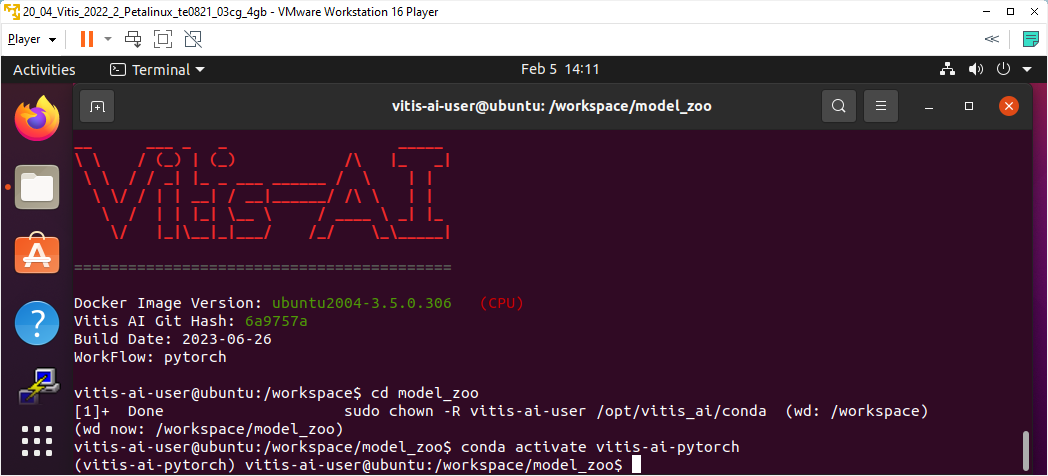
Parameters for model compilation script compile_model.sh :
- pt pytorch model
- resnet50_pruned_0_4_pt Model name
- pt_resnet50_imagenet_224_224_0.4_4.9G_3.0 Directory
- ResNet_0_int.xmodel Quantized model
Pytorch model is indicated by pt
Model name can be found in the readme file in classification directory:
/home/devel/work/Vitis-AI-3.0/examples/vai_library/samples/classification/readme
Part of classification/readme file content
Valid model name:
    …
    resnet50_pruned_0_4_pt
    …
Directory is name of the unzipped directory associated to the model
Quantized model is name of file <name>.xmodel located in directory associated to the model in subdirectory quantized
/work/Vitis-AI- 3.0/model_zoo/pt_resnet50_imagenet_224_224_0.4_4.9G_3.0/quantized/ResNet_0_int.xmodel
This file name <name> can be different for different models but the location always in the subdirectory quantized and the extension is always .xmodel
Command for compilation of pytorch model:
./compile_model.sh pt resnet50_pruned_0_4_pt pt_resnet50_imagenet_224_224_0.4_4.9G_3.0 ResNet_0_int.xmodel
Compilation listing:
(vitis-ai-pytorch) vitis-ai-user@ubuntu:/workspace/model_zoo$ ./compile_model.sh pt resnet50_pruned_0_4_pt pt_resnet50_imagenet_224_224_0.4_4.9G_3.0 ResNet_0_int.xmodel
**************************************************
* VITIS_AI Compilation - Xilinx Inc.
**************************************************
[UNILOG][INFO] Compile mode: dpu
[UNILOG][INFO] Debug mode: null
[UNILOG][INFO] Target architecture: DPUCZDX8G_ISA1_B1600
[UNILOG][INFO] Graph name: ResNet_0, with op num: 417
[UNILOG][INFO] Begin to compile...
[UNILOG][INFO] Total device subgraph number 3, DPU subgraph number 1
[UNILOG][INFO] Compile done.
[UNILOG][INFO] The meta json is saved to "/workspace/model_zoo/./compiled_output_pt/resnet50_pruned_0_4_pt/meta.json"
[UNILOG][INFO] The compiled xmodel is saved to "/workspace/model_zoo/./compiled_output_pt/resnet50_pruned_0_4_pt/resnet50_pruned_0_4_pt.xmodel"
[UNILOG][INFO] The compiled xmodel's md5sum is 8977ac80ac31133b9a957c20d55643d4, and has been saved to "/workspace/model_zoo/./compiled_output_pt/resnet50_pruned_0_4_pt/md5sum.txt"
(vitis-ai-pytorch) vitis-ai-user@ubuntu:/workspace/model_zoo$
Directory compiled_output_pt is created. It contains compiled model files for the AMD DPUCZDX8G in configuration B2304 in the directory resnet50_pruned_0_4_pt
./compiled_output_pt/resnet50_pruned_0_4_pt
One file is needed in the compiled model. File is present in archive with precompiled model for the AMD DPU in B4096 configurations.
Open archive
resnet50_pruned_0_4_pt-zcu102_zcu104_kv260-r3.0.0.tar.gz
copy file
resnet50_pruned_0_4_pt/resnet50_pruned_0_4_pt.prototxt
to file
./compiled_output_pt/resnet50_pruned_0_4_pt/resnet50_pruned_0_4_pt.prototxt
General classification Model: pt_resnet50_imagenet_224_224_0.4_4.9G_3.0
is compiled for AMD DPU in B2304 configuration. It contains 4 files:
~/work/Vitis-AI-3.0/model_zoo/compiled_output_pt/resnet50_pruned_0_4_pt/md5sum.txt
~/work/Vitis-AI-3.0/model_zoo/compiled_output_pt/resnet50_pruned_0_4_pt/meta.json
~/work/Vitis-AI-3.0/model_zoo/compiled_output_pt/resnet50_pruned_0_4_pt/resnet50_pruned_0_4_pt.xmodel
~/work/Vitis-AI-3.0/model_zoo/compiled_output_pt/resnet50_pruned_0_4_pt/ resnet50_pruned_0_4_pt.prototxt
Compile Other Pytorch Models for AMD DPUCZDX8G in configuration B2304
Perform similar compilation steps for other 9 seleced models:
Face detection Model:
pt_face-mask-detection_512_512_0.67G_3.0

Vehicle make Model:
pt_vehicle-make-classification_VMMR_224_224_3.64G_3.0
Vehicle type Model:
pt_vehicle-type-classification_CarBodyStyle_224_224_3.64G_3.0

Vehicle color Model:
pt_vehicle-color-classification_VCoR_224_224_3.64G_3.0
General classification Model:
pt_resnet50_imagenet_224_224_8.2G_3.0
General classification Model:
pt_resnet50_imagenet_224_224_0.3_5.8G_3.0
General classification Model:
pt_resnet50_imagenet_224_224_0.4_4.9G_3.0 (allready compiled)
General classification Model:
pt_resnet50_imagenet_224_224_0.5_4.1G_3.0
General classification Model:
pt_resnet50_imagenet_224_224_0.6_3.3G_3.0
General classification Model:
pt_resnet50_imagenet_224_224_0.7_2.5G_3.0
Find the expected model names in sample application readme files:
~/work/Vitis-AI-3.0/examples/vai_library/samples/yolov4/readme
~/work/Vitis-AI-3.0/examples/vai_library/samples/vehicleclassification/readme
~/work/Vitis-AI-3.0/examples/vai_library/samples/classification/readme
Result of compilations is folder (with all 10 model subfolders targeting the AMD DPUCZDX8G in configuration B2304).
./compiled_output_pt/*
Compres it as .zip file. It will be used to target Vitis AI 3.0 demos with AMD DPUCZDX8G in configuration B2304.
Copy this archive into directory indicating the AMD DPUCZDX8G in configuration B2304. like:
~/work/B2304/compiled_output_pt.zip
Delete directory
~/work/Vitis-AI-3.0/model_zoo/compiled_output_pt/*
Sample Vitis AI 3.5 applications
Demos from the Vitis AI 3.5 library can be compiled in Vitis 2023.2.1 for Petalinux 2023.2 run-time for TE0950 evaluation board. Demos can use models from the Vitis AI 3.0 library for the AMD DPUCZDX8G in configuration B2304. This is possible due to unchanged internal structure of the AMD DPUCZDX8G in Vitis 2022.2 and Vitis 2023.2.1.
SW examples from the Vitis AI 3.5 package to be moved:
~/work/Vitis-AI-3.5/examples/vai_library/samples/yolov4
~/work/Vitis-AI-3.5/examples/vai_library/samples/vehicleclassification
~/work/Vitis-AI-3.5/examples/vai_library/samples/classification
Compress them to:
~/work/yolov4.zip
~/work/vehicleclassification.zip
~/work/classification.zip
Archive to be moved:
~/work/B2304/compiled_output_pt.zip
~/work/yolov4.zip
~/work/vehicleclassification.zip
~/work/classification.zip
Compile Tensorflow Models
Process of compilation models is similar to pytorch model. Change directory to:
~/work/Vitis-AI-3.0
Start tensorflow docker
sudo ./docker_run.sh xilinx/vitis-ai-tensorflow-cpu:latest
In tensorflow docker WorkFlow, change directory to model_zoo
cd model_zoo
Start tensorflow compiler ftramework
conda activate vitis-ai-tensorflow
There are only 3 parameters for model compilation script compile model.sh :
- tf tensorflow model
- Model name
- Directory
The tensorflow model is indicated by tf
Model name can be found in the readme file in the sample application.
Directory is name of the unzipped directory associated to the model.
Compile Tensorflow2 Models
~/work/Vitis-AI-3.0
Start tensorflow docker
sudo ./docker_run.sh xilinx/vitis-ai-tensorflow2-cpu:latest
In tensorflow docker WorkFlow, change directory to model_zoo
cd model_zoo
Start tensorflow2 compiler framework
conda activate vitis-ai-tensorflow2
There are only 3 parameters for model compilation script compile model.sh :
- tf2 tensorflow2 model
- Model name
- Directory
Tensorflow2 model is indicated by tf2
Model name can be found in the readme file in the sample application.
Directory is name of the unzipped directory associated to the model.
Test Sample Vitis AI 3.5 Applications
Install Archives on TE0950
Use ssh to copy Vitis AI 3.5 examples from PC :
~/work/yolov4.zip
~/work/vehicleclassification.zip
~/work/classification.zip
to TE0950 board
~/yolov4.zip
~/vehicleclassification.zip
~/classification.zip
Use ssh to copy compiled Vitis 3.0 model archives from PC:
~/work/B2304/compiled_output_pt.zip
to TE0950 board
~/B2304/compiled_output_pt.zip
On TE0950 board, unzip Vitis AI 3.5 sample applications from
~/yolov4.zip
~/vehicleclassification.zip
~/classification.zip
to:
~/yolov4
~/vehicleclassification
~/classification
On target board, copy models from the relevant directory:
~/B2304/compiled_output_pt/face_mask_detection_pt
to:
~/yolov4/face_mask_detection_pt
From:
~/B2304/compiled_output_pt/vehicle_make_resnet18_pt
~/B2304/compiled_output_pt/vehicle_type_resnet18_pt
to:
~/vehicleclassification/vehicle_make_resnet18_pt
~/vehicleclassification/vehicle_type_resnet18_pt
From:
~/B2304/compiled_output_pt/chen_color_resnet18_pt
~/B2304/compiled_output_pt/resnet50_pt
~/B2304/compiled_output_pt/resnet50_pruned_0_3_pt
~/B2304/compiled_output_pt/resnet50_pruned_0_4_pt
~/B2304/compiled_output_pt/resnet50_pruned_0_5_pt
~/B2304/compiled_output_pt/resnet50_pruned_0_6_pt
~/B2304/compiled_output_pt/resnet50_pruned_0_7_pt
to:
~/classification/chen_color_resnet18_pt
~/classification/resnet50_pt
~/classification/resnet50_pruned_0_3_pt
~/classification/resnet50_pruned_0_4_pt
~/classification/resnet50_pruned_0_5_pt
~/classification/resnet50_pruned_0_6_pt
~/classification/resnet50_pruned_0_7_pt
Compile Vitis AI 3.5 Applications on TE0950
On TE0950 board, compile all sample applications:
sh-5.1# cd ~/yolov4
sh-5.1# chmod +x build.sh
sh-5.1# ./build,sh
sh-5.1# cd ~/vehicleclassification
sh-5.1# chmod +x build.sh
sh-5.1# ./build,sh
sh-5.1# cd ~/classification
sh-5.1# chmod +x build.sh
sh-5.1# ./build,sh
Export Path to the DPU
On TE0950 board, use export command:
sh-5.1# export XLNX_VART_FIRMWARE=/run/media/mmcblk1p1/dpu.xclbin
Test Vitis AI 3.5 Application on TE0950
Test Vitis AI 3.5 applications with commands described in sample application readme files:
~/yolov4/readme
~/vehicleclassification/readme
~classification/readme
Change directory to
~/yolov4
Test face mask detection with input from file sample_face_mask.jpg
sh-5.1# ./test_jpeg_yolov4 face_mask_detection_pt sample_face_mask.jpg
Output: face mask detection coordinates on terminal.
Test performance of face mask detection with input from files listed in test_performance_face_mask.list file.
sh-5.1# ./test_performance_yolov4 face_mask_detection_pt test_performance_face_mask.list -s 60 -t 3
Output: data about performance (in FPS) of face mask detection on terminal.
-s 60 defines length of benchmark in seconds.
-t 3 defines use of 3 SW threads (sharing one AMD DPUCZDX8G in configuration B2304)
Test face mask detection with USB www camera input
sh-5.1# ./test_video_yolov4 face_mask_detection_pt 0 -t 1
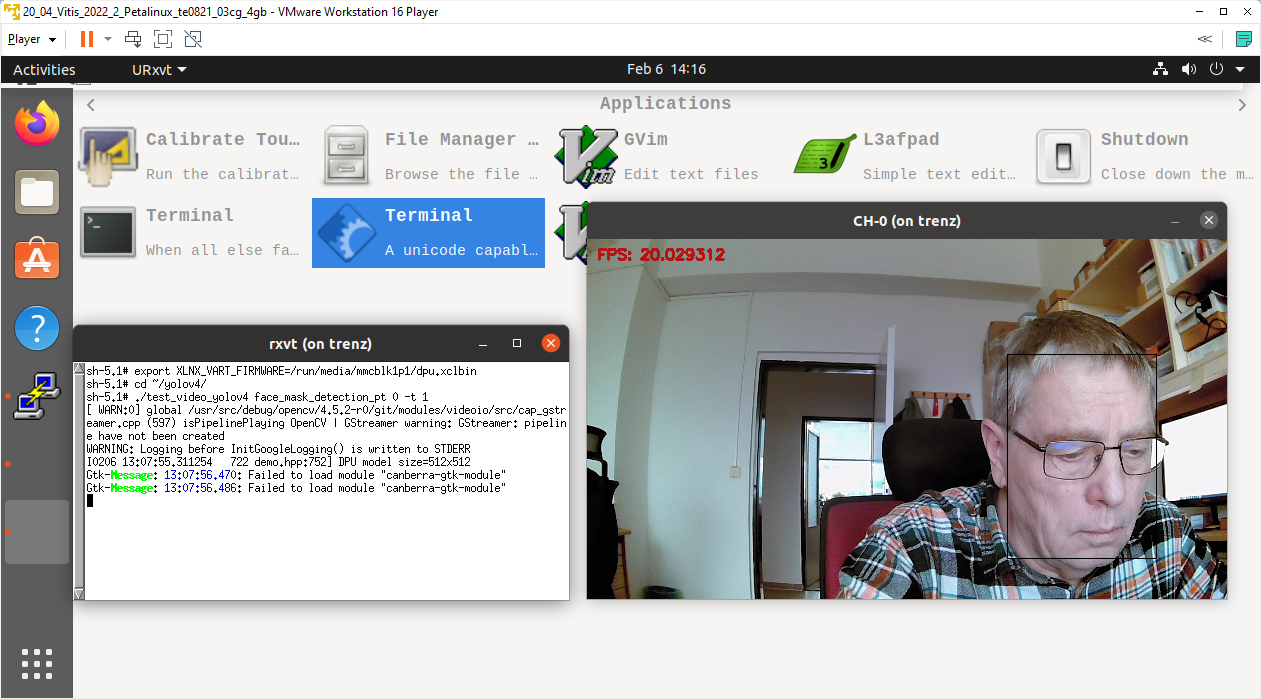
Face_mask_detection Vitis AI 3.5 application with camera input, AMD DPUCZDX8G in configuration B2304.
Output: Video output with face mask coordinates in video and performance (in FPS) displayed as text in video.
0 defines USB www camera device number
-t 1 defines use of 1 SW thread
The Face mask detection Vitis AI 3.0 application can be stopped by pointing mouse to the X11 window with video output and typing Esc key on the keyboard.
Other Vitis AI 3.5 Applications on TE0950
Vitis AI 3.5 sample test applications located in the directory ~/vehicleclassification have analogical format for calling and parameters.
Two different AI models can be used to classify make or type of the vehicle.
Vitis AI 3.5 sample test applications located in the directory ~/classification have analogic format.
Several precompiled AI 3.0 models can be used to
- Classify color of vehicle,
- Classify objects with AI 3.0 resnet50_pt model
- Classify objects with resnet50_pt model, pruned by factor of 0.3, 0.4, 0.5, 0.6 or 0.7. Models have gradually reduced complexity and potentially reduced classification quality.
Measured Vitis AI 3.5 Application Performance on TE0950
Measured performance on TE0950:
- Performance in frames per second [FPS],
- Power consumption in [W],
- End to end performance in (int8) Giga operations per second [GOPs].
TE0950 board with AMD DPUCZDX8G in configuration B2304
Vitis AI 3.5 examples with AI 3.0 Models | Performance with input from camera e2e [FPS] | Power with camera and VGA [W] | Performance with input from file e2e | Power with input from file [W] | GigaOps with input from file e2e |
Face detection Model: pt_face-mask-detection_512_512_0.67G_3.0 | 20.0 | 12.4 | 90.3 | 12.2 | 60.5 |
Vehicle make Model: pt_vehicle-make-classification_VMMR_224_224_3.64G_3.0 | 20.0 | 13.0 | 91.5 | 13.0 | 333.1 |
Vehicle type Model: pt_vehicle-type-classification_CarBodyStyle_224_224_3.64G_3.0 | 20.0 | 12.5 | 91.2 | 13.0 | 332.0 |
Vehicle color Model: pt_vehicle-color-classification_VCoR_224_224_3.64G_3.0 | 20.0 | 12.5 | 91.2 | 13.0 | 332.0 |
General classification Model: pt_resnet50_imagenet_224_224_8.2G_3.0 | 20.0 | 13.0 | 37.2 | 13.0 | 305.0 |
General classification Model: pt_resnet50_imagenet_224_224_0.3_5.8G_3.0 | 20.0 | 12.8 | 45.91 | 12.9 | 266.3 |
General classification Model: pt_resnet50_imagenet_224_224_0.4_4.9G_3.0 | 20.0 | 12.8 | 49.7 | 12.9 | 243.5 |
General classification Model: pt_resnet50_imagenet_224_224_0.5_4.1G_3.0 | 20.0 | 12.7 | 55.3 | 12.8 | 226.7 |
General classification Model: pt_resnet50_imagenet_224_224_0.6_3.3G_3.0 | 20.0 | 12.6 | 66.3 | 12.8 | 218.8 |
General classification Model: pt_resnet50_imagenet_224_224_0.7_2.5G_3.0 | 20.0 | 12.6 | 75.4 | 12.8 | 188.5 |
Measurement conditions:
- TE0950 board xcve2302 device, 8GB DDR4
- AMD DPUCZDX8G in configuration B2304 in programmable logic, clock 200/400 MHz
- USB WWW camera ETERNICO with sensor JX_F23, 1920x1080, max 20 FP
- Power supply 12V/5A
- Power measured at the 230V power plug
References
- TE0950, Vitis 2023.2.1, Extensible Platform
- TE0950, Vitis 2023.2.1, Integration of DPUCZDX8G
- TE0950, Vitis 2023.2.1, Integration of DPUCV2DX8G
- TE0950, Vitis 2023.2.1, AI 3.0 Models for DPUCZDX8G
- TE0950, Vitis 2023.2.1, AI 3.5 Models for DPUCV2DX8G
- AMD Versal™ AI Edge Evalboard with VE2302 device, 8 GB DDR4 SDRAM, 15 x12 cm
https://shop.trenz-electronic.de/en/TE0950-03-EGBE21C-AMD-Versal-AI-Edge-Evalboard-with-VE2302-device-8-GB-DDR4-SDRAM-15-x12-cm?path=Trenz_Electronic/Development_Boards/TE0950/Reference_Design/2023.2/test_board - TE0950 Basic Linux Example archive for Vivado 2023.2.1, build 4, from 31.05.2024 - Versal device
https://shop.trenz-electronic.de/trenzdownloads/Trenz_Electronic/Development_Boards/TE0950/Reference_Design/2023.2/test_board/
TE0950-test_board-vivado_2023.2-build_4_20240531092954.zip - TE0950 Basic Linux Example archive for Vivado 2023.2.1, build 4, from 31.05.2024 - Artix device
https://shop.trenz-electronic.de/trenzdownloads/Trenz_Electronic/Development_Boards/TE0950/Reference_Design/2023.2/test_board/
TE0950-test_board_artix-vivado_2023.2-build_4_20240531084104.zip - DPUCZDX8G for Zynq UltraScale+ MPSoCs Product Guide (PG338)
Introduction • DPUCZDX8G for Zynq UltraScale+ MPSoCs Product Guide (PG338) • Reader • AMD Technical Information Portal
OIder Vitis AI Versions
Not available
Table of contents
Overview
Content Tools