Vitis AI 2023.2
Objective of this Tutorial
This tutorial describes creation of Vitis 2023.2 extensible platform for Trenz Electronic TE0820 modules with 2GB DDR.
It also describes integration of the AMD AI 3.0 DPUCZDX8G IP.
Platform supports Vitis AI 3.5 sample examples with AI inference accelerated on the AMD AI 3.0 DPUCZDX8G IP.
Compilation of AI 3.0 models for the AMD DPUCZDX8G is described in separate AI Tutorial:
Creation of extensible platform and integration of AMD AI 3.0 DPUCZDX8G IP is demonstrated for TE0820 modules:
ID=23 module: TE0820-03-04EV-1EA, device xczu4ev-sfvc784-1-e, 2GB DDR4
Tutorial was also tested for:
- ID=70 module: TE0820-04-4DE21FA, device xczu4ev-sfvc784-1-e, 2GB DDR4
- ID=107 module: TE0820-05-4AE21MA, device xczu4cg-sfvc784-1-e, 2GB DDR4
- ID=89 module: TE0820-05-2AE21MA, device xczu2cg-sfvc784-1-e, 2GB DDR4
- ID=103 module: TE0820-05-3BE81MA, device xczu3eg-sfvc784-1-e, 2GB DDR4
List of all supported TE0820 modules is reprinted from TE0820_board_files.csv file included in the evaluation package associated to this application note.
This Tutorial and associated evaluation package supports 119 versions of TE0820 modules:
Prepare Development Environment
Virtual Machine
On Win10 Pro PC, you can use:
- Oracle VirtualBox 6.1
https://www.virtualbox.org/ - VMware Workstation 16 Player
https://www.vmware.com/products/workstation-player/workstation-player-evaluation.html - Microsoft WSL. See Trenz installation guide for WSL
https://wiki.trenz-electronic.de/display/PD/Xilinx+Tools+and+Win10+WSL
The presented extendible platform has been created on: Windows 10 Pro, ver. 21H2 OS build 19044.1889, VMware Workstation 16 Player (Version 16.2.4 build-20089737), Ubuntu 20.04 LTS Desktop 64-bit PC (AMD64)
https://linuxconfig.org/Ubuntu-20-04-download
Vitis/Vivado 2023.2 and creation of the extendible platform from ZIP archive has been also tested on:
Windows 11 Pro PC (upgrade from Windows 10 Pro, ver. 23H2 OS build 22631.3447)
VMware Workstation 16 Player (Version 16.2.5 build-20904516),
Ubuntu 20.04 LTS Desktop 64-bit PC (AMD64).
https://linuxconfig.org/Ubuntu-20-04-download
Windows 11 Pro PC (upgrade from Windows 10 Pro, ver. 23H2 OS build 22631.3447)
VMware Workstation 16 Player (Version 16.2.5 build-20904516),
Ubuntu 20.04 LTS Desktop 64-bit PC (AMD64).
https://linuxconfig.org/Ubuntu-20-04-download
Linux OS
Only supported OS are selected Linux distributions. You will need either native or virtual PC with Linux distribution.
Create new VM with Linux OS supported by Vitis 2023.2 tools.
Use English as OS language for your Linux System. Keyboard language can be any language.
Other languages may cause errors in PetaLinux build process.
Set Language
In Ubuntu 20.04, open terminal and type command:
$ locale
Language is OK, if the command response starts with:
LANG=en_US.UTF-8
Set Bash as Terminal in Ubuntu
In Ubuntu, set bash as terminal.
$ sudo dpkg-reconfigure dash shell
select: no
Use of bash shell is required by Xilinx tools.
The Ubuntu 20.04 LTS terminal (selected as default installation) is dash.
Install OpenCL Client Drivers
On Ubuntu, install OpenCL Installable Client Driver Loader by executing:
$ sudo apt-get install ocl-icd-libopencl1
$ sudo apt-get install opencl-headers
$ sudo apt-get install ocl-icd-opencl-dev
Software Installation
Vitis 2023.2
Download Vitis
Download the Vitis Tools installer from the link below https://www.xilinx.com/support/download.html
Install Vitis
If Vitis 2023.2 is not installed, follow installation steps described in:
After a successful installation of the Vitis 2023.2 and Vivado 2023.2 in /tools directory, a confirmation message is displayed, with a prompt to run the installLibs.sh script.
Script location:
/tools/Vitis/2023.2/scripts/installLibs.sh
In Ubuntu terminal, change directory to /tools/Vitis/2023.2/script and run the script using sudo privileges:
$ sudo installLibs.sh
The command installs a number of necessary packages for the Vitis 2023.2 tools based on the actual OS version of your Ubuntu system.
Install License Supporting Vivado
In Ubuntu terminal, source paths to Vivado tools by executing
$ source /tools/Xilinx/Vitis/2023.2/settings64.sh
Execute Vivado License Manager:
$ vlm
From vlm, login to your Xilinx account by an www browser.
In www browser, specify Vitis 2023.2 license. Select Linux target.
Download xilinx license file and copy it into the directory of your choice.
~/License/vitis_2023_2/Xilinx.lic
In vlm, select Load License -> Copy License
Putty
The putty terminal can be used for Ethernet connected terminal. Putty supports keyboard, mouse and forwarding of X11 for Zynq Ultrascale+ applications designed for X11 desktop GUI.
In Ubuntu terminal, execute:
$ sudo apt install putty
To test the installation, execute putty application from Ubuntu terminal by:
$ putty &
Exit from putty.
Petalinux 2023.2
Download Petalinux
Download the PetaLinux Tools installer from the link below https://www.xilinx.com/support/download/index.html/content/xilinx/en/downloadNav/embedded-design-tools.html
Install Required Libraries
Install Petalinux 2023.2. Follow guideline described in:
https://wiki.trenz-electronic.de/display/PD/PetaLinux+KICKstart#PetaLinuxKICKstart-PetaLinux2023.2
Before PetaLinux installation, check UG1144 chapter "PetaLinux Tools Installation Requirements" and install missing tool/libraries with help of script plnx-env-setup.sh attached to the Xilinx Answer Record 73296 - PetaLinux: How to install the required packages for the PetaLinux Build Host?
https://www.xilinx.com/support/answers/73296.html
Use this page to download script: plnx-env-setup.sh
The script detects whether the Host OS is a Ubuntu, RHEL, or CentOS Linux distribution and then automatically installs all of the required packages for the PetaLinux Build Host.
The script requires root privileges. The script does not install the PetaLinux Tools. Command to run the script:
$ sudo ./plnx-env-setup.sh
Perform update of your PetaLinux and additional installation libraries.
$ sudo apt-get update
$ sudo apt-get install iproute2 gawk python3 python build-essential gcc git make net-tools libncurses5-dev tftpd zlib1g-dev libssl-dev flex bison libselinux1 gnupg wget git-core diffstat chrpath socat xterm autoconf libtool tar unzip texinfo zlib1g-dev gcc-multilib automake zlib1g:i386 screen pax gzip cpio python3-pip python3-pexpect xz-utils debianutils iputils-ping python3-git python3-jinja2 libegl1-mesa libsdl1.2-dev pylint3 -y
Install Petalinux
and follow the directions in the "Installing the PetaLinux Tool" section of (UG1144).
https://www.xilinx.com/support/documentation/sw_manuals/xilinx2023_2/ug1144-petalinux-tools-reference-guide.pdf
To install petalinux do not start from shared folder, copy installer into your home directory.
$ mkdir -p ~/petalinux/2023.2
Copy petalinux-v2023.2-final-installer.run into ~/petalinux/2023.2
$ ./petalinux-v2023.2-final-installer.run
Source environment
$ source ~/petalinux/2023.2/settings.sh
Prepare Reference Design for Extensible Custom Platform
The design process is demonstrated for module with ID=23: TE0820-03-04EV-1EA, device xczu4ev-sfvc784-1-e, 2GB DDR4. If your module has different ID, replace 23 with that ID. In Ubuntu terminal, source paths to Vitis 2023.2 and Vivado 2023.2 tools by
$ source /tools/Xilinx/Vitis/2023.2/settings64.sh
Download TE0820 test_board Linux Design file from:
https://shop.trenz-electronic.de/trenzdownloads/Trenz_Electronic/Modules_and_Module_Carriers/4x5/TE0820/Reference_Design/2023.2/test_board/TE0820-test_board-vivado_2023.2-build_4_20241125214948.zip
This TE0820 test_board ZIP file contains bring-up scripts for creation of Petalinux for range of modules in zipped directory named “test_board”.
Unzip the file to directory:
~/work/te0820_23_240
All supported modules are identified in file:
~/work/te0820_23_240/test_board/board_files/TE0820_board_files.csv
We will select module 23 with name TE0820-03-04EV-1EA, with device xczu04ev-sfvc784-1-e on TE0701-06 carrier board. We will use default clock 240 MHz. That is why we name the package te0820_23_240 and proposed to unzip the TE0820 test_board Linux Design files into the directory:
~/work/te0820_23_240
Reference HW for TE0820 module
In Ubuntu terminal, change directory to the test_board directory:
$ cd ~/work/te0820_23_240/test_board
Setup the test_board directory files for a Linux host machine.
In Ubuntu terminal, execute:
$ chmod ugo+rwx ./console/base_sh/*.sh
$ chmod ugo+rwx ./_create_linux_setup.sh
$ ./_create_linux_setup.sh
Select option (0) to open Selection Guide and press Enter

Select variant 23 from the selection guide, press enter and agree selection
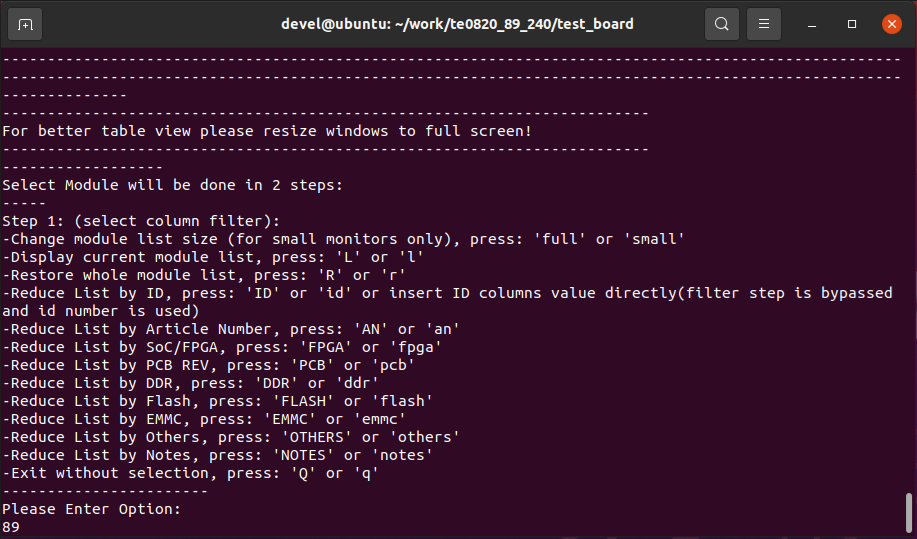
Create Vivado Project with option 1
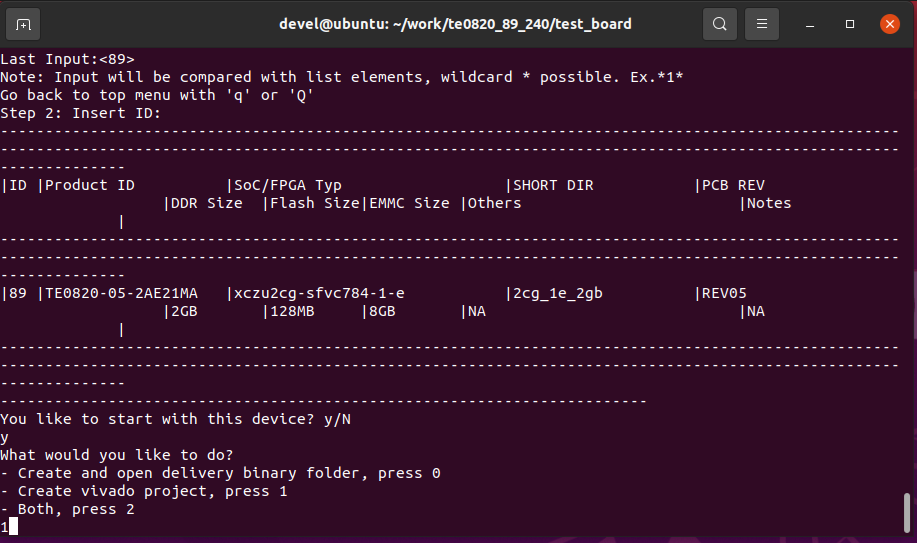
Vivado Project will be generated for the selected variant.
HW support for Vitis Extensible Design Flow
Create Extensible platform HW
This section describes manual creation of extensible platform HW. You can follow it or you can alternatively use the fast track script described in section 3.2.
In Vivado project, click in Flow Navigator on Settings. In opened Settings window, select General in Project Settings, select Project is an extensible Vitis platform. Click on OK.
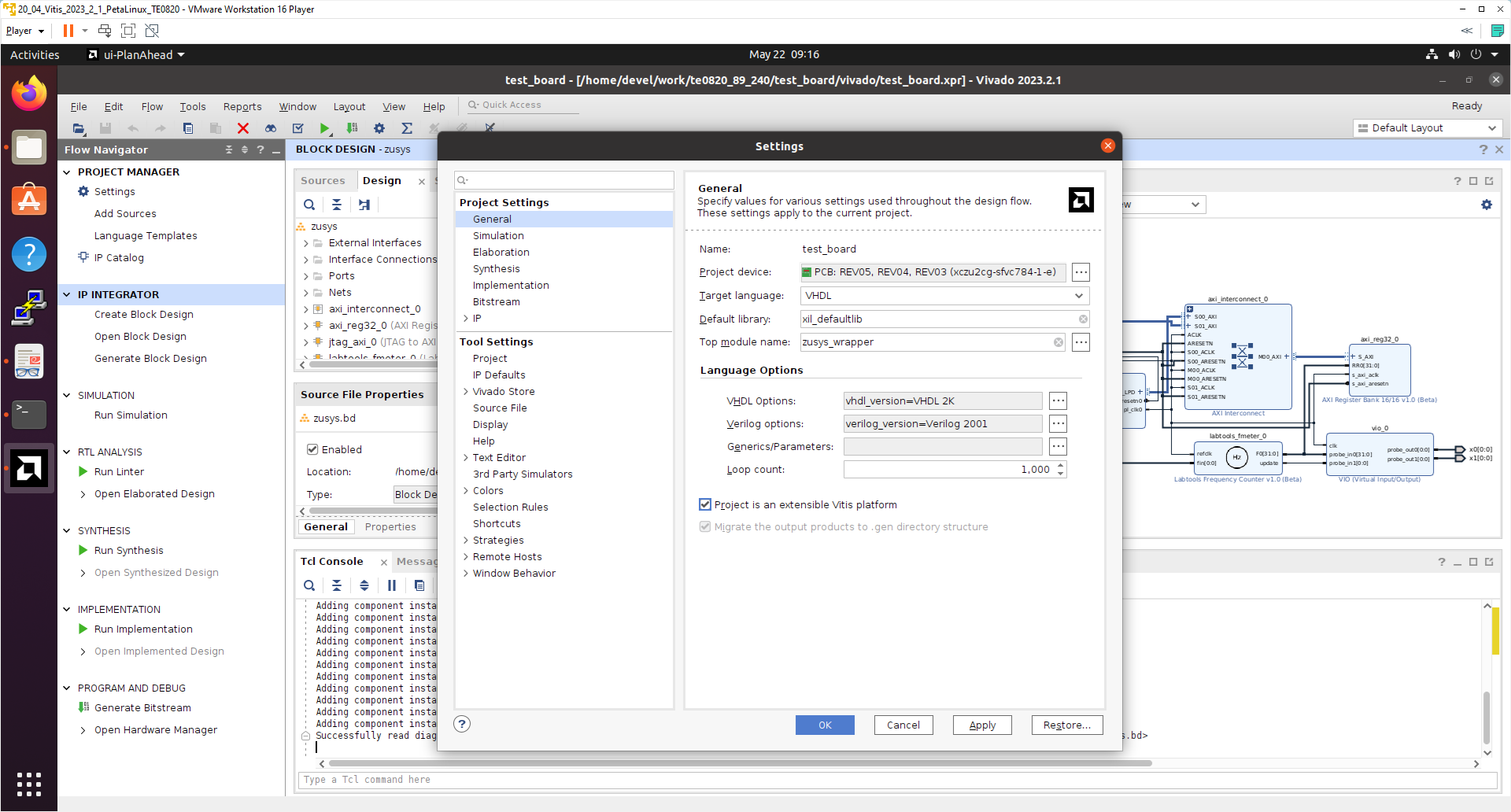
IP Integrator of project set up as an extensible Vitis platform has an additional Platform Setup window.
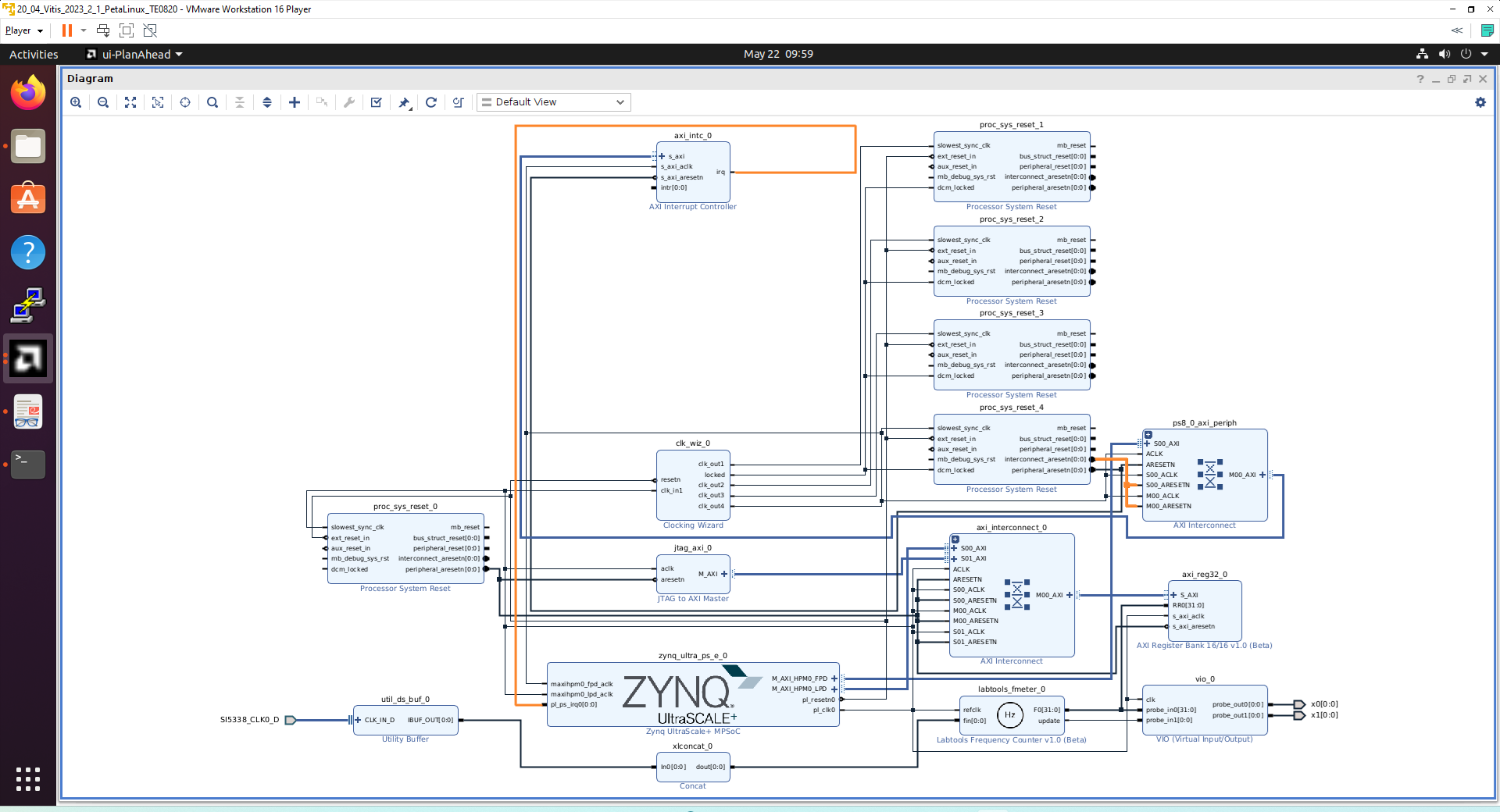
Add multiple clocks and processor system reset IPs
In IP Integrator Diagram Window, right click, select Add IP and add Clocking Wizard IP clk_wiz_0. Double-click on the IP to Re-customize IP window. Select Output Clocks panel. Select four clocks with frequency 100, 200, 400 and 240 MHz.
100 MHz clock will serve as low speed clock.
200 MHz and 400 MHz clock will serve as clock for the AMD DPU AI 3.0 HW IP.
240 MHz clock will serve as the default extensible platform clock. By default, Vitis will compile HW IPs with this default clock.
400 MHz clock will serve as high speed clock.
Set reset type from the default Active High to Active Low.
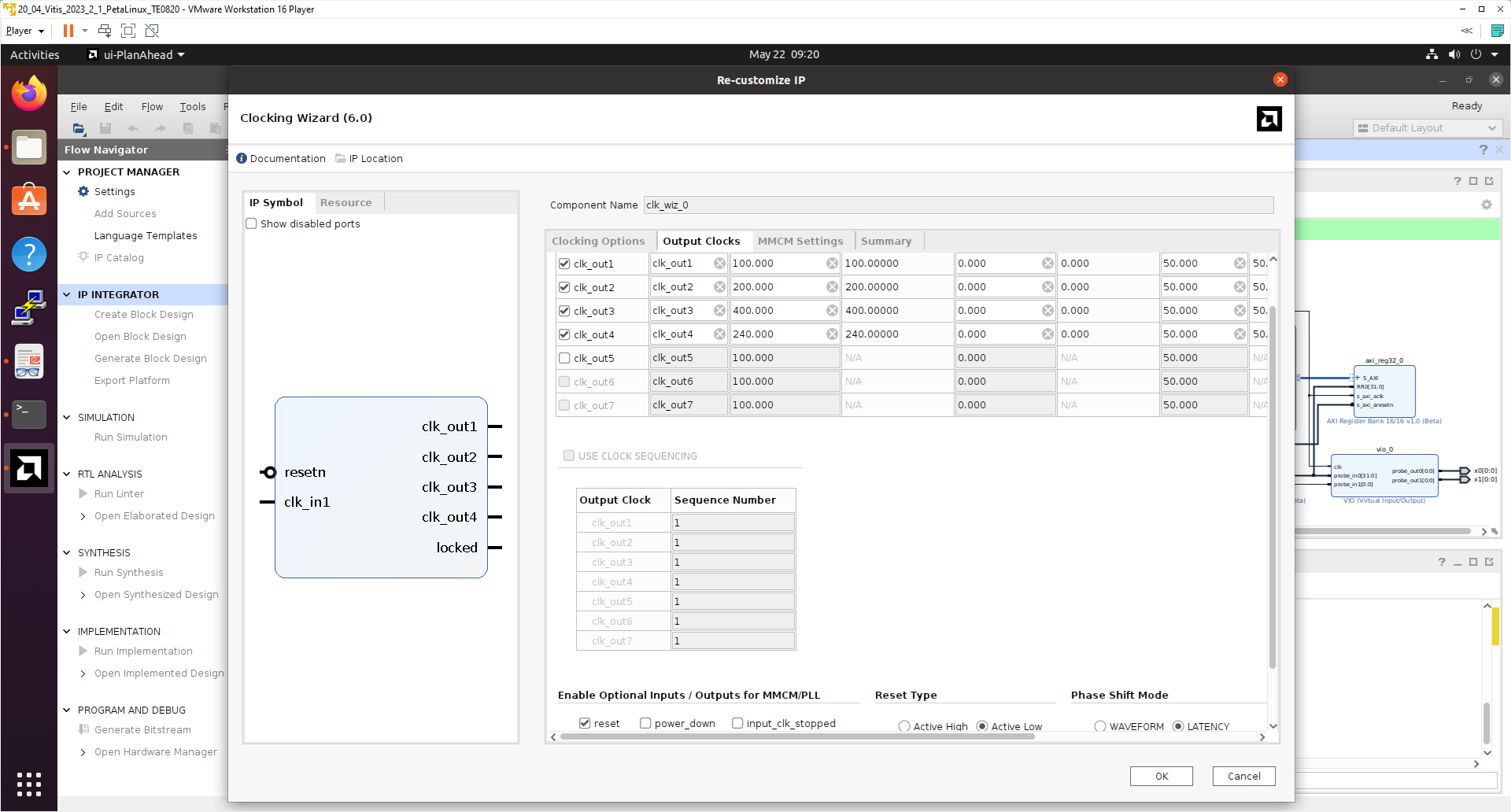
Clik on OK to close the Re-customize IP window.
Connect input resetn of clk_wiz_0 with output pl_resetn0 of zynq_ultra_ps_e_0.
Connect input clk_in1 of clk_wiz_0 with output pl_clk0 of zynq_ultra_ps_e_0.
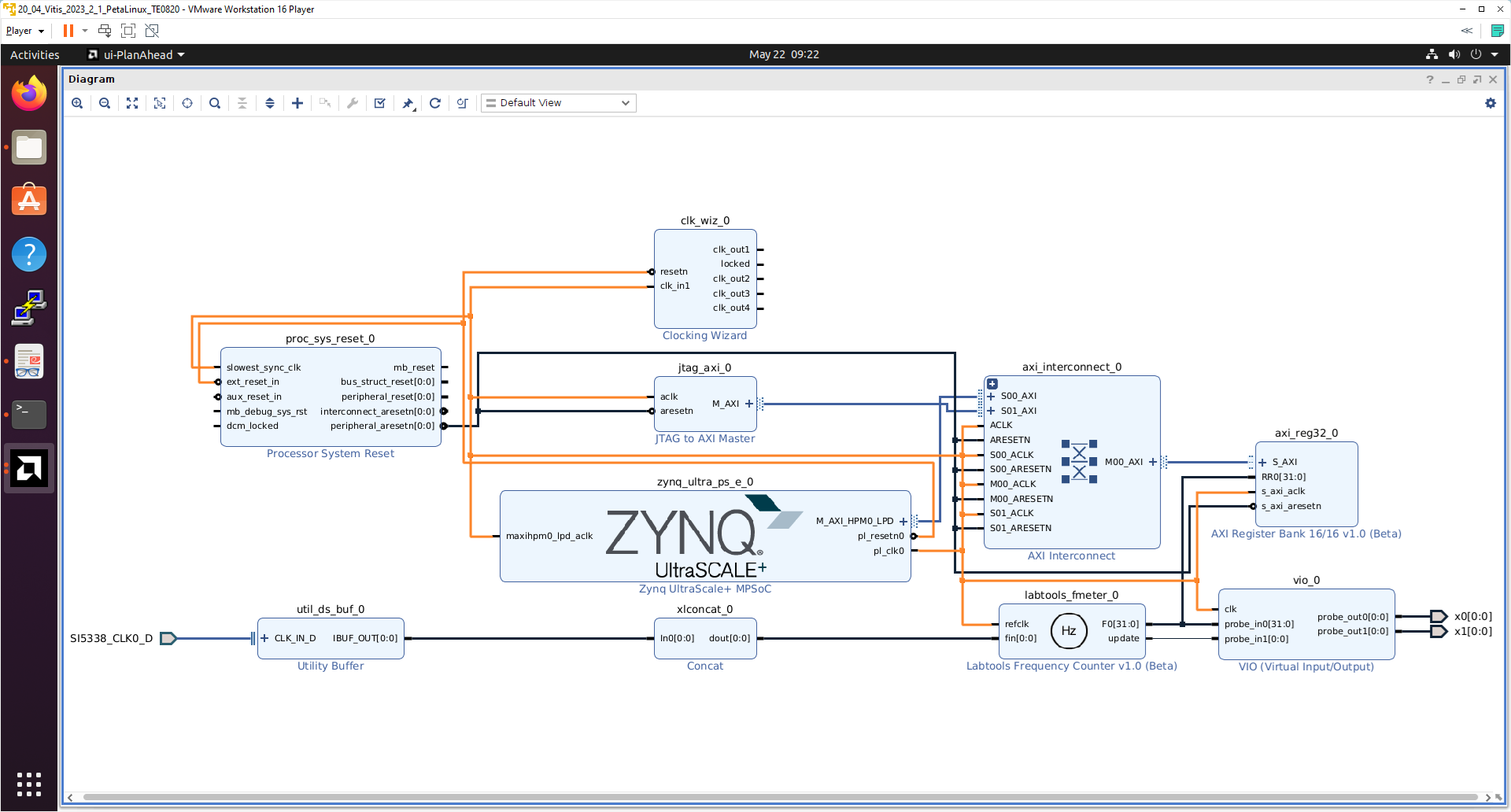
Add and connect four Processor System Reset blocks for each generated clock.

Open Platform Setup window of IP Integrator to define Clocks. In Settings, select Clock.
In “Enabled” column select all four defined clocks clk_out1, clk_out2, clk_out3, clk_out4 of clk_wiz_0 block.
In ID column keep the default Clock ID: 1, 2, 3, 4
In Is Default column, select clk_out4 (with ID=4) as the default clock. One and only one clock must be selected as default clock.
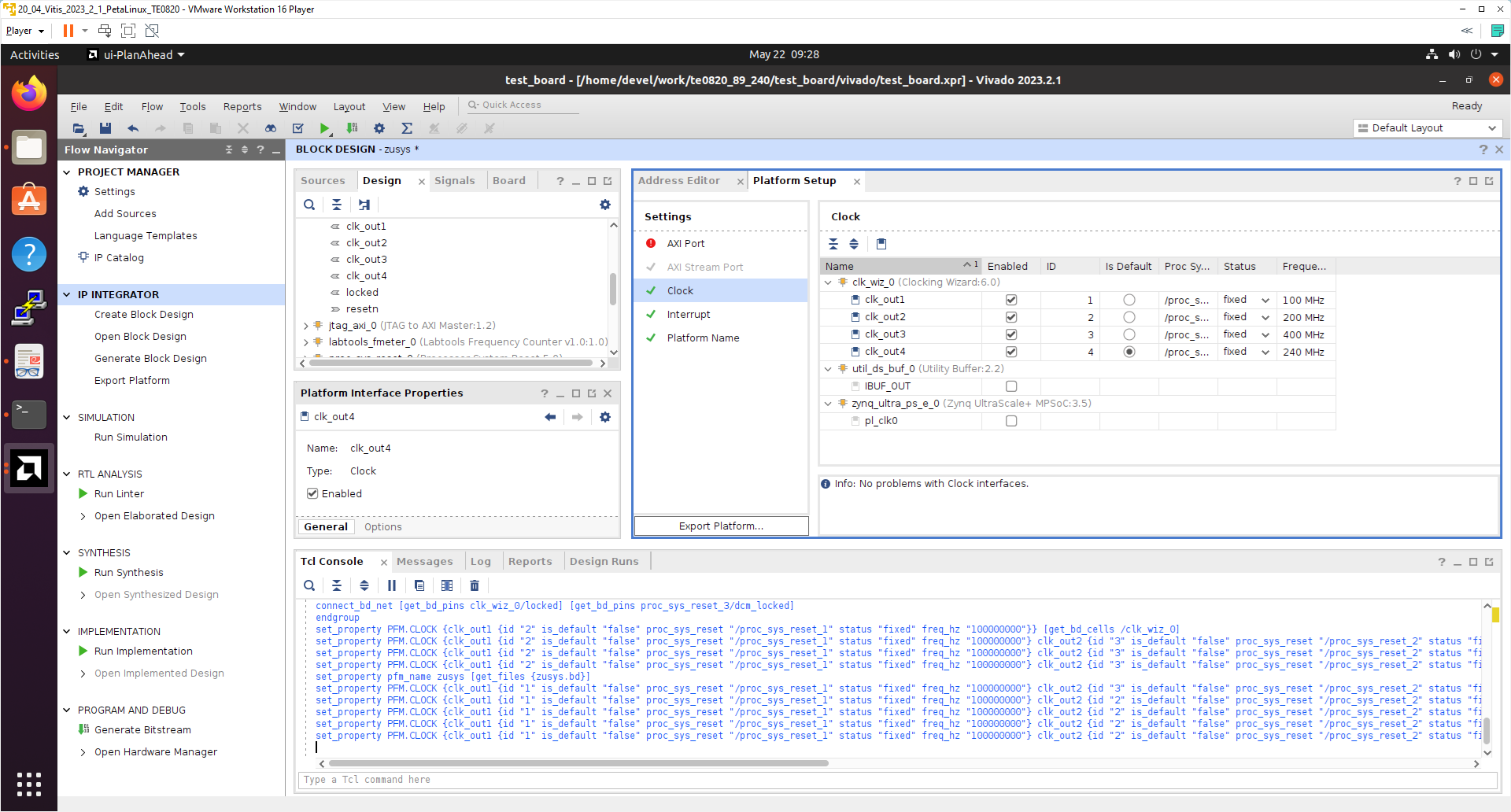
Double-click on zynq_ultra_ps_e_0 block and enable M_AXI_HPM0_FPD port. Select data width 32bit. It will be used for integration of interrupt controller on new dedicated AXI stream subsystem with 240 MHz clock. It will also enable new input pin maxihpm0_fpd_aclk of zynq_ultra_ps_e_0. Connect it to 240 MHz clock net.
Connect input pin maxihpm0_fpd_aclk of zynq_ultra_ps_e_0 to the 240 MHz clk_out4 of clk_wiz_0 IP block.
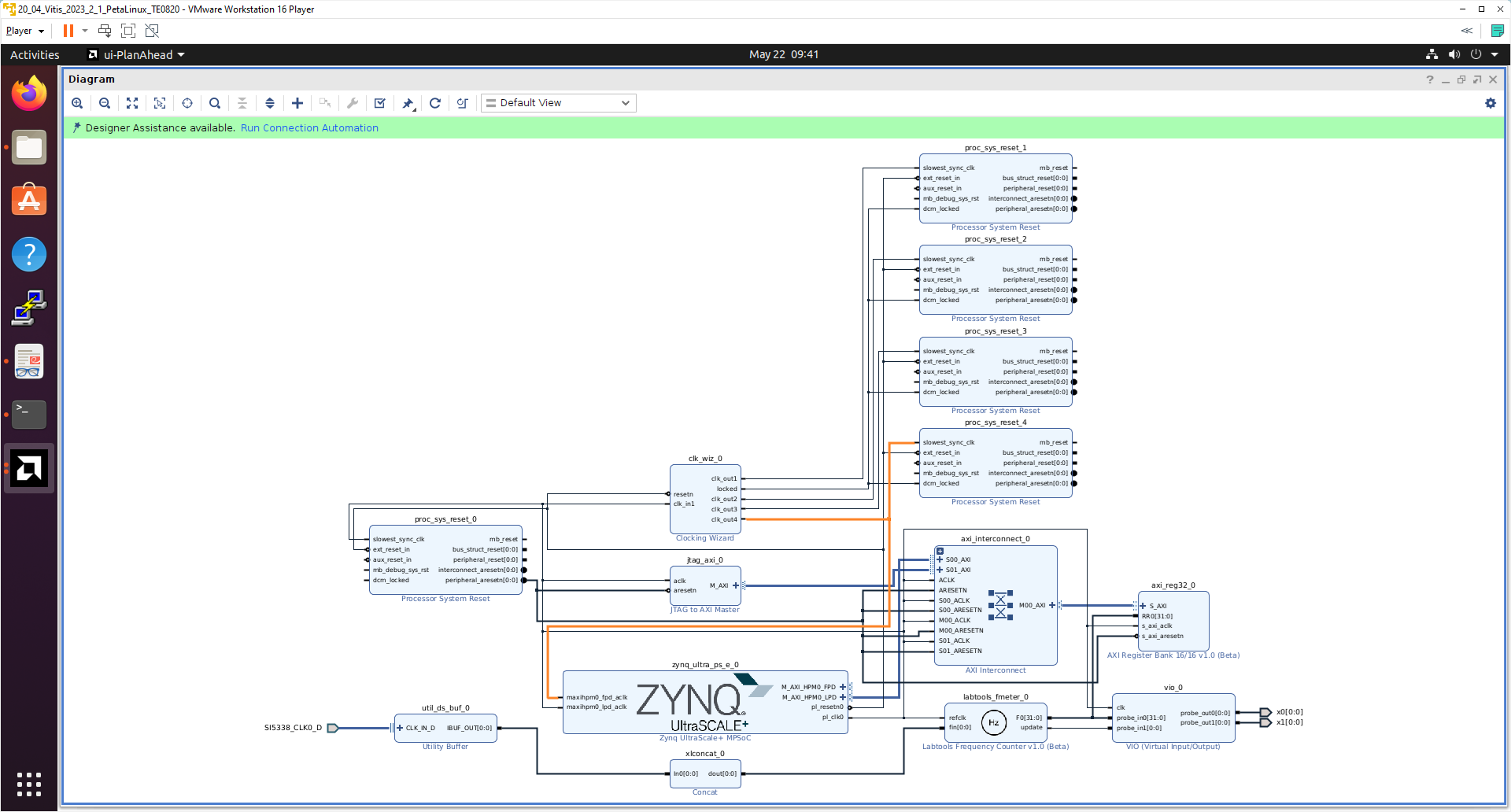
Add, customize and connect the AXI Interrupt Controller
Add AXI Interrupt Controller IP axi_intc_0.
Double-click on axi_intc_0 to re-customize it.
In Processor Interrupt Type and Connection section select the Interrupt Output Connection from Bus to Single.
Click on OK to accept these changes.
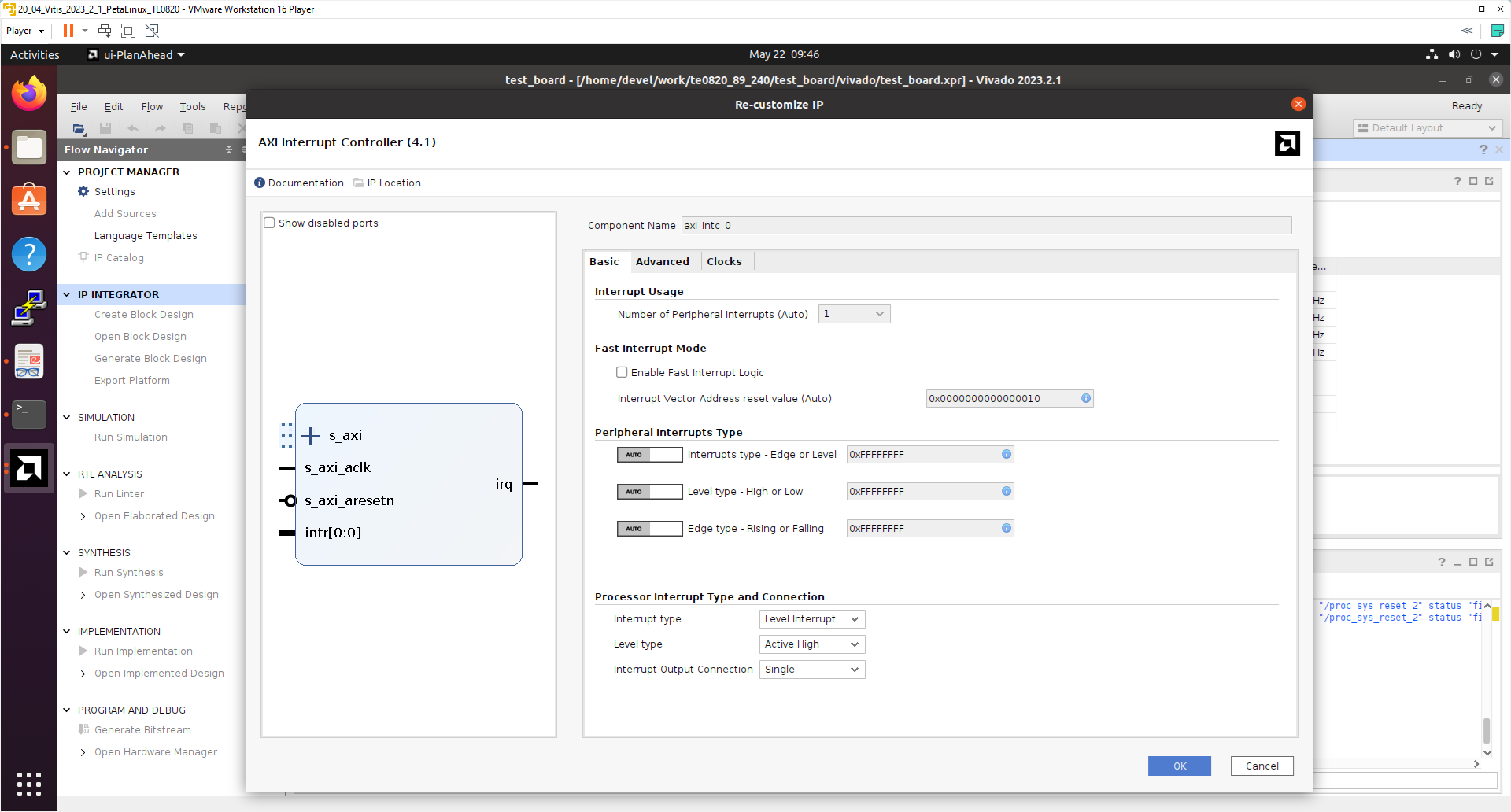
Connect interrupt controller clock input s_axi_aclk of axi_intc_0 to output dlk_out4 of clk_wiz_0. It is the default, 240 MHz clock of the extensible platform.
Connect interrupt controller input s_axi_aresetn of axi_intc_0 to output peripheral_aresetn[0:0] of proc_sys_reset_4 . It is the reset block for default, 240 MHz clock of the extensible platform.
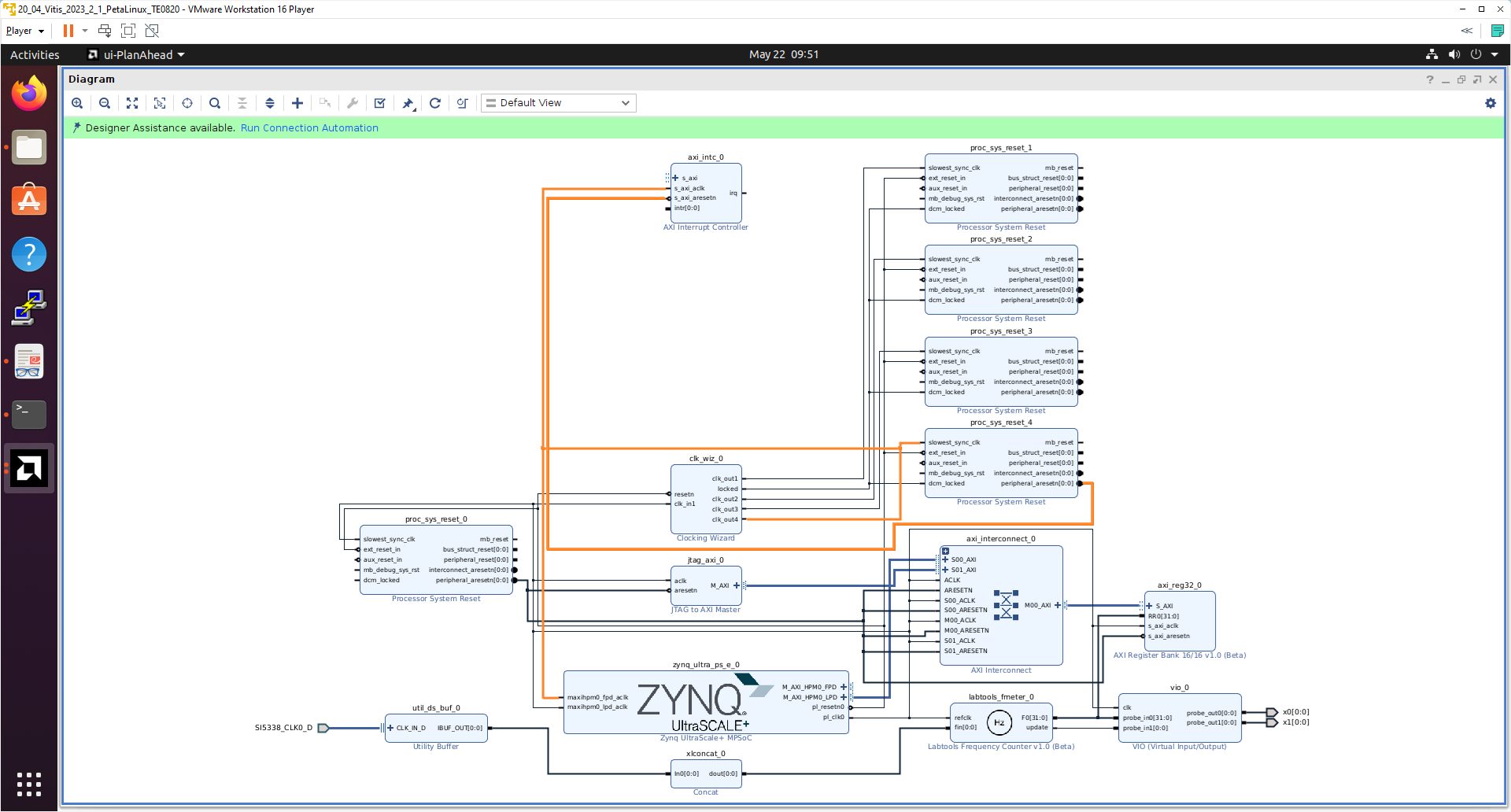
Use the Run Connection Automation wizard to connect the axi lite interface of interrupt controller axi_intc_0 to master interface M_AXI_HPM0_FPD of zynq_ultra_ps_e_0.
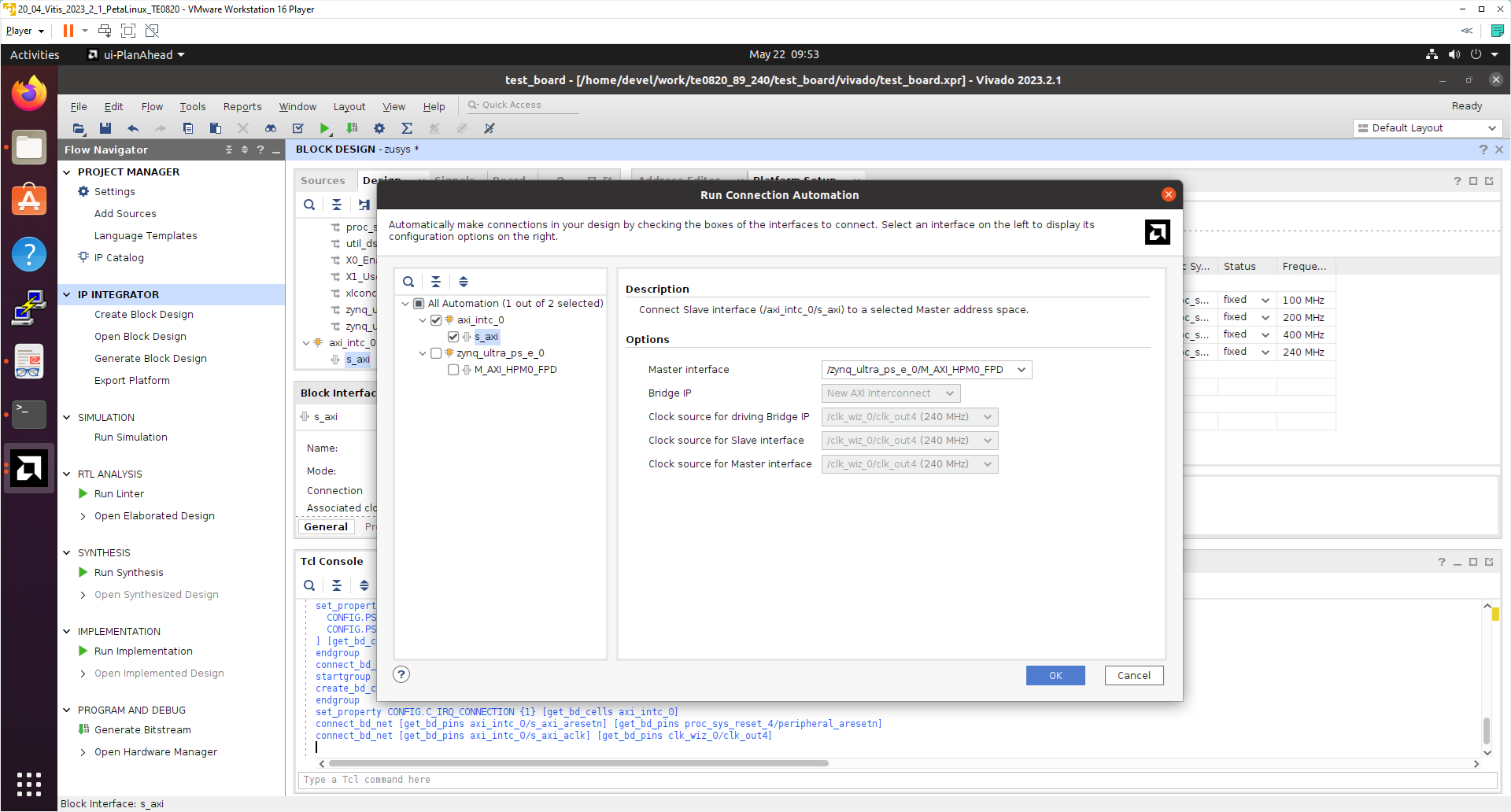
In Run Connection Automaton window, click OK.
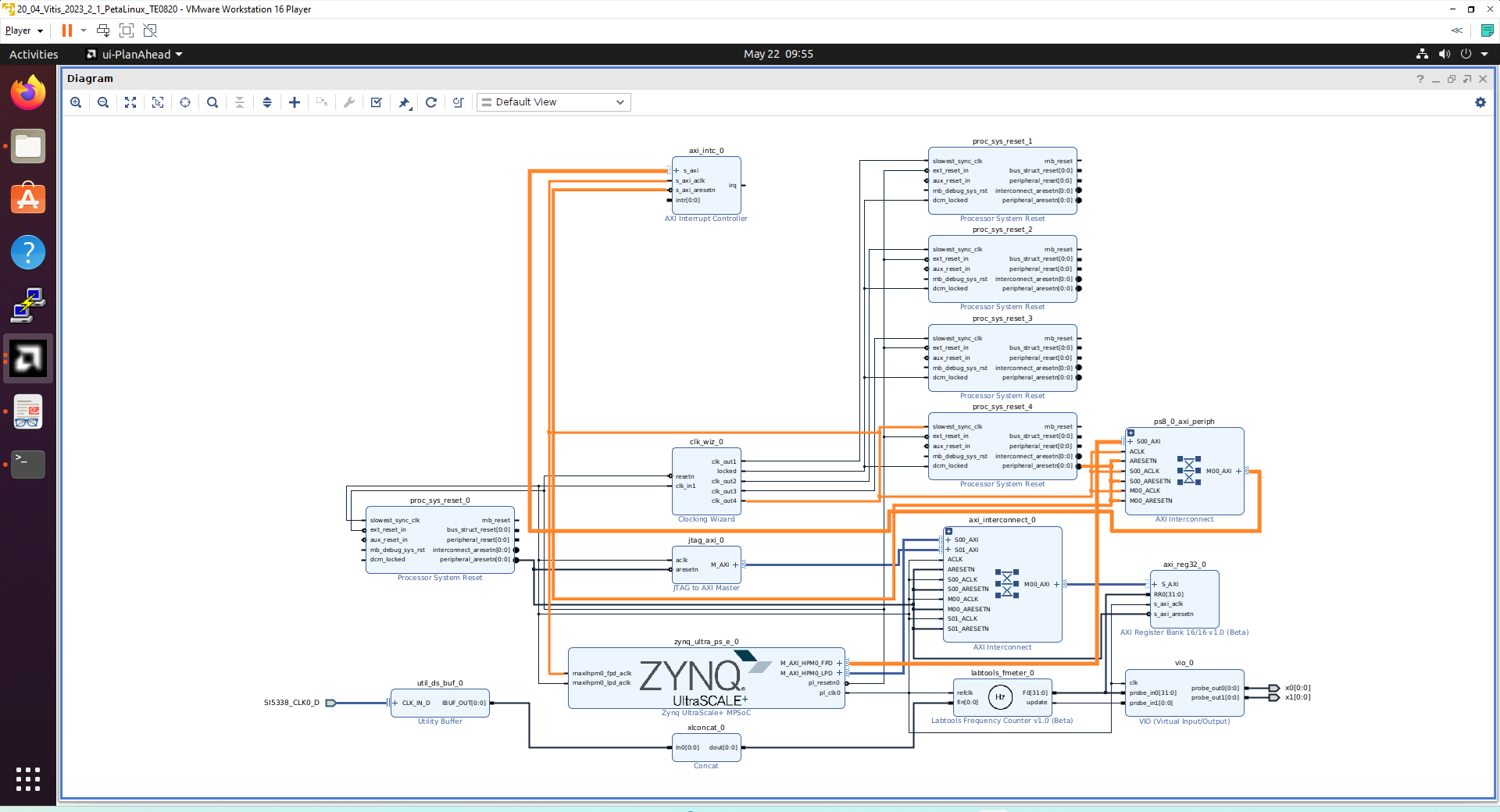
New AXI interconnect ps_8_axi_periph is created. It connects master interface M_AXI_HPM0_FPD of zynq_ultra_ps_e_0 with interrupt controller axi_intc_0.
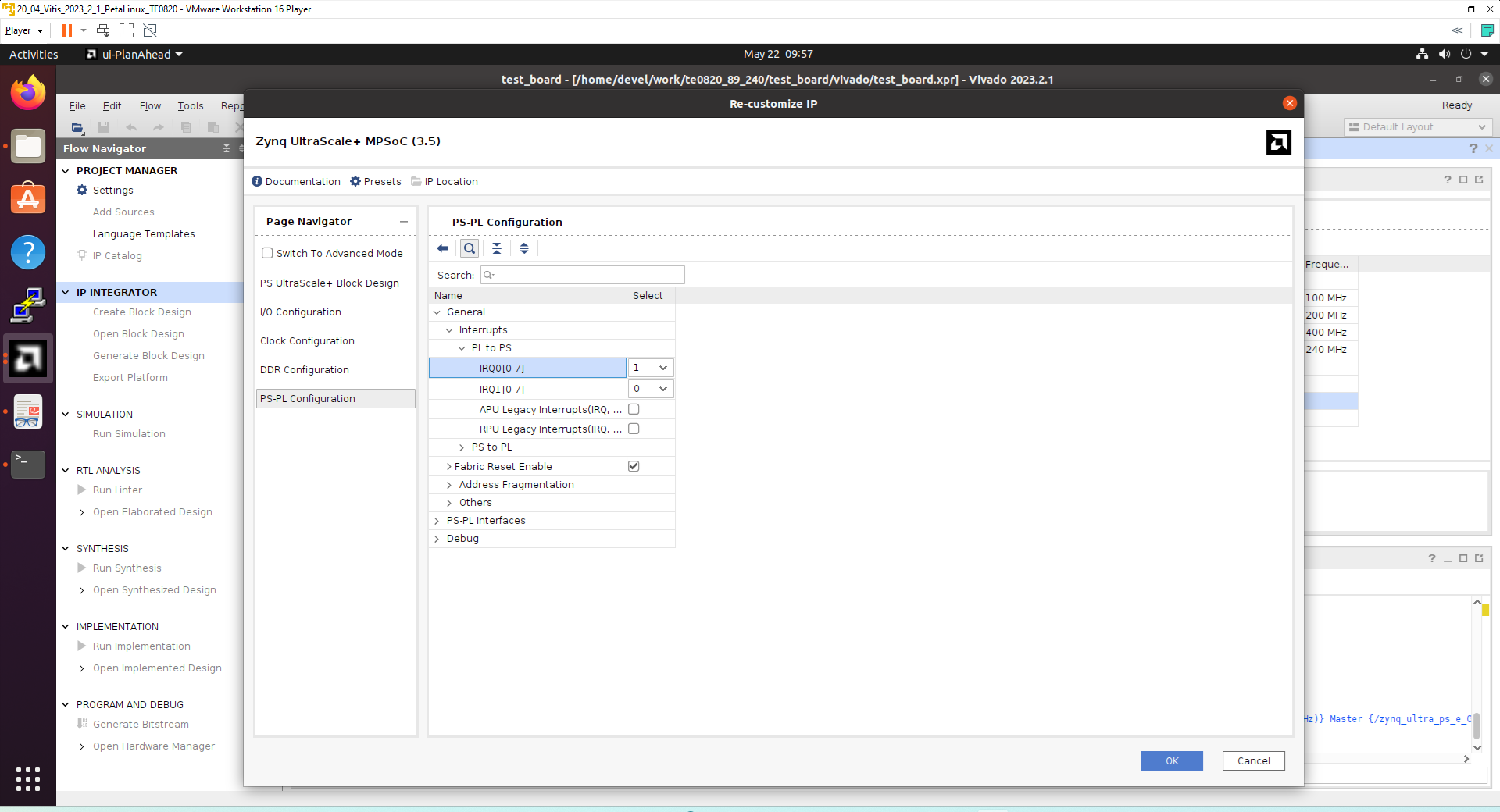
Double-click on zynq_ultra_ps_e_0 to re-customize it by enabling of an interrupt input pl_ps_irq0[0:0]. Click OK.
Modify the automatically generated reset network of AXI interconnect ps_8_axi_periph .
Disconnect input S00_ARESETN of ps_8_axi_periph from the network driven by output peripherial_aresetn[0:0] of proc_sys_reset_4 block.
Connect input S00_ARESETN of ps_8_axi_periph block with output interconnect_aresetn[0:0] of proc_sys_reset_4 block.
Disconnect input M00_ARESETN of ps_8_axi_periph block from the network driven by output peripherial_aresetn[0:0] of proc_sys_reset_4 block.
Connect input M00_ARESETN of ps_8_axi_periph to outputinterconnect_aresetn[0:0] of proc_sys_reset_4 block.
This modification will make the reset structure of the AXI interconnect ps_8_axi_periph block identical to the future extensions of this interconnect generated by the Vitis extensible design flow.
Connect the interrupt input pl_ps_irq0[0:0] of zynq_ultra_ps_e_0 block with output irq of axi_intc_0 block.
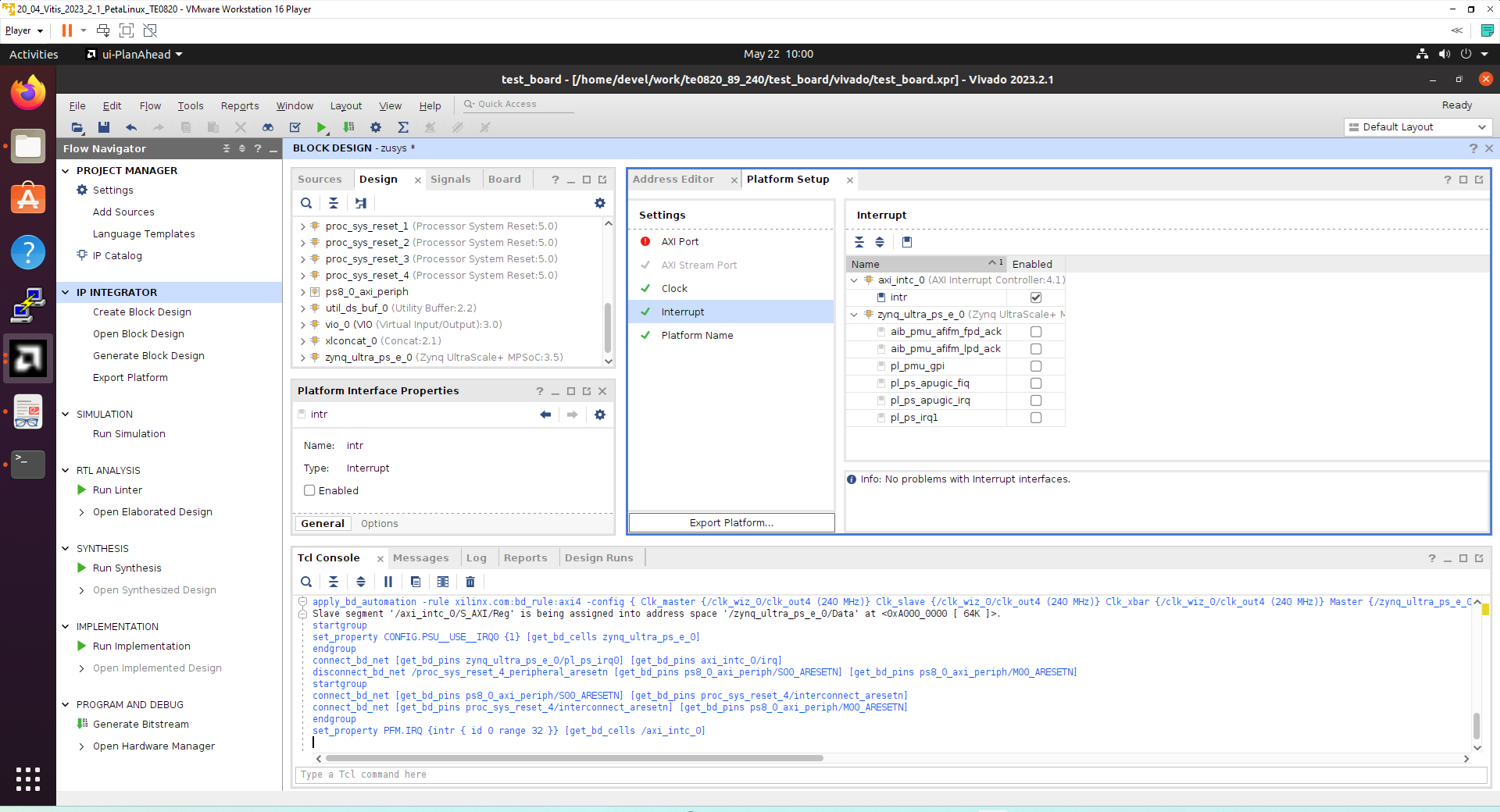
In Platform Setup, select Interrupt and enable intr in the Enabled column.
Rename automatically generated name ps8_0_axi_periph of the interconnect to new name: axi_interconnect_1 . This new name will be used in Platform Setup selection of AXI ports for the extensible platform.
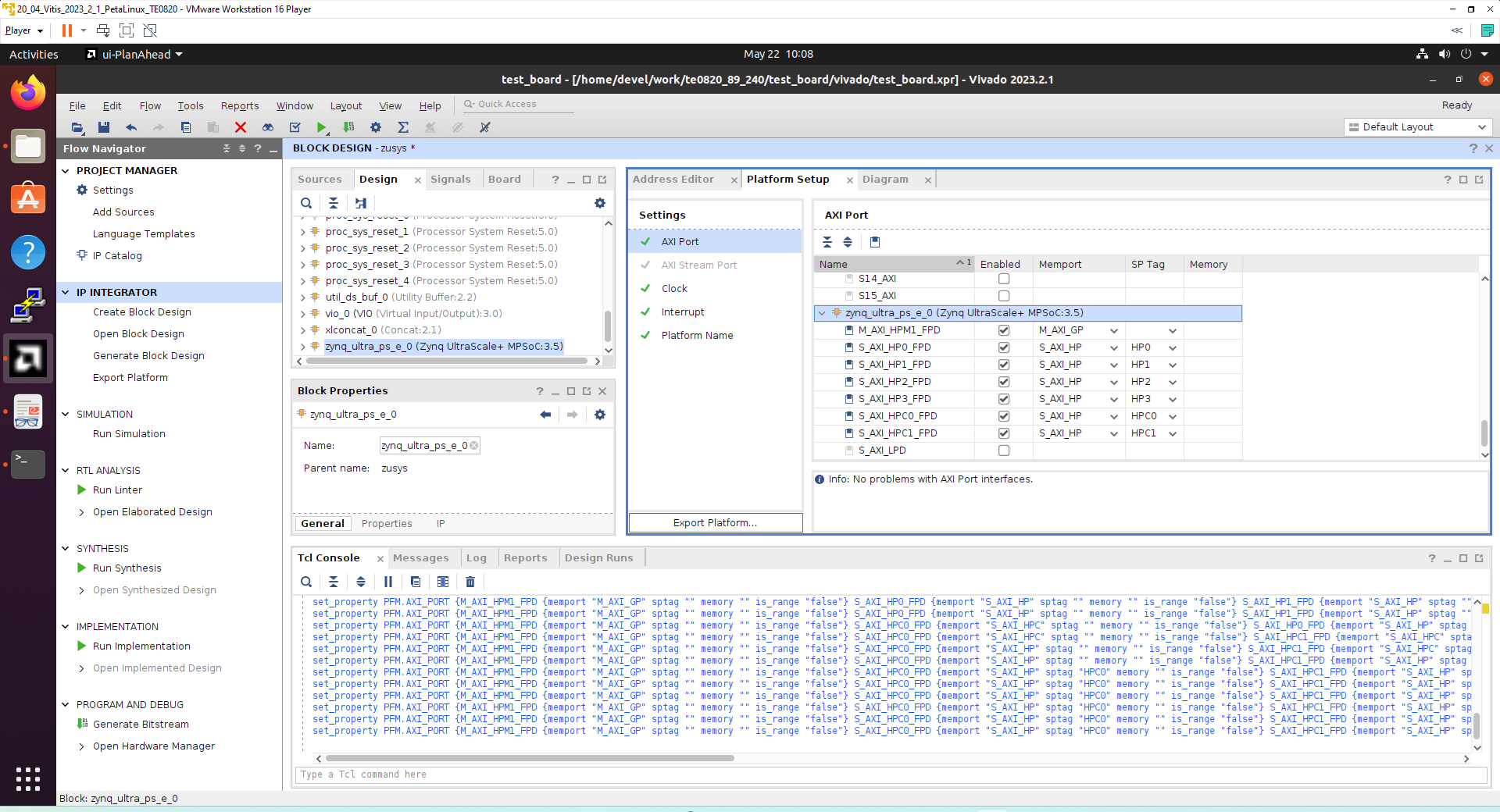
In Platform Setup, select AXI Ports for zynq_ultra_ps_e_0:
Select M_AXI_HPM1_FPD in column Enabled.
Select S_AXI_HPC0_FPD and S_AXI_HPC1_FPD in column “Enabled”.
For S_AXI_HPC0_FPD, change S_AXI_HPC to S_AXI_HP in column Memport.
For S_AXI_HPC1_FPD, change S_AXI_HPC to S_AXI_HP in column Memport.
Select S_AXI_HP0_FPD, S_AXI_HP1_FPD, S_AXI_HP2_FPD, S_AXI_HP3_FPD in column Enabled.
Type into the sptag column the names for these 6 interfaces so that they can be selected by v++ configuration during linking phase. HPC0, HPC1, HP0, HP1, HP2, HP3
In Platform Setup, select AXI Ports for the recently renamed axi_interconnect_1:
Select M01_AXI, M02_AXI, M03_AXI, M04_AXI, M05_AXI, M06_AXI and M07_AXI in column “Enabled”.
Make sure, that you are selecting these AXI ports for the 240 MHz AXI interconnect axi_interconnect_1
Keep all AXI ports of the 100 MHz interconnect axi_interconnect_0 unselected. The AXI interconnect axi_interconnect_0 connects other logic and IPs which are part of the initial design.
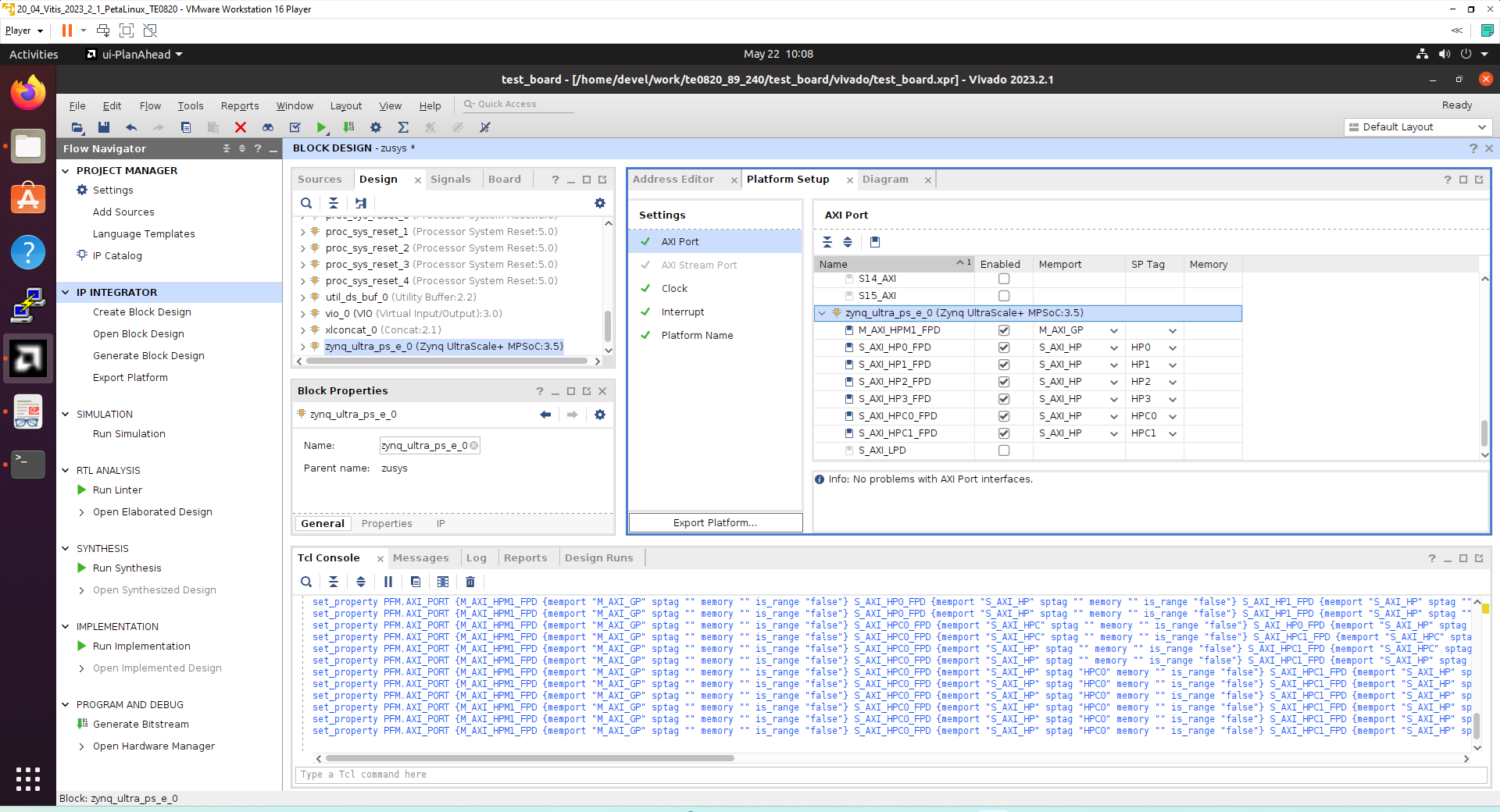
The modifications of the default design for the extensible platform are completed, now.
In Vivado, save block design by clicking on icon Save Block Design.
To continue the manual design path, go to section 3.3 Validate design.
Fast Track for Creation of Extensible platform HW
HW modifications can be made by sourcing this script in Vivado with open diagram in IP Integrator.
Copy script:
#activate extensible platform
set_property platform.extensible true [current_project]
save_bd_design

set_property PFM_NAME [string map {part0 zusys} [string map {trenz.biz trenz} [current_board_part]]] [get_files zusys.bd]
set_property platform.design_intent.embedded {true} [current_project]
set_property platform.design_intent.datacenter {false} [current_project]
set_property platform.design_intent.server_managed {false} [current_project]
set_property platform.design_intent.external_host {false} [current_project]
set_property platform.default_output_type {sd_card} [current_project]
set_property platform.uses_pr {false} [current_project]
save_bd_design

startgroup
create_bd_cell -type ip -vlnv xilinx.com:ip:clk_wiz:6.0 clk_wiz_0
endgroup

set_property -dict [list \
  CONFIG.CLKOUT2_JITTER {102.086} \
  CONFIG.CLKOUT2_PHASE_ERROR {87.180} \
  CONFIG.CLKOUT2_REQUESTED_OUT_FREQ {200.000} \
  CONFIG.CLKOUT2_USED {true} \
  CONFIG.CLKOUT3_JITTER {90.074} \
  CONFIG.CLKOUT3_PHASE_ERROR {87.180} \
  CONFIG.CLKOUT3_REQUESTED_OUT_FREQ {400.000} \
  CONFIG.CLKOUT3_USED {true} \
  CONFIG.CLKOUT4_JITTER {98.767} \
  CONFIG.CLKOUT4_PHASE_ERROR {87.180} \
  CONFIG.CLKOUT4_REQUESTED_OUT_FREQ {240.000} \
  CONFIG.CLKOUT4_USED {true} \
  CONFIG.MMCM_CLKOUT1_DIVIDE {6} \
  CONFIG.MMCM_CLKOUT2_DIVIDE {3} \
  CONFIG.MMCM_CLKOUT3_DIVIDE {5} \
  CONFIG.NUM_OUT_CLKS {4} \
  CONFIG.RESET_PORT {resetn} \
  CONFIG.RESET_TYPE {ACTIVE_LOW} \
] [get_bd_cells clk_wiz_0]
connect_bd_net [get_bd_pins clk_wiz_0/resetn] [get_bd_pins zynq_ultra_ps_e_0/pl_resetn0]
connect_bd_net [get_bd_pins clk_wiz_0/clk_in1] [get_bd_pins zynq_ultra_ps_e_0/pl_clk0]

startgroup
create_bd_cell -type ip -vlnv xilinx.com:ip:proc_sys_reset:5.0 proc_sys_reset_1
endgroup

set_property location {3 1192 -667} [get_bd_cells proc_sys_reset_1]
copy_bd_objs /  [get_bd_cells {proc_sys_reset_1}]
set_property location {3 1190 -487} [get_bd_cells proc_sys_reset_2]
copy_bd_objs /  [get_bd_cells {proc_sys_reset_2}]
set_property location {3 1126 -309} [get_bd_cells proc_sys_reset_3]
copy_bd_objs /  [get_bd_cells {proc_sys_reset_3}]
set_property location {3 1148 -136} [get_bd_cells proc_sys_reset_4]
connect_bd_net [get_bd_pins proc_sys_reset_1/slowest_sync_clk] [get_bd_pins clk_wiz_0/clk_out1]
connect_bd_net [get_bd_pins proc_sys_reset_2/slowest_sync_clk] [get_bd_pins clk_wiz_0/clk_out2]
connect_bd_net [get_bd_pins proc_sys_reset_3/slowest_sync_clk] [get_bd_pins clk_wiz_0/clk_out3]
connect_bd_net [get_bd_pins proc_sys_reset_4/slowest_sync_clk] [get_bd_pins clk_wiz_0/clk_out4]

startgroup
connect_bd_net [get_bd_pins proc_sys_reset_4/ext_reset_in] [get_bd_pins zynq_ultra_ps_e_0/pl_resetn0]
connect_bd_net [get_bd_pins zynq_ultra_ps_e_0/pl_resetn0] [get_bd_pins proc_sys_reset_3/ext_reset_in]
connect_bd_net [get_bd_pins zynq_ultra_ps_e_0/pl_resetn0] [get_bd_pins proc_sys_reset_2/ext_reset_in]
connect_bd_net [get_bd_pins zynq_ultra_ps_e_0/pl_resetn0] [get_bd_pins proc_sys_reset_1/ext_reset_in]
endgroup

startgroup
connect_bd_net [get_bd_pins proc_sys_reset_4/dcm_locked] [get_bd_pins clk_wiz_0/locked]
connect_bd_net [get_bd_pins clk_wiz_0/locked] [get_bd_pins proc_sys_reset_2/dcm_locked]
connect_bd_net [get_bd_pins clk_wiz_0/locked] [get_bd_pins proc_sys_reset_1/dcm_locked]
connect_bd_net [get_bd_pins clk_wiz_0/locked] [get_bd_pins proc_sys_reset_3/dcm_locked]
endgroup

set_property PFM.CLOCK {clk_out1 {id "2" is_default "false" proc_sys_reset "/proc_sys_reset_1" status "fixed" freq_hz "100000000"}} [get_bd_cells /clk_wiz_0]
set_property PFM.CLOCK {clk_out1 {id "2" is_default "false" proc_sys_reset "/proc_sys_reset_1" status "fixed" freq_hz "100000000"} clk_out2 {id "3" is_default "false" proc_sys_reset "/proc_sys_reset_2" status "fixed" freq_hz "200000000"}} [get_bd_cells /clk_wiz_0]
set_property PFM.CLOCK {clk_out1 {id "2" is_default "false" proc_sys_reset "/proc_sys_reset_1" status "fixed" freq_hz "100000000"} clk_out2 {id "3" is_default "false" proc_sys_reset "/proc_sys_reset_2" status "fixed" freq_hz "200000000"} clk_out3 {id "4" is_default "false" proc_sys_reset "/proc_sys_reset_3" status "fixed" freq_hz "400000000"}} [get_bd_cells /clk_wiz_0]
set_property PFM.CLOCK {clk_out1 {id "2" is_default "false" proc_sys_reset "/proc_sys_reset_1" status "fixed" freq_hz "100000000"} clk_out2 {id "3" is_default "false" proc_sys_reset "/proc_sys_reset_2" status "fixed" freq_hz "200000000"} clk_out3 {id "4" is_default "false" proc_sys_reset "/proc_sys_reset_3" status "fixed" freq_hz "400000000"} clk_out4 {id "5" is_default "false" proc_sys_reset "/proc_sys_reset_4" status "fixed" freq_hz "240000000"}} [get_bd_cells /clk_wiz_0]
set_property pfm_name zusys [get_files {zusys.bd}]
set_property PFM.CLOCK {clk_out1 {id "1" is_default "false" proc_sys_reset "/proc_sys_reset_1" status "fixed" freq_hz "100000000"} clk_out2 {id "3" is_default "false" proc_sys_reset "/proc_sys_reset_2" status "fixed" freq_hz "200000000"} clk_out3 {id "4" is_default "false" proc_sys_reset "/proc_sys_reset_3" status "fixed" freq_hz "400000000"} clk_out4 {id "5" is_default "false" proc_sys_reset "/proc_sys_reset_4" status "fixed" freq_hz "240000000"}} [get_bd_cells /clk_wiz_0]
set_property PFM.CLOCK {clk_out1 {id "1" is_default "false" proc_sys_reset "/proc_sys_reset_1" status "fixed" freq_hz "100000000"} clk_out2 {id "2" is_default "false" proc_sys_reset "/proc_sys_reset_2" status "fixed" freq_hz "200000000"} clk_out3 {id "4" is_default "false" proc_sys_reset "/proc_sys_reset_3" status "fixed" freq_hz "400000000"} clk_out4 {id "5" is_default "false" proc_sys_reset "/proc_sys_reset_4" status "fixed" freq_hz "240000000"}} [get_bd_cells /clk_wiz_0]
set_property PFM.CLOCK {clk_out1 {id "1" is_default "false" proc_sys_reset "/proc_sys_reset_1" status "fixed" freq_hz "100000000"} clk_out2 {id "2" is_default "false" proc_sys_reset "/proc_sys_reset_2" status "fixed" freq_hz "200000000"} clk_out3 {id "3" is_default "false" proc_sys_reset "/proc_sys_reset_3" status "fixed" freq_hz "400000000"} clk_out4 {id "5" is_default "false" proc_sys_reset "/proc_sys_reset_4" status "fixed" freq_hz "240000000"}} [get_bd_cells /clk_wiz_0]
set_property PFM.CLOCK {clk_out1 {id "1" is_default "false" proc_sys_reset "/proc_sys_reset_1" status "fixed" freq_hz "100000000"} clk_out2 {id "2" is_default "false" proc_sys_reset "/proc_sys_reset_2" status "fixed" freq_hz "200000000"} clk_out3 {id "3" is_default "false" proc_sys_reset "/proc_sys_reset_3" status "fixed" freq_hz "400000000"} clk_out4 {id "4" is_default "false" proc_sys_reset "/proc_sys_reset_4" status "fixed" freq_hz "240000000"}} [get_bd_cells /clk_wiz_0]
set_property PFM.CLOCK {clk_out1 {id "1" is_default "false" proc_sys_reset "/proc_sys_reset_1" status "fixed" freq_hz "100000000"} clk_out2 {id "2" is_default "false" proc_sys_reset "/proc_sys_reset_2" status "fixed" freq_hz "200000000"} clk_out3 {id "3" is_default "false" proc_sys_reset "/proc_sys_reset_3" status "fixed" freq_hz "400000000"} clk_out4 {id "4" is_default "true" proc_sys_reset "/proc_sys_reset_4" status "fixed" freq_hz "240000000"}} [get_bd_cells /clk_wiz_0]
save_bd_design

startgroup
set_property -dict [list \
  CONFIG.PSU__USE__IRQ0 {1} \
  CONFIG.PSU__USE__M_AXI_GP0 {1} \
] [get_bd_cells zynq_ultra_ps_e_0]
endgroup

connect_bd_net [get_bd_pins zynq_ultra_ps_e_0/maxihpm0_fpd_aclk] [get_bd_pins clk_wiz_0/clk_out4]

startgroup
create_bd_cell -type ip -vlnv xilinx.com:ip:axi_intc:4.1 axi_intc_0
endgroup

set_property CONFIG.C_IRQ_CONNECTION {1} [get_bd_cells axi_intc_0]
connect_bd_net [get_bd_pins axi_intc_0/s_axi_aclk] [get_bd_pins clk_wiz_0/clk_out4]
connect_bd_net [get_bd_pins axi_intc_0/s_axi_aresetn] [get_bd_pins proc_sys_reset_4/peripheral_aresetn]
connect_bd_net [get_bd_pins axi_intc_0/irq] [get_bd_pins zynq_ultra_ps_e_0/pl_ps_irq0]

startgroup
set_property CONFIG.PSU__MAXIGP0__DATA_WIDTH {32} [get_bd_cells zynq_ultra_ps_e_0]
endgroup

startgroup
apply_bd_automation -rule xilinx.com:bd_rule:axi4 -config { Clk_master {/clk_wiz_0/clk_out4 (240 MHz)} Clk_slave {/clk_wiz_0/clk_out4 (240 MHz)} Clk_xbar {/clk_wiz_0/clk_out4 (240 MHz)} Master {/zynq_ultra_ps_e_0/M_AXI_HPM0_FPD} Slave {/axi_intc_0/s_axi} ddr_seg {Auto} intc_ip {New AXI Interconnect} master_apm {0}}  [get_bd_intf_pins axi_intc_0/s_axi]
endgroup

disconnect_bd_net /proc_sys_reset_4_peripheral_aresetn [get_bd_pins ps8_0_axi_periph/S00_ARESETN]
disconnect_bd_net /proc_sys_reset_4_peripheral_aresetn [get_bd_pins ps8_0_axi_periph/M00_ARESETN]

startgroup
connect_bd_net [get_bd_pins ps8_0_axi_periph/S00_ARESETN] [get_bd_pins proc_sys_reset_4/interconnect_aresetn]
connect_bd_net [get_bd_pins proc_sys_reset_4/interconnect_aresetn] [get_bd_pins ps8_0_axi_periph/M00_ARESETN]
endgroup

set_property name ps8_0_axi_interconnect_1 [get_bd_cells ps8_0_axi_periph]
set_property name axi_interconnect_1 [get_bd_cells ps8_0_axi_interconnect_1]
set_property PFM.IRQ {intr { id 0 range 32 }} [get_bd_cells /axi_intc_0]
set_property PFM.AXI_PORT {M01_AXI {memport "M_AXI_GP" sptag "" memory "" is_range "false"}} [get_bd_cells /axi_interconnect_1]
set_property PFM.AXI_PORT {M01_AXI {memport "M_AXI_GP" sptag "" memory "" is_range "false"} M02_AXI {memport "M_AXI_GP" sptag "" memory "" is_range "false"}} [get_bd_cells /axi_interconnect_1]
set_property PFM.AXI_PORT {M01_AXI {memport "M_AXI_GP" sptag "" memory "" is_range "false"} M02_AXI {memport "M_AXI_GP" sptag "" memory "" is_range "false"} M03_AXI {memport "M_AXI_GP" sptag "" memory "" is_range "false"}} [get_bd_cells /axi_interconnect_1]
set_property PFM.AXI_PORT {M01_AXI {memport "M_AXI_GP" sptag "" memory "" is_range "false"} M02_AXI {memport "M_AXI_GP" sptag "" memory "" is_range "false"} M03_AXI {memport "M_AXI_GP" sptag "" memory "" is_range "false"} M04_AXI {memport "M_AXI_GP" sptag "" memory "" is_range "false"}} [get_bd_cells /axi_interconnect_1]
set_property PFM.AXI_PORT {M01_AXI {memport "M_AXI_GP" sptag "" memory "" is_range "false"} M02_AXI {memport "M_AXI_GP" sptag "" memory "" is_range "false"} M03_AXI {memport "M_AXI_GP" sptag "" memory "" is_range "false"} M04_AXI {memport "M_AXI_GP" sptag "" memory "" is_range "false"} M05_AXI {memport "M_AXI_GP" sptag "" memory "" is_range "false"}} [get_bd_cells /axi_interconnect_1]
set_property PFM.AXI_PORT {M01_AXI {memport "M_AXI_GP" sptag "" memory "" is_range "false"} M02_AXI {memport "M_AXI_GP" sptag "" memory "" is_range "false"} M03_AXI {memport "M_AXI_GP" sptag "" memory "" is_range "false"} M04_AXI {memport "M_AXI_GP" sptag "" memory "" is_range "false"} M05_AXI {memport "M_AXI_GP" sptag "" memory "" is_range "false"} M06_AXI {memport "M_AXI_GP" sptag "" memory "" is_range "false"}} [get_bd_cells /axi_interconnect_1]
set_property PFM.AXI_PORT {M01_AXI {memport "M_AXI_GP" sptag "" memory "" is_range "false"} M02_AXI {memport "M_AXI_GP" sptag "" memory "" is_range "false"} M03_AXI {memport "M_AXI_GP" sptag "" memory "" is_range "false"} M04_AXI {memport "M_AXI_GP" sptag "" memory "" is_range "false"} M05_AXI {memport "M_AXI_GP" sptag "" memory "" is_range "false"} M06_AXI {memport "M_AXI_GP" sptag "" memory "" is_range "false"} M07_AXI {memport "M_AXI_GP" sptag "" memory "" is_range "false"}} [get_bd_cells /axi_interconnect_1]
set_property PFM.AXI_PORT {M_AXI_HPM1_FPD {memport "M_AXI_GP" sptag "" memory "" is_range "false"}} [get_bd_cells /zynq_ultra_ps_e_0]
set_property PFM.AXI_PORT {M_AXI_HPM1_FPD {memport "M_AXI_GP" sptag "" memory "" is_range "false"} S_AXI_HPC0_FPD {memport "S_AXI_HPC" sptag "" memory "" is_range "false"}} [get_bd_cells /zynq_ultra_ps_e_0]
set_property PFM.AXI_PORT {M_AXI_HPM1_FPD {memport "M_AXI_GP" sptag "" memory "" is_range "false"} S_AXI_HPC0_FPD {memport "S_AXI_HPC" sptag "" memory "" is_range "false"} S_AXI_HPC1_FPD {memport "S_AXI_HPC" sptag "" memory "" is_range "false"}} [get_bd_cells /zynq_ultra_ps_e_0]
set_property PFM.AXI_PORT {M_AXI_HPM1_FPD {memport "M_AXI_GP" sptag "" memory "" is_range "false"} S_AXI_HPC0_FPD {memport "S_AXI_HPC" sptag "" memory "" is_range "false"} S_AXI_HPC1_FPD {memport "S_AXI_HPC" sptag "" memory "" is_range "false"} S_AXI_HP0_FPD {memport "S_AXI_HP" sptag "" memory "" is_range "false"}} [get_bd_cells /zynq_ultra_ps_e_0]
set_property PFM.AXI_PORT {M_AXI_HPM1_FPD {memport "M_AXI_GP" sptag "" memory "" is_range "false"} S_AXI_HPC0_FPD {memport "S_AXI_HPC" sptag "" memory "" is_range "false"} S_AXI_HPC1_FPD {memport "S_AXI_HPC" sptag "" memory "" is_range "false"} S_AXI_HP0_FPD {memport "S_AXI_HP" sptag "" memory "" is_range "false"} S_AXI_HP1_FPD {memport "S_AXI_HP" sptag "" memory "" is_range "false"}} [get_bd_cells /zynq_ultra_ps_e_0]
set_property PFM.AXI_PORT {M_AXI_HPM1_FPD {memport "M_AXI_GP" sptag "" memory "" is_range "false"} S_AXI_HPC0_FPD {memport "S_AXI_HPC" sptag "" memory "" is_range "false"} S_AXI_HPC1_FPD {memport "S_AXI_HPC" sptag "" memory "" is_range "false"} S_AXI_HP0_FPD {memport "S_AXI_HP" sptag "" memory "" is_range "false"} S_AXI_HP1_FPD {memport "S_AXI_HP" sptag "" memory "" is_range "false"} S_AXI_HP2_FPD {memport "S_AXI_HP" sptag "" memory "" is_range "false"}} [get_bd_cells /zynq_ultra_ps_e_0]
set_property PFM.AXI_PORT {M_AXI_HPM1_FPD {memport "M_AXI_GP" sptag "" memory "" is_range "false"} S_AXI_HPC0_FPD {memport "S_AXI_HPC" sptag "" memory "" is_range "false"} S_AXI_HPC1_FPD {memport "S_AXI_HPC" sptag "" memory "" is_range "false"} S_AXI_HP0_FPD {memport "S_AXI_HP" sptag "" memory "" is_range "false"} S_AXI_HP1_FPD {memport "S_AXI_HP" sptag "" memory "" is_range "false"} S_AXI_HP2_FPD {memport "S_AXI_HP" sptag "" memory "" is_range "false"} S_AXI_HP3_FPD {memport "S_AXI_HP" sptag "" memory "" is_range "false"}} [get_bd_cells /zynq_ultra_ps_e_0]
set_property PFM.AXI_PORT {M_AXI_HPM1_FPD {memport "M_AXI_GP" sptag "" memory "" is_range "false"} S_AXI_HPC0_FPD {memport "S_AXI_HP" sptag "" memory "" is_range "false"} S_AXI_HPC1_FPD {memport "S_AXI_HPC" sptag "" memory "" is_range "false"} S_AXI_HP0_FPD {memport "S_AXI_HP" sptag "" memory "" is_range "false"} S_AXI_HP1_FPD {memport "S_AXI_HP" sptag "" memory "" is_range "false"} S_AXI_HP2_FPD {memport "S_AXI_HP" sptag "" memory "" is_range "false"} S_AXI_HP3_FPD {memport "S_AXI_HP" sptag "" memory "" is_range "false"}} [get_bd_cells /zynq_ultra_ps_e_0]
set_property PFM.AXI_PORT {M_AXI_HPM1_FPD {memport "M_AXI_GP" sptag "" memory "" is_range "false"} S_AXI_HPC0_FPD {memport "S_AXI_HP" sptag "" memory "" is_range "false"} S_AXI_HPC1_FPD {memport "S_AXI_HP" sptag "" memory "" is_range "false"} S_AXI_HP0_FPD {memport "S_AXI_HP" sptag "" memory "" is_range "false"} S_AXI_HP1_FPD {memport "S_AXI_HP" sptag "" memory "" is_range "false"} S_AXI_HP2_FPD {memport "S_AXI_HP" sptag "" memory "" is_range "false"} S_AXI_HP3_FPD {memport "S_AXI_HP" sptag "" memory "" is_range "false"}} [get_bd_cells /zynq_ultra_ps_e_0]
set_property PFM.AXI_PORT {M_AXI_HPM1_FPD {memport "M_AXI_GP" sptag "" memory "" is_range "false"} S_AXI_HPC0_FPD {memport "S_AXI_HP" sptag "HPC0" memory "" is_range "false"} S_AXI_HPC1_FPD {memport "S_AXI_HP" sptag "" memory "" is_range "false"} S_AXI_HP0_FPD {memport "S_AXI_HP" sptag "" memory "" is_range "false"} S_AXI_HP1_FPD {memport "S_AXI_HP" sptag "" memory "" is_range "false"} S_AXI_HP2_FPD {memport "S_AXI_HP" sptag "" memory "" is_range "false"} S_AXI_HP3_FPD {memport "S_AXI_HP" sptag "" memory "" is_range "false"}} [get_bd_cells /zynq_ultra_ps_e_0]
set_property PFM.AXI_PORT {M_AXI_HPM1_FPD {memport "M_AXI_GP" sptag "" memory "" is_range "false"} S_AXI_HPC0_FPD {memport "S_AXI_HP" sptag "HPC0" memory "" is_range "false"} S_AXI_HPC1_FPD {memport "S_AXI_HP" sptag "HPC1" memory "" is_range "false"} S_AXI_HP0_FPD {memport "S_AXI_HP" sptag "" memory "" is_range "false"} S_AXI_HP1_FPD {memport "S_AXI_HP" sptag "" memory "" is_range "false"} S_AXI_HP2_FPD {memport "S_AXI_HP" sptag "" memory "" is_range "false"} S_AXI_HP3_FPD {memport "S_AXI_HP" sptag "" memory "" is_range "false"}} [get_bd_cells /zynq_ultra_ps_e_0]
set_property PFM.AXI_PORT {M_AXI_HPM1_FPD {memport "M_AXI_GP" sptag "" memory "" is_range "false"} S_AXI_HPC0_FPD {memport "S_AXI_HP" sptag "HPC0" memory "" is_range "false"} S_AXI_HPC1_FPD {memport "S_AXI_HP" sptag "HPC1" memory "" is_range "false"} S_AXI_HP0_FPD {memport "S_AXI_HP" sptag "" memory "" is_range "false"} S_AXI_HP1_FPD {memport "S_AXI_HP" sptag "" memory "" is_range "false"} S_AXI_HP2_FPD {memport "S_AXI_HP" sptag "" memory "" is_range "false"} S_AXI_HP3_FPD {memport "S_AXI_HP" sptag "" memory "" is_range "false"}} [get_bd_cells /zynq_ultra_ps_e_0]
set_property PFM.AXI_PORT {M_AXI_HPM1_FPD {memport "M_AXI_GP" sptag "" memory "" is_range "false"} S_AXI_HPC0_FPD {memport "S_AXI_HP" sptag "HPC0" memory "" is_range "false"} S_AXI_HPC1_FPD {memport "S_AXI_HP" sptag "HPC1" memory "" is_range "false"} S_AXI_HP0_FPD {memport "S_AXI_HP" sptag "HP0" memory "" is_range "false"} S_AXI_HP1_FPD {memport "S_AXI_HP" sptag "" memory "" is_range "false"} S_AXI_HP2_FPD {memport "S_AXI_HP" sptag "" memory "" is_range "false"} S_AXI_HP3_FPD {memport "S_AXI_HP" sptag "" memory "" is_range "false"}} [get_bd_cells /zynq_ultra_ps_e_0]
set_property PFM.AXI_PORT {M_AXI_HPM1_FPD {memport "M_AXI_GP" sptag "" memory "" is_range "false"} S_AXI_HPC0_FPD {memport "S_AXI_HP" sptag "HPC0" memory "" is_range "false"} S_AXI_HPC1_FPD {memport "S_AXI_HP" sptag "HPC1" memory "" is_range "false"} S_AXI_HP0_FPD {memport "S_AXI_HP" sptag "HP0" memory "" is_range "false"} S_AXI_HP1_FPD {memport "S_AXI_HP" sptag "HP1" memory "" is_range "false"} S_AXI_HP2_FPD {memport "S_AXI_HP" sptag "" memory "" is_range "false"} S_AXI_HP3_FPD {memport "S_AXI_HP" sptag "" memory "" is_range "false"}} [get_bd_cells /zynq_ultra_ps_e_0]
set_property PFM.AXI_PORT {M_AXI_HPM1_FPD {memport "M_AXI_GP" sptag "" memory "" is_range "false"} S_AXI_HPC0_FPD {memport "S_AXI_HP" sptag "HPC0" memory "" is_range "false"} S_AXI_HPC1_FPD {memport "S_AXI_HP" sptag "HPC1" memory "" is_range "false"} S_AXI_HP0_FPD {memport "S_AXI_HP" sptag "HP0" memory "" is_range "false"} S_AXI_HP1_FPD {memport "S_AXI_HP" sptag "HP1" memory "" is_range "false"} S_AXI_HP2_FPD {memport "S_AXI_HP" sptag "HP2" memory "" is_range "false"} S_AXI_HP3_FPD {memport "S_AXI_HP" sptag "" memory "" is_range "false"}} [get_bd_cells /zynq_ultra_ps_e_0]
set_property PFM.AXI_PORT {M_AXI_HPM1_FPD {memport "M_AXI_GP" sptag "" memory "" is_range "false"} S_AXI_HPC0_FPD {memport "S_AXI_HP" sptag "HPC0" memory "" is_range "false"} S_AXI_HPC1_FPD {memport "S_AXI_HP" sptag "HPC1" memory "" is_range "false"} S_AXI_HP0_FPD {memport "S_AXI_HP" sptag "HP0" memory "" is_range "false"} S_AXI_HP1_FPD {memport "S_AXI_HP" sptag "HP1" memory "" is_range "false"} S_AXI_HP2_FPD {memport "S_AXI_HP" sptag "HP2" memory "" is_range "false"} S_AXI_HP3_FPD {memport "S_AXI_HP" sptag "HP3" memory "" is_range "false"}} [get_bd_cells /zynq_ultra_ps_e_0]

save_bd_design

# add addresses to unmapped peripherals
assign_bd_address

#save
save_bd_design

#save project XPR name
global proj_xpr
set proj_xpr [current_project]
append proj_xpr .xpr

#close project
close_project

# reopen project
open_project $proj_xpr

# open block design
open_bd_design [current_project].srcs/sources_1/bd/zusys/zusys.bd

#validate
#validate_bd_design
to
~/work/te0820_23_240/test_board/vivado/script_te0820.txt
Execute in Vivado Tcl console this command:
source script_te0820.txt
Validate Design
Results of HW creation via Manual Track or Fast Track are identical.
Open diagram by clicking on zusys.bd if not already open.
In Diagram window, validate design by clicking on Validate Design icon.
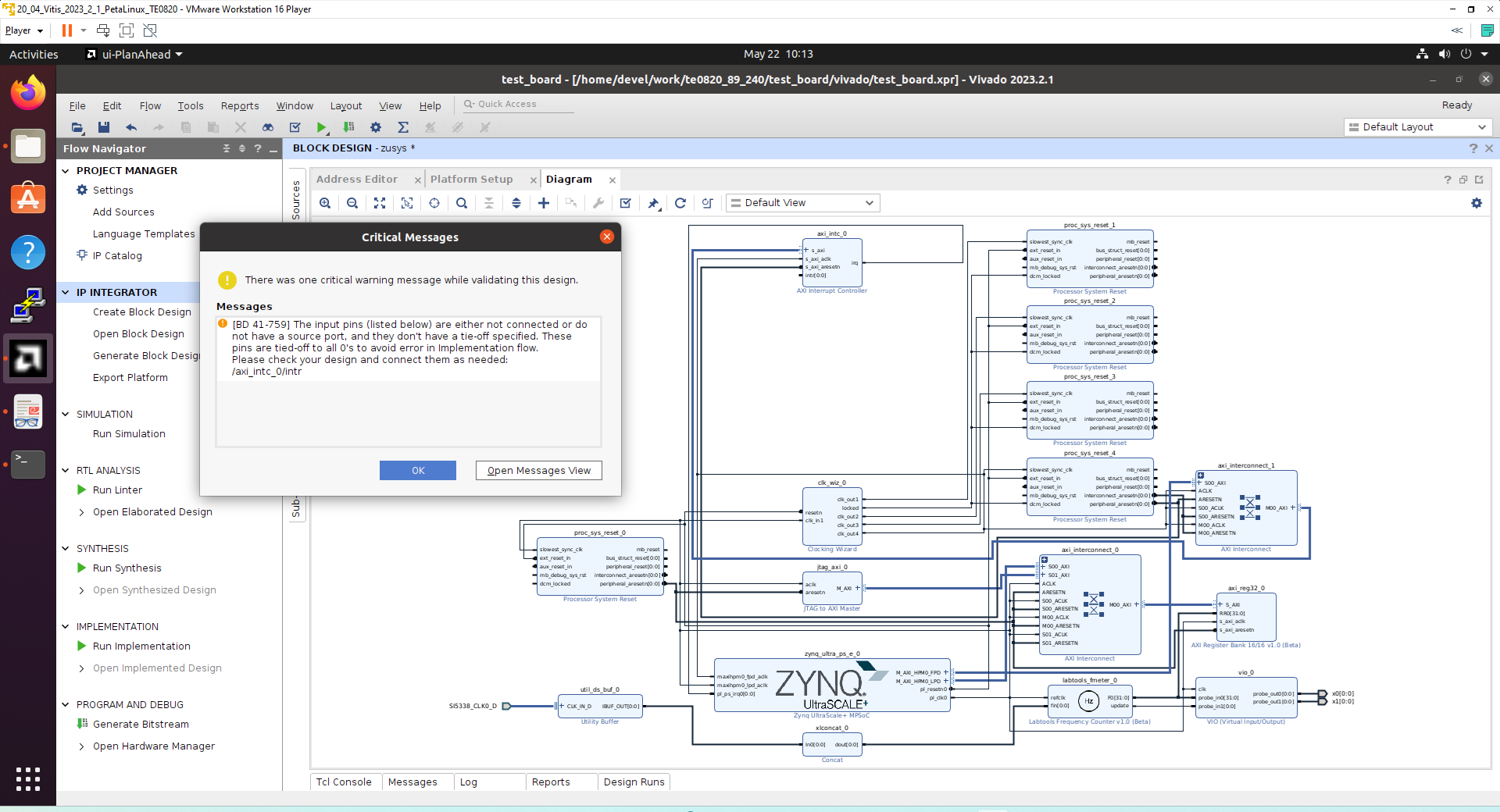
Received Critical Messages window indicates that input intr[0:0] of axi_intc_0 is not connected. This is expected. The Vitis extensible design flow will connect this input to interrupt outputs from generated HW IPs.
Click OK.
You can generate pdf of the block diagram by clicking to any place in diagram window and selecting Save as PDF File. Use default file name:
~/work/te0820_23_240/test_board/vivado/zusys.pdf
Compile Created HW and Custom SW with Trenz Scripts
In Vivado Tcl Console, type the following script and execute it by Enter.
TE::hw_build_design -export_prebuilt
It taks some time to compile HW. HW design and to export the corresponding standard XSA package with included bitstream. Archive test_board_2cg_1e_2gb.xsa for extensible system is created:
~/work/te0820_23_240/test_board/vivado/test_board_2cg_1e_2gb.xsa
In Vivado Tcl Console, type the following script and execute it by Enter.
TE::sw_run_vitis -all
It will take some time to compile and finally the Vitis SDK GUI is opened.
Close the Vitis Welcome page.
Compile the two included SW projects.
Standalone custom Vitis platform TE0820-05-4DE21MA has been created and compiled.
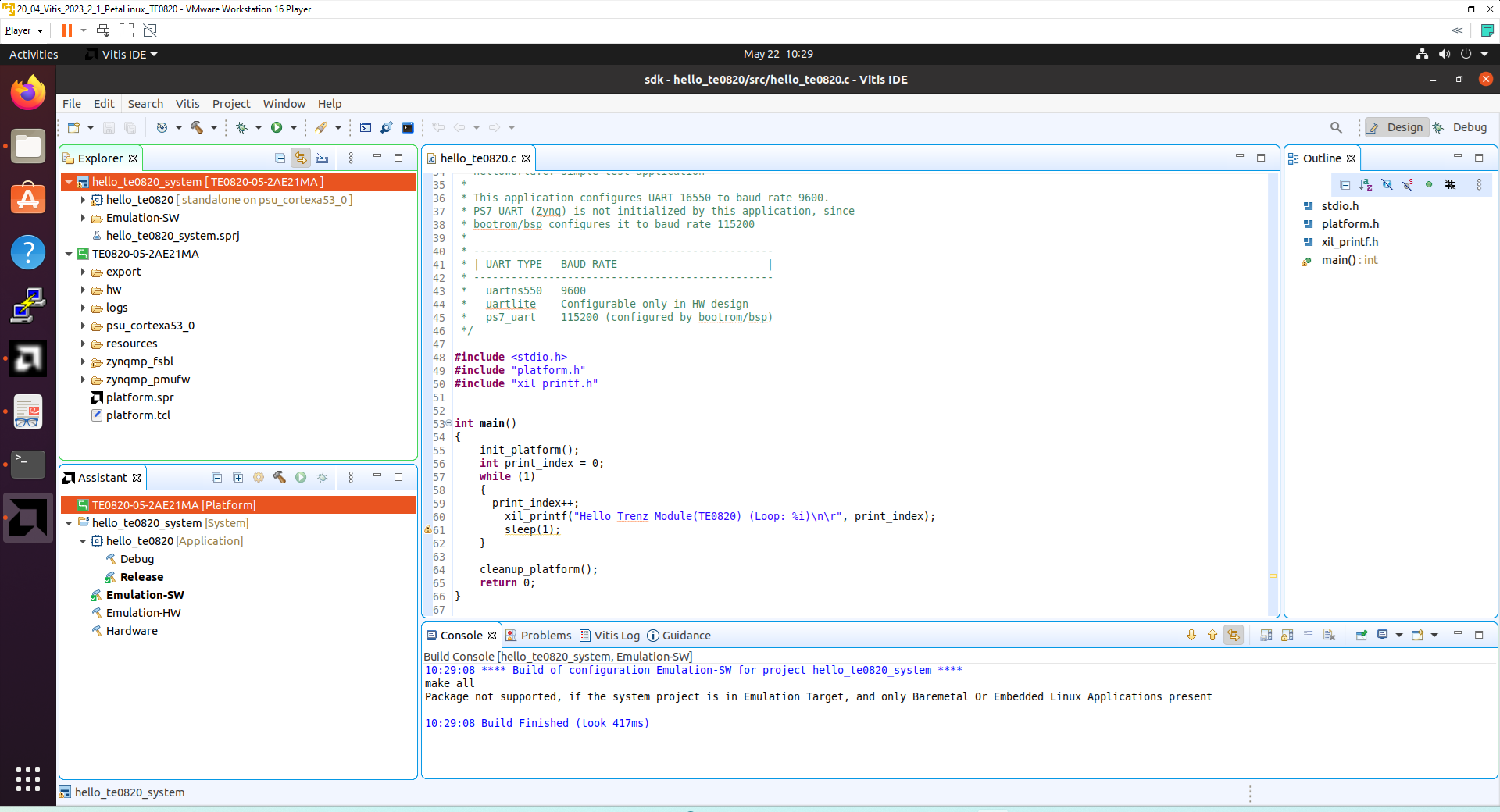
The TE0820-03-04EV-1EA Vitis platform includes Trenz Electronic custom first stage boot loader in folder zynqmp_fsbl. It includes SW extension specific for the Trenz module initialisation.
This custom zynqmp_fsbl project created an executable file fsbl.elf :
~/work/te0820_23_240/test_board/prebuilt/software/2cg_1e_2gb/fsbl.elf
This customised first stage boot loader is needed for the Vitis extensible platform.
Exit the opened Vitis SDK project.
In Vivado top menu select File->Close Project to close project. Click OK.
In Vivado top menu select File->Exit to close Vivado. Click OK.
Copy Created Custom First Stage Boot Loader
Up to now, test_board directory has been used for all development.
~/work/te0820_23_240/test_board
Create new folders:
~/work/te0820_23_240/test_board_pfm/pfm/boot
~/work/te0820_23_240/test_board_pfm/pfm/sd_dir
Copy the recently created custom first stage boot loader executable file from
~/work/te0820_23_240/test_board/prebuilt/software/2cg_1e_2gb/fsbl.elf
to
~/work/te0820_23_240/test_board_pfm/pfm/boot/fsbl.elf
Building Petalinux for Vitis AI 3.0 and AI 3.5
Vitis AI3.0 models and Vitis AI 3.5 library
Petalinux 2023.2.1 contains recepies for the Vitis-AI 3.5 library.
The AMD DPU is compatible with Vitis-AI 3.0 models.
Building Petalinux for Extensible Design Flow
Change directory to the default Petalinux folder
~/work/te0820_23_240/test_board/os/petalinux
Source Vitis and Petalinux scripts to set environment for access to Vitis and PetaLinux tools.
$ source /tools/Xilinx/Vitis/2023.2/settings64.sh
$ source ~/petalinux/2023.2/settings.sh
Configure petalinux with the test_board_2cg_1e_2gb.xsa for the extensible design flow by executing:
$ petalinux-config --get-hw-description=
/home/<user>/work/te0820_84_240/test_board/vivado
Replace <user> by your user name.
In our case, <user>=devel we use:
$ petalinux-config --get-hw-description=
/home/devel/work/te0820_84_240/test_board/vivado
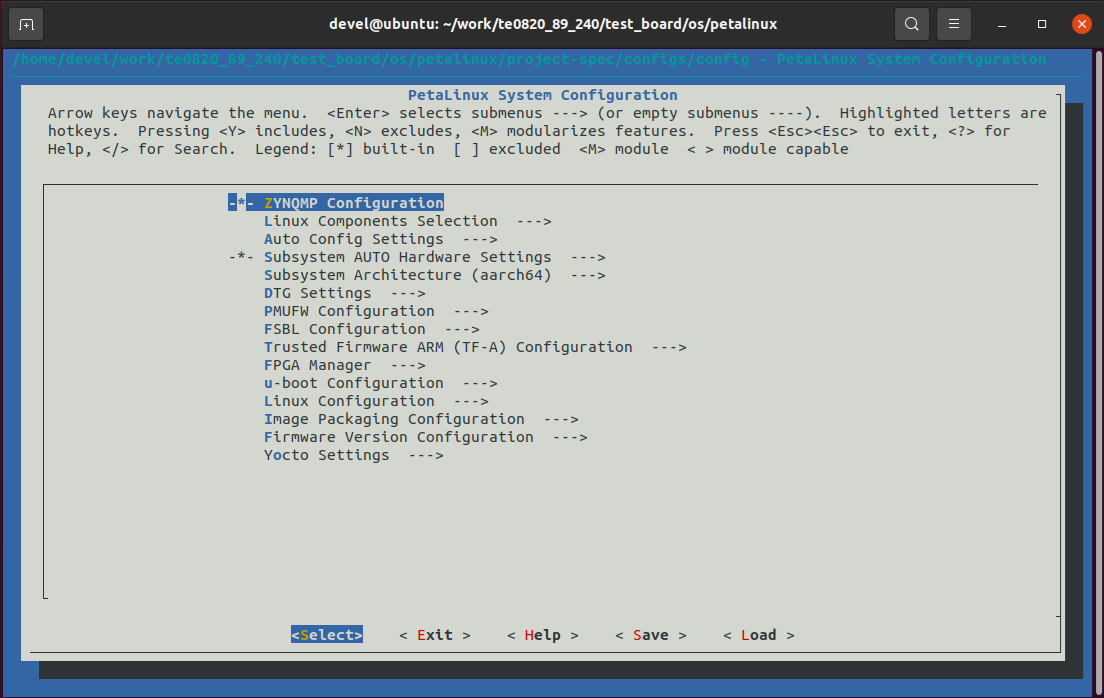
Select Exit->Yes to close this window.
In text editor, modify the user-rootfsconfig file:
~/work/te0820_23_240/test_board/os/petalinux/project-spec/meta-user/conf/user-rootfsconfig
In text editor, append these lines:
CONFIG_xrt
CONFIG_xrt-dev
CONFIG_zocl
CONFIG_opencl-clhpp-dev
CONFIG_opencl-headers-dev
CONFIG_packagegroup-petalinux-opencv
CONFIG_packagegroup-petalinux-opencv-dev
CONFIG_dnf
CONFIG_e2fsprogs-resize2fs
CONFIG_parted
CONFIG_resize-part
CONFIG_packagegroup-petalinux-vitisai
CONFIG_packagegroup-petalinux-self-hosted
CONFIG_cmake
CONFIG_packagegroup-petalinux-vitisai-dev
CONFIG_mesa-megadriver
CONFIG_packagegroup-petalinux-x11
CONFIG_packagegroup-petalinux-v4lutils
CONFIG_packagegroup-petalinux-matchbox
CONFIG_packagegroup-petalinux-vitis-acceleration
CONFIG_packagegroup-petalinux-vitis-acceleration-dev
xrt, xrt-dev and zocl are required for Vitis acceleration flow.
dnf is for package management.
parted, e2fsprogs-resize2fs and resize-part can be used for ext4 partition resize.
Other included packages serve for natively building Vitis AI applications on target board and for running Vitis-AI demo applications with GUI.
The Vitis-AI 3.5 recepies for installation of the correspoding Vitis-AI 3.5 libraries into rootfs of PetaLinux are specified allready as selected recepies in PetaLinux 2023.2
Launch rootfs config:
$ petalinux-config -c rootfs
Enable user packages
Select user packages
user packages   --->
[*] cmake
[*] dnf
[*] e2fsprogs-resize2fs
[*] gpio-demo
[*] imagefeature-debug-tweaks
[*] imagefeature-package-management
[ ] imagefeature-ssh-server-dropbear
[*] imagefeature-ssh-server-openssh
[*] mesa-megadriver
[*] opencl-clhpp-dev
[*] opencl-headers-dev
[*] openssh
[*] openssh-scp
[*] openssh-sftp-server
[*] openssh-sshd
[ ] packagegroup-core-ssh-dropbear
[*] packagegroup-petalinux-matchbox
[*] packagegroup-petalinux-opencv
[*] packagegroup-petalinux-opencv-dev
[*] packagegroup-petalinux-self-hosted
[*] packagegroup-petalinux-v4lutils
[*] packagegroup-petalinux-vitis-acceleration
[*] packagegroup-petalinux-vitis-acceleration-dev
[*] packagegroup-petalinux-vitis-acceleration-essential
[ ] packagegroup-petalinux-vitis-acceleration-essential-dbg
[*] packagegroup-petalinux-vitis-acceleration-essential-dev
[*] packagegroup-petalinux-vitisai
[*] packagegroup-petalinux-vitisai-dev
[*] packagegroup-petalinux-x11
[*] parted
[*] peekpoke
[*] resize-part
[*] startup
[*] webfwu
[*] xrt
[*] xrt-dev
[*] zocl
Select all packages to have an asterisk [*].
Still in the RootFS configuration window, go to root directory by select Exit once.
Enable Petalinux package groups
Select Petalinux Package Groups:
Petalinux Package Groups  --->
  packagegroup-petalinux-vitis-acceleration-essential   --->
     [*] packagegroup-petalinux-vitis-acceleration-essential
     [ ] packagegroup-petalinux-vitis-acceleration-essential-dbg
     [*] packagegroup-petalinux-vitis-acceleration-essential-dev
Still in the RootFS configuration window, go to root directory by select Exit once.
Enable OpenSSH and Disable Dropbear
Dropbear is the default SSH tool in Vitis Base Embedded Platform. If OpenSSH is used to replace Dropbear, the system could achieve faster data transmission speed over ssh. Created Vitis extensible platform applications may use remote display feature. Using of OpenSSH can improve the display experience.
Go to Image Features.
Disable ssh-server-dropbear and enable ssh-server-openssh and click Exit once.
Go to Filesystem Packages->misc->packagegroup-core-ssh-dropbear and disable packagegroup-core-ssh-dropbear.
Go to Filesystem Packages level by Exit twice.
Go to console->network->openssh and enable
[*] openssh
[*] openssh-sftp-server
[*] openssh-sshd
[*] openssh-scp.
Go to root level by selection of Exit four times.
Enable Package Management
Package management feature can allow the board to install and upgrade software packages on the fly.
In rootfs config go to Image Features and enable:
[*] package management
[*] debug_tweaks
options. Click OK, Exit twice and select Yes to save the changes.
Disable CPU IDLE in Kernel Config
CPU IDLE would cause processors get into IDLE state (WFI) when the processor is not in use. When JTAG is connected, the hardware server on host machine talks to the processor regularly. If it talks to a processor in IDLE status, the system will hang because of incomplete AXI transactions.
So, it is recommended to disable the CPU IDLE feature during project development phase.
It can be re-enabled after the design has completed to save power in final products.
Launch kernel config:
$ petalinux-config -c kernel
Ensure the following items are TURNED OFF by entering 'n' in the [ ] menu selection:
CPU Power Management->CPU Idle->CPU idle PM support
CPU Power Management->CPU Frequency scaling->CPU Frequency scaling
Select Exit and Yes to Save changes.
Add EXT4 rootfs Support
Let PetaLinux generate EXT4 rootfs. In terminal, execute:
$ petalinux-config
Go to Image Packaging Configuration.
Enter into Root File System Type
Select Root File System Type EXT4
Change the Device node of SD device from the default value
/dev/mmcblk0p2
to new value required for the TE0820 module:
/dev/mmcblk1p2
Go to
Image Packaging Configuration -->
modify Root filesystem formats from
cpio cpio.gz cpio.gz.u-boot ext4 tar.gz jffs2
to
ext4
Select Exit and Yes to save changes.
Let Linux Use EXT4 rootfs During Boot
The setting of which rootfs to use during boot is controlled by bootargs. We would change bootargs settings to allow Linux to boot from EXT4 partition.
In terminal, execute:
$ petalinux-config
Change DTG settings->Kernel Bootargs->generate boot args automatically to NO.
Update User Set Kernel Bootargs to:
earlycon console=ttyPS0,115200 clk_ignore_unused root=/dev/mmcblk1p2 rw rootwait cma=512M
Click OK, Exit three times and Save.
Build PetaLinux Image
In terminal, build the PetaLinux project by executing:
$ petalinux-build
The PetaLinux image files will be generated in the directory:
~/work/te0820_23_240/test_board/os/petalinux/images/linux
Generation of PetaLinux takes some time and requires Ethernet connection and sufficient free disk space.
Create Petalinux SDK
The SDK will be used by Vitis tool to cross compile applications for newly created platfom.
In terminal, execute:
$ petalinux-build --sdk
The generated sysroot package sdk.sh will be located in directory
~/work/te0820_23_240/test_board/os/petalinux/images/linux
Generation of SDK package takes some time and requires sufficient free disk space.
Time needed for these two steps depends also on number of allocated processor cores.
Copy Files for Extensible Platform
Copy these four files:
| Files | From | To |
|---|---|---|
| bl31.elf pmufw.elf system.dtb u-boot-dtb.elf | ~/work/te0820_23_240/test_board/os/petalinux/images/linux | ~/work/te0820_23_240/test_board_pfm/pfm/boot |
Rename the copied file u-boot-dtb.elf to u-boot.elf
The directory
~/work/te0820_23_240/test_board_pfm/pfm/boot
contains these five files:
bl31.elf
fsbl.elf
pmufw.elf
system.dtb
u-boot.elf
Copy files:
| File | From | To |
|---|---|---|
| boot.scr system.dtb | ~/work/te0820_23_240/test_board/os/petalinux/images/linux | ~/work/te0820_23_240/test_board_pfm/pfm/sd_dir |
Copy file:
| File | From | To |
|---|---|---|
| init.sh | ~/work/te0820_23_240/test_board/misc/sd | ~/work/te0820_23_240/test_board_pfm/pfm/sd_dir |
init.sh is an place-holder for user defined bash code to be executed after the boot:
#!/bin/sh
normal="\e[39m"
lightred="\e[91m"
lightgreen="\e[92m"
green="\e[32m"
yellow="\e[33m"
cyan="\e[36m"
red="\e[31m"
magenta="\e[95m"
echo -ne $lightred
echo Load SD Init Script
echo -ne $cyan
echo User bash Code can be inserted here and put init.sh on SD
echo -ne $normal
Create Extensible Platform Archive
Create new directory tree:
~/work/te0820_23_240_move/test_board/os/petalinux/images
~/work/te0820_23_240_move/test_board/Vivado
~/work/te0820_23_240_move/test_board_pfm/pfm/boot ~/work/te0820_23_240_move/test_board_pfm/pfm/sd_dir
Copy all files from the directory:
| Files | Source | Destination |
|---|---|---|
| all | ~/work/te0820_23_240/test_board/os/petalinux/images | ~/work/te0820_23_240_move/test_board/os/petalinux/images |
| all | ~/work/te0820_23_240/test_board_pfm/pfm/boot | ~/work/te0820_23_240_move/test_board_pfm/pfm/boot |
| all | ~/work/te0820_23_240/test_board_pfm/pfm/sd_dir | ~/work/te0820_23_240_move/test_board_pfm/pfm/sd_dir |
| test_board_2cg_1e_2gb.xsa | ~/work/te0820_23_240/test_board/Vivado/test_board_2cg_1e_2gb.xsa | ~/work/te0820_23_240_move/test_board/Vivado/test_board_2cg_1e_2gb.xsa |
Zip the directory
~/work/te0820_23_240_move
into ZIP archive:
~/work/te0820_23_240_move.zip
The archive te0820_23_240_move.zip can be used to create extensible platform on the same or on an another PC with installed Ubuntu 20.04 and Vitis tools, with or without installed Petalinux. The archive includes all needed components, and script sdk.sh serving for generation of the sysroot .
The archive te0820_23_240_move.zip is valid for module number (89). This is the te0820 HW module with xczu4CG-sfvc784-1-e device with 2 GB memory. The Extensible Vitis platform will have the default clock 240 MHz.
Clean Petainux Files (optional)
The Petalinux compilation process has created round 50 GBytes of files which can be deleated to save Ubuntu disk space.
Change directory to the default Petalinux folder
~/work/te0820_23_240/test_board/os/petalinux
Source Vitis and Petalinux scripts to set environment for access to Vitis and PetaLinux tools.
$ source /tools/Xilinx/Vitis/2023.2/settings64.sh
$ source ~/petalinux/2023.2/settings.sh
Clean Petalinux project files by command
petalinux-build -x mrproper
This will delete also final files needed PetaLinux files in the images directory.
Restore the final needed PetaLinux files in the images directory.
| Files | Source | Destination |
|---|---|---|
| all | ~/work/te0820_23_240_move/test_board/os/petalinux/images | ~/work/te0820_23_240_move/test_board/os/petalinux/images |
Copy the te0820_89_240_move.zip archive to an disk drive backup.
Delete:
~/work/te0820_23_240_move
~/work/te0820_23_240_move.zip
Clean Ubuntu Trash.
1.1 Generation of SYSROOT
This part of development can be direct continuation of the previous Petalinux configuration and compilation steps.
Alternatively, it is also possible to implement all next steps on an Ubuntu 20.04 without installed PetaLinux Only the Ubuntu 20.04 and Vitis/Vivado installation is needed.
All required files created in the PetaLinux for the specific module (89) are present in the archive: te0820_23_240_move.zip
In Ubuntu terminal, change the working directory to:
~/work/te0820_23_240/test_board/os/petalinux/images/linux
In Ubuntu terminal, execute script enabling access to Vitis 2023.2 tools.
$ source /tools/Xilinx/Vitis/2023.2/settings64.sh
In Ubuntu terminal, execute script
$ ./sdk.sh -d /home/<user>/work/te0820_23_240/test_board_pfm
For <user>= devel
$ ./sdk.sh -d /home/devel/work/te0820_23_240/test_board_pfm
SYSROOT directories and files for PC and for Zynq Ultrascale+ will be created in:
~/work/te0820_23_240/test_board_pfm/sysroots/x86_64-petalinux-linux
~/work/te0820_23_240/test_board_pfm/sysroots/cortexa72-cortexa53-xilinx-linux
Once created, do not move these directories (due to some internally created absolute paths).
Generation of Extensible Platform for Vitis
In Ubuntu terminal, change the working directory to:
~/work/te0820_23_240/test_board_pfm
Start the vitis -classic version of Vitis tool by executing
$ vitis –classic &
In Vitis “Launcher”, set the workspace for the extensible platform compilation:
~/work/te0820_23_240/test_board_pfm
Click on “Launch” to launch vitis -classic version of Vitis
Close Welcome page.
In Vitis, select in the main menu: File -> New -> Platform Project
Type name of the extensible platform: te0820_23_240_pfm. Click Next.
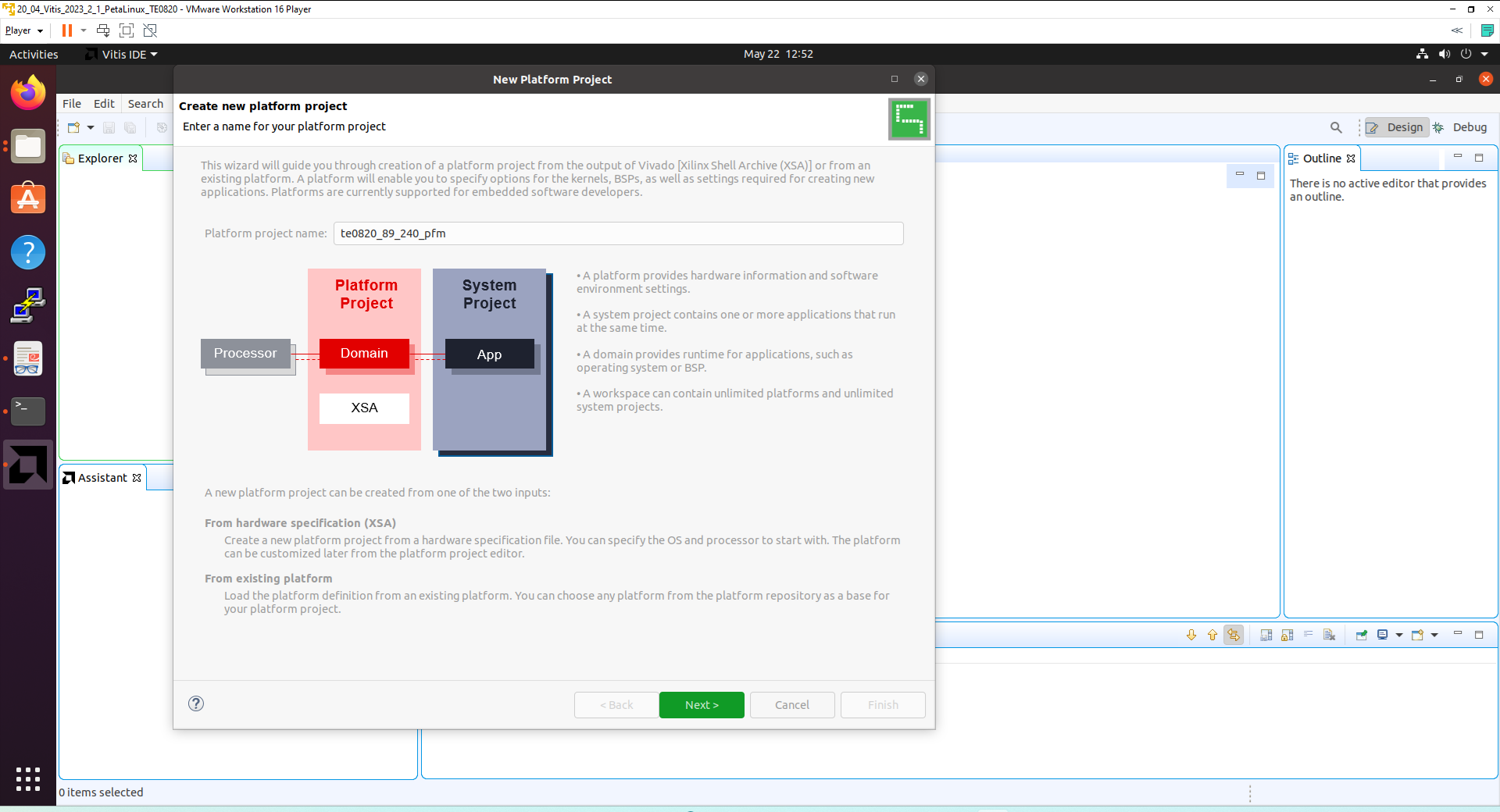
For hardware specification, select extensible platform archive:
~/work/te0820_23_240/test_board/vivado/test_board_4ev_1e_2gb.xsa
In Software specification select: linux
In Boot Components unselect Generate boot components
(these components have been already generated by Vivado and PetaLinux design flow)
New window te0820_23_240_pfm is opened.
Click on linux on psu_cortex53 to open window Domain: linux_domain
In Description write: xrt
In Bif File find and select the pre-defied option: Generate Bif
In Boot Components Directory select:
~/work/te0820_23_240/test_board_pfm/pfm/boot
In FAT32 Partition Directory select:
~/work/te0820_23_240/test_board_pfm/pfm/sd_dir
In Vitis IDE Explorer section, click on te0820_23_240_pfm to highlight it.
Right-click on the highlighted te0820_23_240_pfm and select build project in the open submenu. Platform is compiled in few seconds.
Close the Vitis tool by selection: File -> Exit.
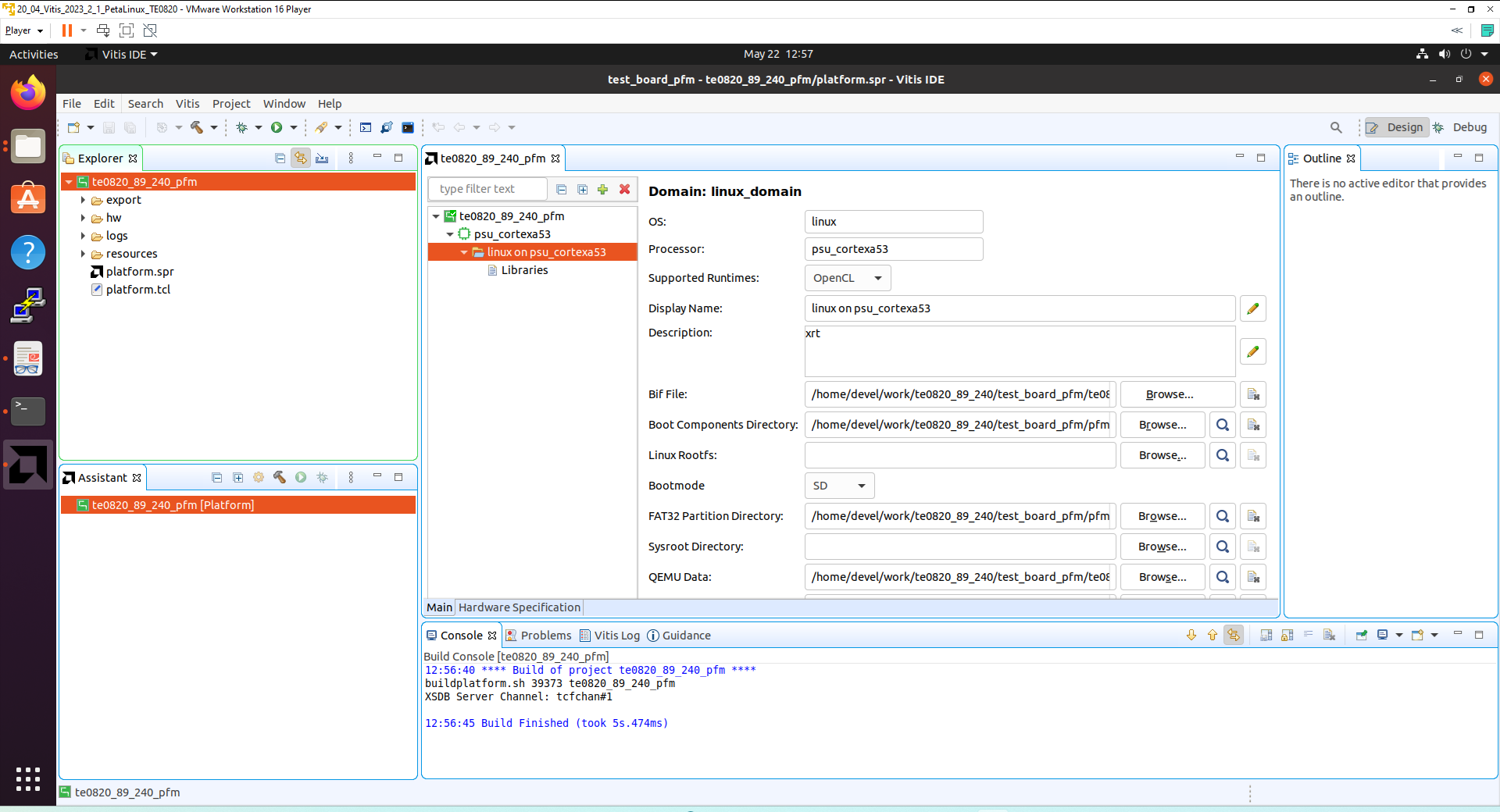
Vits extensible platform te0820_23_240_pfm has been created in the directory:
~/work/te0820_23_240/test_board_pfm/te0820_23_240_pfm/export/te0820_23_240_pfm
Platform Usage
Read Platform Info
With Vitis environment setup, platforminfo tool can report platform information.
platforminfo ~/work/te0820_23_240/test_board_pfm/te0820_23_240_pfm/export/te0820_23_240_pfm/te0820_23_240_pfm.xpfm
==========================
Basic Platform Information
==========================
Platform:           te0820_105_240_pfm
File:               /home/devel/work/te0820_105_240/test_board_pfm/te0820_105_240_pfm/export/te0820_105_240_pfm/te0820_105_240_pfm.xpfm
Description:
te0820_105_240_pfm

=====================================
Hardware Platform (Shell) Information
=====================================
Vendor:                           vendor
Board:                            zusys
Name:                             zusys
Version:                          1.0
Generated Version:                2023.2.1
Hardware:                         1
Software Emulation:               1
Hardware Emulation:               0
Hardware Emulation Platform:      0
FPGA Family:                      zynquplus
FPGA Device:                      xczu4cg
Board Vendor:                     trenz.biz
Board Name:                       trenz.biz:te0820_4cg_1e:2.0
Board Part:                       xczu4cg-sfvc784-1-e

=================
Clock Information
=================
  Default Clock Index: 4
  Clock Index:         1
    Frequency:         100.000000
  Clock Index:         2
    Frequency:         200.000000
  Clock Index:         3
    Frequency:         400.000000
  Clock Index:         4
    Frequency:         240.000000

==================
Memory Information
==================
  Bus SP Tag: HP0
  Bus SP Tag: HP1
  Bus SP Tag: HP2
  Bus SP Tag: HP3
  Bus SP Tag: HPC0
  Bus SP Tag: HPC1

=============================
Software Platform Information
=============================
Number of Runtimes:            1
Default System Configuration:  te0820_105_240_pfm
System Configurations:
  System Config Name:                      te0820_105_240_pfm
  System Config Description:               te0820_105_240_pfm
  System Config Default Processor Group:   linux_domain
  System Config Default Boot Image:        standard
  System Config Is QEMU Supported:         1
  System Config Processor Groups:
    Processor Group Name:      linux on psu_cortexa53
    Processor Group CPU Type:  cortex-a53
    Processor Group OS Name:   linux
  System Config Boot Images:
    Boot Image Name:           standard
    Boot Image Type:
    Boot Image BIF:            te0820_105_240_pfm/boot/linux.bif
    Boot Image Data:           te0820_105_240_pfm/linux_domain/image
    Boot Image Boot Mode:      sd
    Boot Image RootFileSystem:
    Boot Image Mount Path:     /mnt
    Boot Image Read Me:        te0820_105_240_pfm/boot/generic.readme
    Boot Image QEMU Args:     te0820_105_240_pfm/qemu/pmu_args.txt:te0820_105_240_pfm/qemu/qemu_args.txt
    Boot Image QEMU Boot:
    Boot Image QEMU Dev Tree:
Supported Runtimes:
  Runtime: OpenCL
Create and Compile Vector Addition Example
Create new directory test_board_test_vadd to test Vitis extendable flow example “vector addition”
~/work/te0820_23_240/test_board_test_vadd
Current directory structure:
~/work/te0820_23_240/test_board
~/work/te0820_23_240/test_board_pfm
~/work/te0820_23_240/test_board_test_vadd
Change working directory:
$cd ~/work/te0820_23_240/test_board_test_vadd
In Ubuntu terminal, start vitis –classic verson of Vitis by:
$ vitis --classic –workspace . &
In Vitis IDE Launcher, select your working direktory
~/work/te0820_23_240/test_board_test_vadd
Click on Launch to launch Vitis.
Select File -> New -> Application project. Click Next.
Skip welcome page if shown.
Click on [+ Add] icon and select the custom extensible platform te0820_23_240_pfm[custom] in the directory:
~/work/te0820_23_240/test_board_pfm/te0820_23_240_pfm/export/te0820_23_240_pfm
We can see available PL clocks and frequencies. PL4 with 240 MHz clock was set as default in the platform creation process.
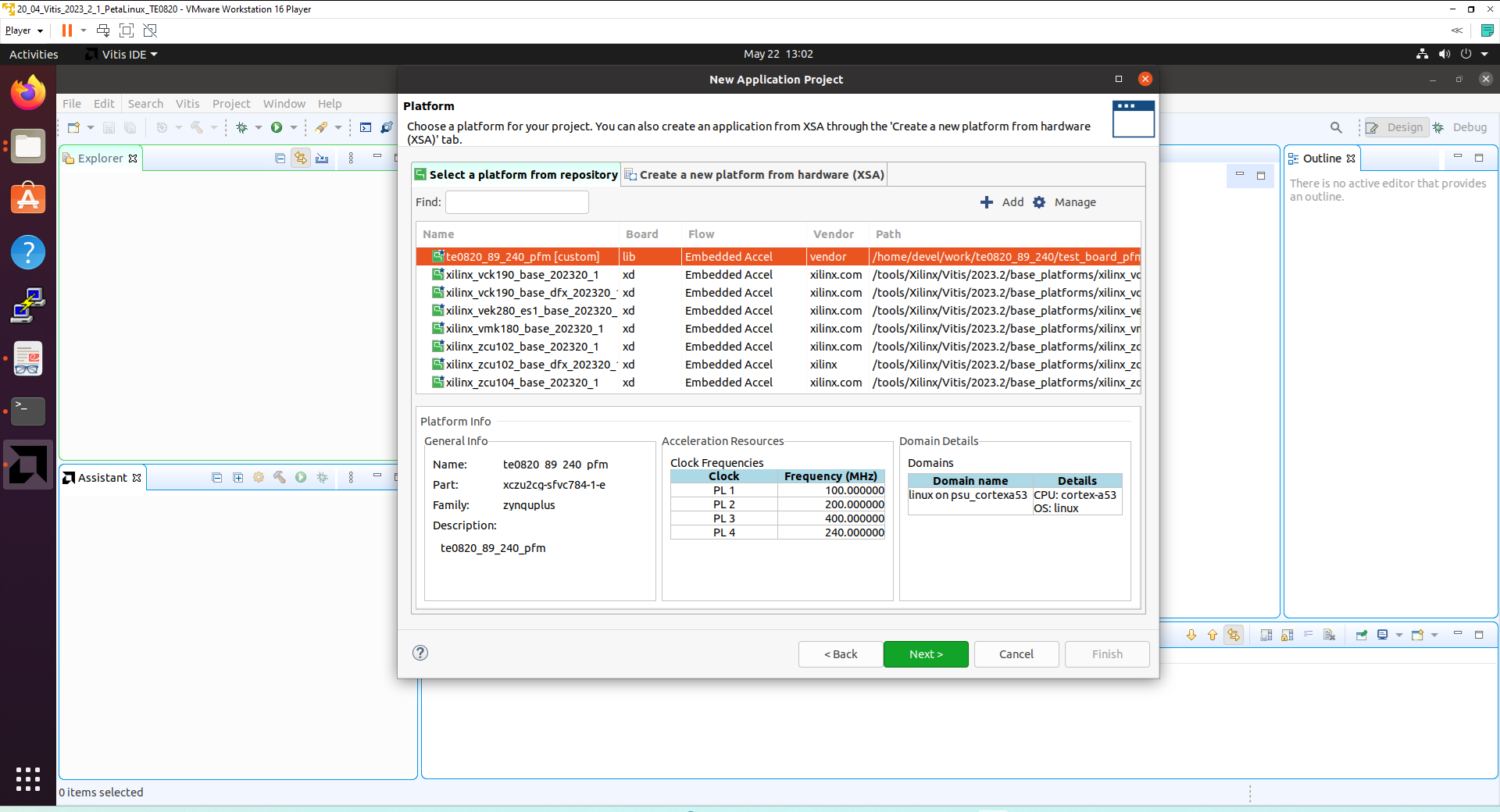
Click Next.
In Application Project Details window type into Application project name: test_vadd
Click Next.
In Domain window type (or select by browse):
Sysroot path:
~/work/te0820_23_240/test_board_pfm/sysroots/cortexa72-cortexa53-xilinx-linux
Root FS:
~/work/te0820_23_240/test_board/os/petalinux/images/linux/rootfs.ext4
Kernel Image:
~/work/te0820_23_240/test_board/os/petalinux/images/linux/Image
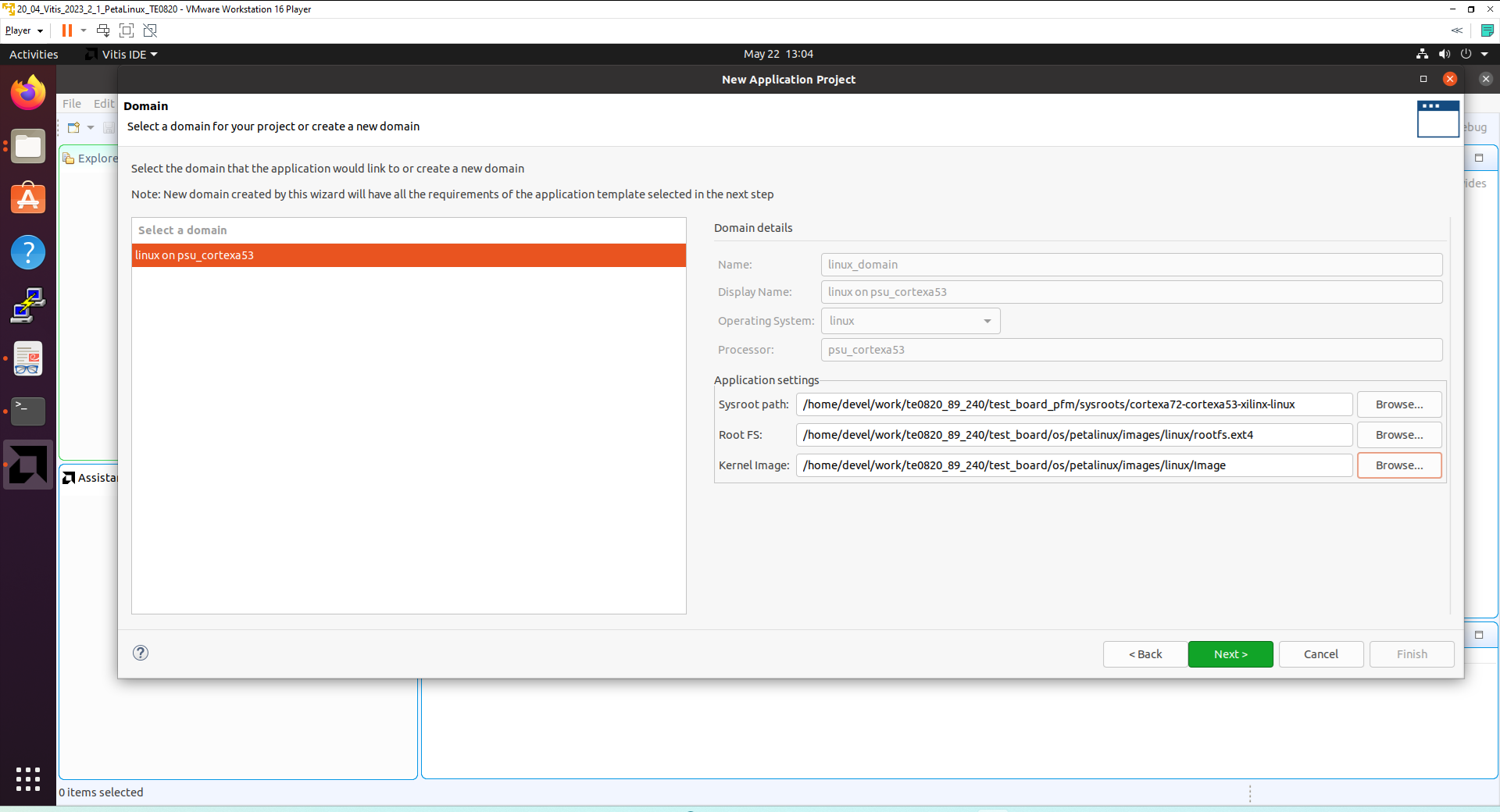
Click Next.
In Templates window, if not done before, update Vitis IDE Examples and Vitis IDE Libraries.
Select Host Examples:
In Find, type: vector add to search for the Vector Addition example.
Select: Vector Addition
Click Finish
New project template is created.
In test_vadd window menu “Active build configuration” switch from SW Emulation to Hardware.
In “Explorer” section of Vitis IDE, click on: test_vadd_system[te0820_23_240_pfm] to select it.
Right Click on: test_vadd_system[te0820_23_240_pfm] and select in the opened sub-menu: Build project
Vitis will compile. This step can take some time.
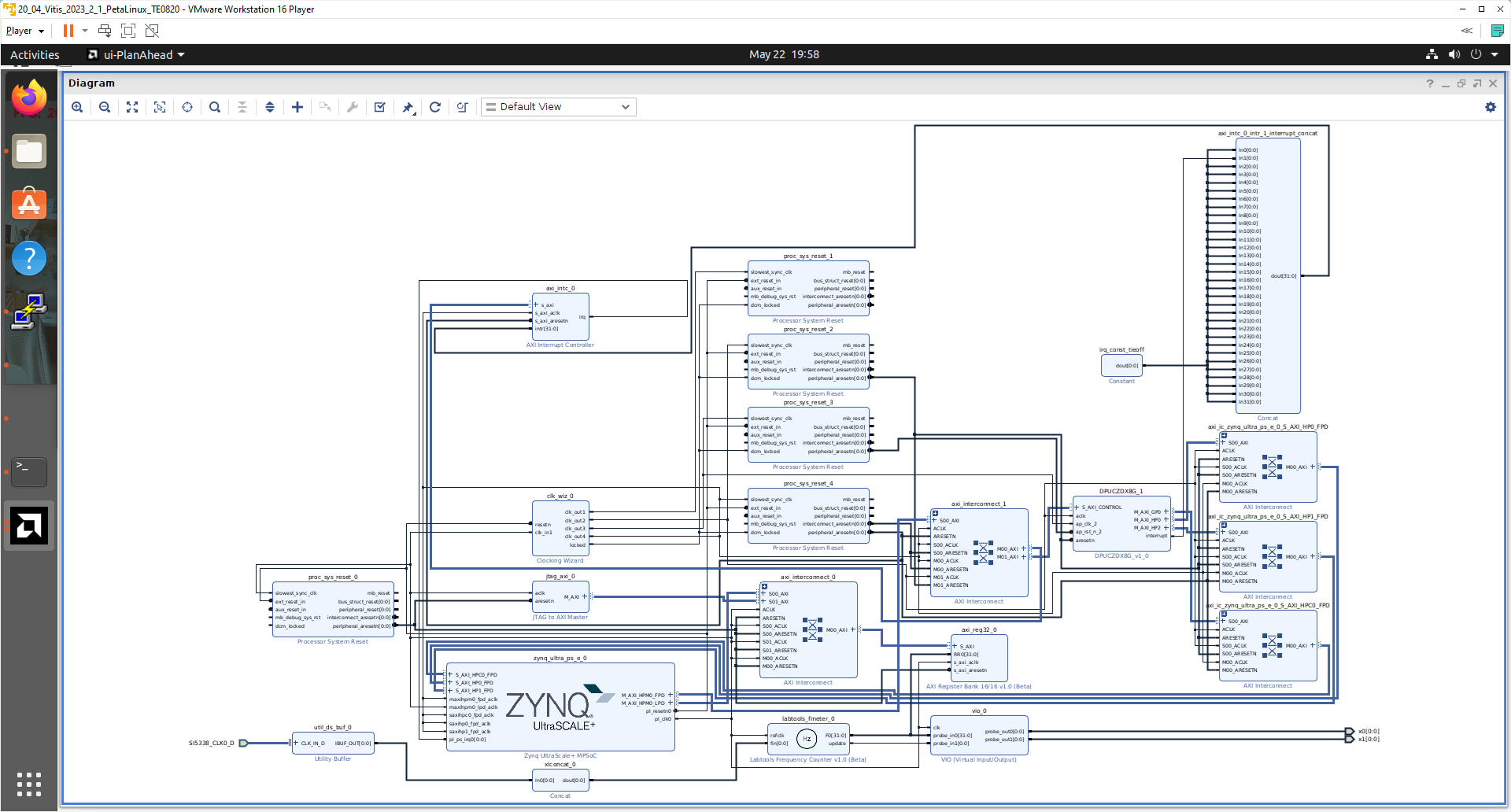
Created extended HW with integrated vadd IP block can be open and analysed in Vivado 2023.2.
Run Compiled test_vadd Example Application
The sd_card.img file is output of the compilation and packing by Vitis. It is located in directory:
~/work/te0820_23_240/test_board_test_vadd/test_vadd_system/Hardware/package/sd_card.img
Write the sd card image sd_card.img to SD card. In Windows Pro 10 (or Windows 11 Pro) PC, inst all program Win32DiskImager for this task.
Win32 Disk Imager can write raw disk image to removable devices.
Insert the SD card to the TE0701-06 carrier board.
Connect PC USB terminal (115200 bps) card to the TE0701-06 carrier board.
Connect Ethernet cable to the TE0701-06 carrier board.
Power on the TE0701-06 carrier board.
In PC, find the assigned serial line COM port number for the USB terminal. In case of Win 10 or Win 11, use device manager.
In PC, open serial line terminal with the assigned COM port number. Speed 115200 bps.
On TE0701-06, reset button to start the system. USB terminal starts to display booting information.
In PC terminal, type:
sh-5.1# cd /media/sd-mmcblk1p1/
sh-5.1# ./test_vadd krnl_vadd.xclbin
The application test_vadd should run with this output:
INFO: Reading krnl_vadd.xclbin
Loading: 'krnl_vadd.xclbin'
Trying to program device[0]: edge
Device[0]: program successful!
TEST PASSED
sh-5.1#
The Vitis application has been compiled to HW and evaluated on custom system
with extensible custom te0820_23_240_pfm platform.
In PC terminal type:
# halt
System is halted. Messages relate to halt of the system can be seen on the USB terminal.
The SD card can be safely removed from the TE0701-06 carrier board.
The terminal can be closed.
TE0701-06 carrier board can be disconnected from power.
Display on X11 terminal
System can be connected to the X11 terminal running on your PC Ubuntu with PuTTY application via Ethernet.
Find Ethernet IP address of your board by ifconfig command in PetaLinux terminal.
In PC Ubuntu OS, open PuTTY application.
In PuTTY, set Ethernet IP of your board.
In PuTTY, select checkbox SSH->X11->Enable X11 forwarding.
Use PC Ubuntu mouse and keyboard. In PuTTY, open PetaLinux terminal and login as:
user: root pswd: root.
In opened PetaLinux terminal, start X11 desktop x-session-manager by typing:
root@Trenz:~# x-session-manager &
Click on X11 icon (A Unicode capable rxvt)
Terminal opens as an X11 graphic window. In X11 terminal rxvt, use Ubuntu PC keyboard and type:
sh-5.1# cd /media/sd-mmcblk1p1/
sh-5.1# ./test_vadd krnl_vadd.xclbin
The application test_vadd should run with this output:
INFO: Reading krnl_vadd.xclbin
Loading: 'krnl_vadd.xclbin'
Trying to program device[0]: edge
Device[0]: program successful!
TEST PASSED
sh-5.1#
The test_board has been running the PetaLinux OS and drives simple version of an X11 GUI on Ubuntu desktop.Application test_vadd has been started from X11 xrvt terminal emulator.
Close the rxvt terminal emulator by click ”x” icon (in the upper right corner) or by typing:
sh-5.1# exit
In X11, click Shutdown icon to safely close PetaLinux running on the test board.
System on the test board is halted. Messages related to halt of the system can be seen on the PC USB terminal.
The SD card can be safely removed from the test_board.
Close the PC USB terminal application.
The TE0701-06 carrier board can be disconnected from power.
Vitis AI 3.0 DPUCZDX8V_VAI_v3.0 Installation
This test implements simple AI 3.0 demo to verify DPU integration to our custom extensible platform. This tutorial follows Xilix Vitis Tutorial for zcu104 with necessary fixes and customizations required for our case.
We have to install correct Vitis project with the DPU instance from this repository:
https://github.com/Xilinx/Vitis-AI/tree/3.0/dpu
Page description contains table with supported targets. Use the line if theis table dedicated to the AMD DPUCZDX8G for MPSoC and Kria K26 devices.
It is link for download of the programmable logic based DPU, targeting general purpose CNN inference with full support for the Vitis AI ModelZoo.
Supports either the Vitis or Vivado flows on 16nm Zynq® UltraScale+™ platforms.
Click on the Download link in the column: Reference Design
This will result in download of file:
~/Downloads/DPUCZDX8V_VAI_v3.0.tar.gz
It contains directory
~/Downloads/DPUCZDX8V_VAI_v3.0
Copy this directory to the directory:
~/work/DPUCZDX8V_VAI_v3.0
It contains HDL code for the DPU and also source files and project files to test the DPU with AI resnet50 inference example.
We have to make these template project files visible for the Vitis tool. Copy the directory:
~/work/DPUCZDX8V_VAI_v3.0
to the directory
/home/<user>/.Xilinx/Vitis/2023.2/vitis_examples/DPUCZDX8V_VAI_v3.0
In case of <user>=devel
/home/devel/.Xilinx/Vitis/2023.2/vitis_examples/DPUCZDX8V_VAI_v3.0
Vitis will see this platform template, now.
Create and Build Vitis Design
Create new directory test_board_dpu_trd to test Vitis extendable flow example dpu trd
~/work/te0820_23_240/test_board_dpu_trd
Current directory structure:
~/work/te0820_23_240/test_board
~/work/te0820_23_240/test_board_pfm
~/work/te0820_23_240/test_board_test_vadd
~/work/te0820_23_240/test_board_dpu_trd
Change working directory:
$cd ~/work/te0820_23_240/test_board_dpu_trd
In Ubuntu terminal, start vitis –classic version of Vitis tool by:
$ vitis –classic –workspace . &
In Vitis IDE Launcher, select your working direktory
~/work/te0820_23_240/test_board_dpu_trd
Click on Launch to start Vitis.
Configure Project for the Vitis Extensible Flow with DPU
Select File -> New -> Application project. Click Next.
Skip welcome page, if it is shown.
Click on [+ Add] icon and select the custom extensible platform te0820_23_240_pfm[custom] in the directory:
~/work/te0820_23_240/test_board_pfm/te0820_23_240_pfm/export/te0820_23_240_pfm
We can see available PL clocks and frequencies. PL4 with 240 MHz clock was set as the default in the platform creation process.
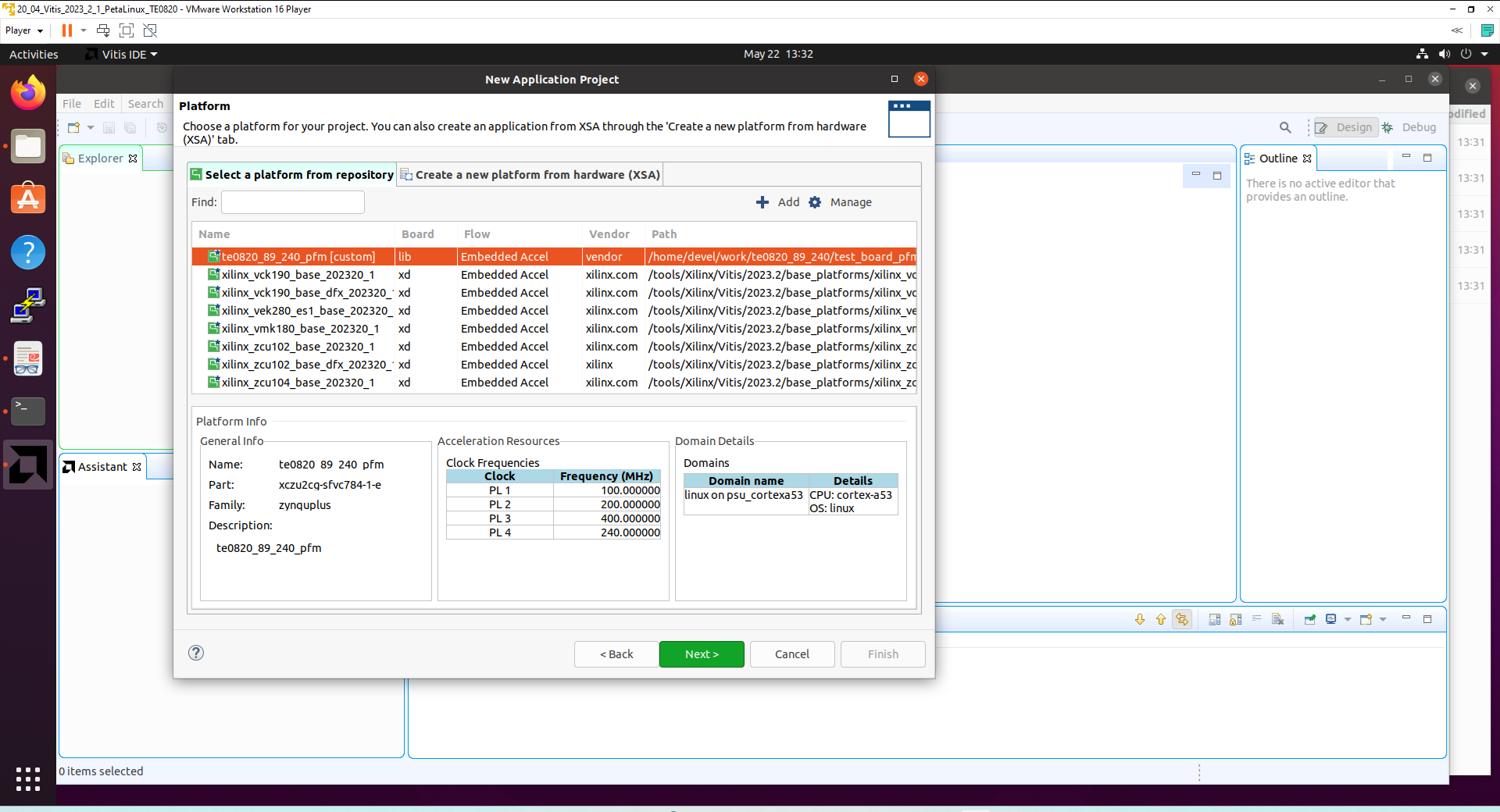
Click Next.
In Application Project Details window type into Application project name: dpu_trd
Click Next.
In Domain window type (or select by browse):
“Sysroot path”:
~/work/te0820_23_240/test_board_pfm/sysroots/cortexa72-cortexa53-xilinx-linux
“Root FS”:
~/work/te0820_23_240/test_board/os/petalinux/images/linux/rootfs.ext4
“Kernel Image”:
~/work/te0820_23_240/test_board/os/petalinux/images/linux/Image
Click Next.
In Templates window, if not done before, update Vitis IDE Examples and Vitis IDE Libraries
In “Find”, type: dpu to search for the DPU Kernel (RTL Kernel) example.
Select: DPU Kernel (RTL Kernel)
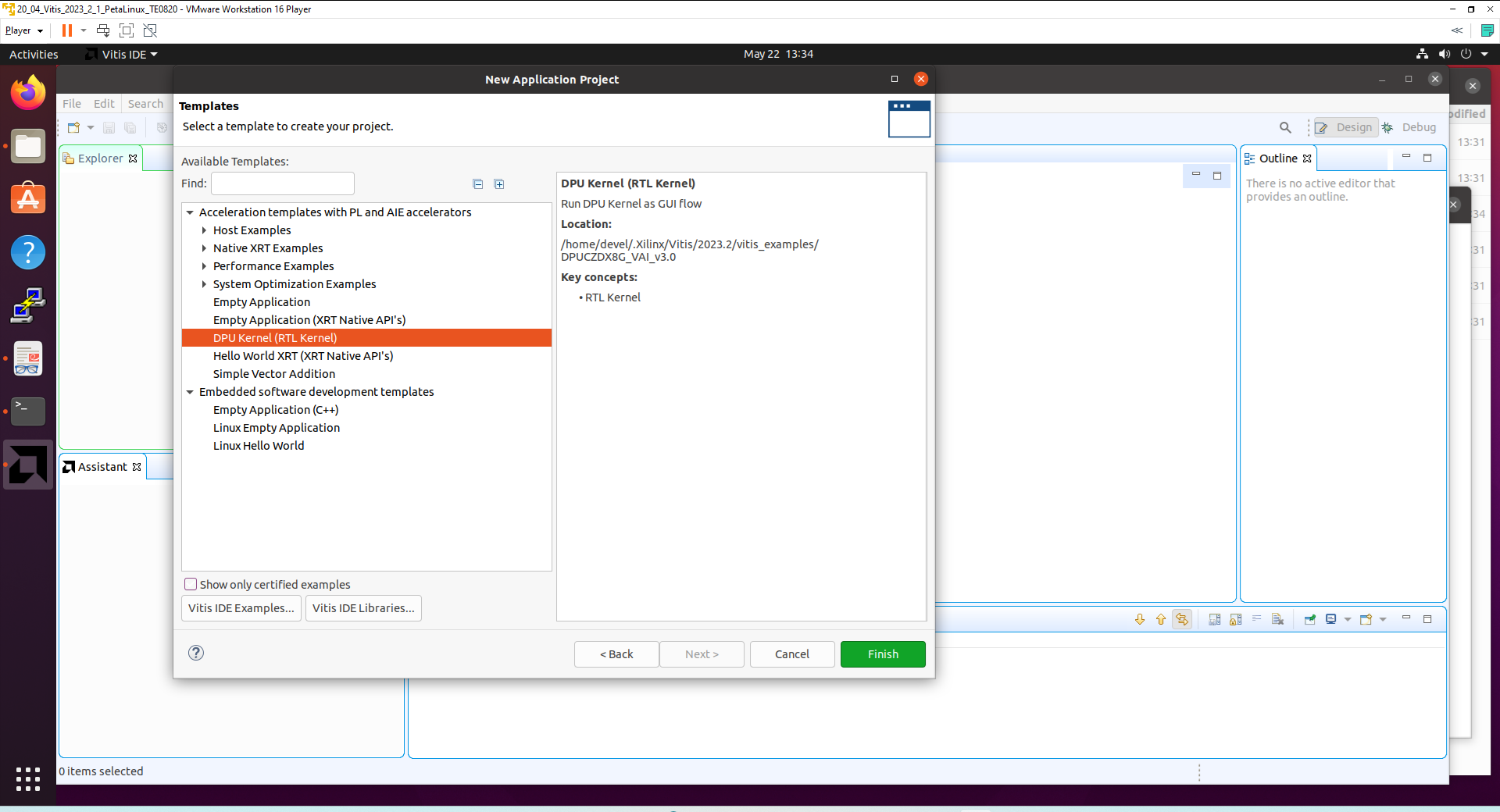
Click Finish
New project template is created.
In dpu_trd window menu Active build configuration switch from SW Emulation to Hardware
File dpu_conf.vh located at dpu_trd_kernels/src/prj/Vitis directory contains DPU configuration.
In case of module with ID=23: TE0820-03-04EV-1EA, device xczu2cg-sfvc784-1-e keep in file dpu_conf.vh DPU size B4096 .
To fit the AMD DPUCZDX8G in configuration B4096, the use of URAM blocks must be enabled. URAM blocks are present only in the xczu04 devices. Modify:
`define URAM_DISABLE
to
`define URAM_ENABLE
Go to dpu_trd_system_hw_link and double click on dpu_trd_system_hw_link.prj
Remove sfm_xrt_top kernel from binary container by right clicking on it and choosing remove.
Reduce number of DPU kernels to one.
Configure Connection of DPU kernel
On the same tab right click on dpu and choose Edit V++ Options
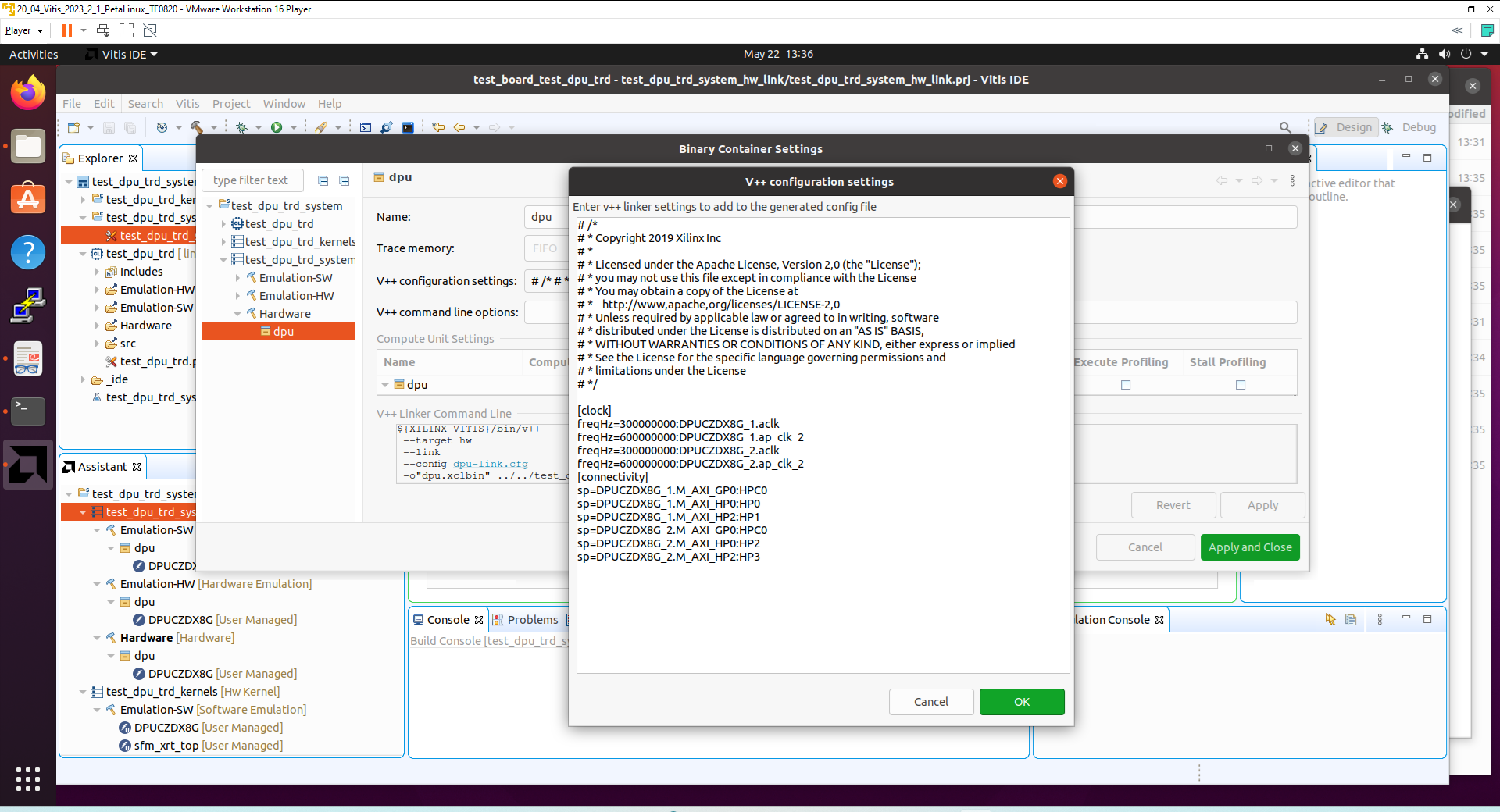
Click "..." button on the line of V++ Configuration Settings and modify configuration as follows:
[clock]
freqHz=200000000:DPUCZDX8G_1.aclk
freqHz=400000000:DPUCZDX8G_1.ap_clk_2

[connectivity]
sp=DPUCZDX8G_1.M_AXI_GP0:HPC0
sp=DPUCZDX8G_1.M_AXI_HP0:HP0
sp=DPUCZDX8G_1.M_AXI_HP2:HP1
To accelerate compilation, you can add to V++ command line options these commands for Vitis:
--hls.jobs 12 --vivado.synth.jobs 12 --vivado.impl.jobs 12
This sets the maximal number of threads for HLS, Vivado Synthesis, and Vivado Implementation to 12 (if you have 12 cores reserved for Ubuntu in ypur virtual machine).
Build the test_dpu_trd Project
In “Explorer” section of Vitis IDE, click on:
dpu_trd_system[te0820_23_240_pfm]
to select it.
Right Click on:
dpu_trd_system[te0820_23_240_pfm]
and select in the opened sub-menu: Build project
Compilation takes some time (approximately 30 minutes).
Created extended HW with integrated DPU with configuration B4096 can be open and analysed in Vivado 2023.2
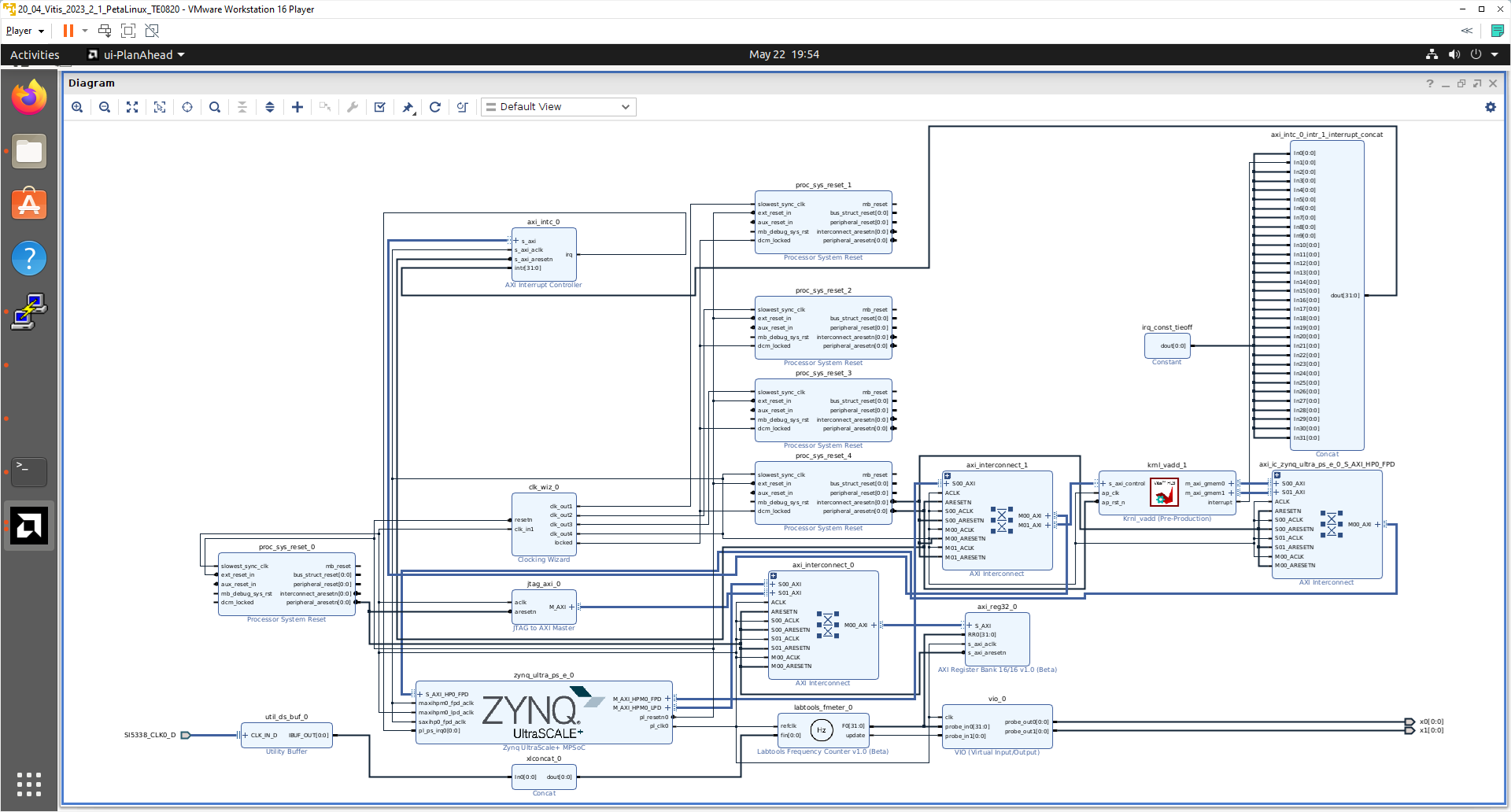
Prepare SD card with test_dpu_trd DPU
Write sd_card.img to SD card using SD card reader.
The sd_card.img file is output of the compilation and packing by Vitis. It is located in directory:
~/work/te0820_23_240/test_board_dpu_trd/dpu_trd_system/Hardware/package
In Windows 10 (or Windows 11) PC, inst all program Win32DiskImager for this task. Win32 Disk Imager can write raw disk image to removable devices.
https://win32diskimager.org/
Boot the board and open terminal on the board either by connecting serial console connection, or by opening ethernet connection to ssh server on the board, or by opening terminal directly using window manager on board. Continue using the embedded board terminal.
Detailed guide how to run embedded board and connect to it can be found in Run Compiled Example Application for Vector Addition.
Resize EXT4 Partition
Check ext4 partition size by:
root@Trenz:~# cd /
root@Trenz:~# df .
Filesystem           1K-blocks      Used Available Use% Mounted on
/dev/root               564048    398340    122364  77% /
Resize partition
root@Trenz:~# resize-part /dev/mmcblk1p2
Check ext4 partition size again, you should see:
root@Trenz:~# df . –h
Filesystem                Size      Used Available Use% Mounted on
/dev/root                 6.1G    390.8M      5.4G   7% /
The available size would be different according to your SD card size.
Set path to Xilinx Firmware:
root@petalinux:~# export DISPLAY=:0.0
Set path to Xilinx Firmware:
sh-5.1# root@petalinux:~# export XLNX_VART_FIRMWARE=/run/media/mmcblk1p1/dpu.xclbin
Test the Integrated DPUCZDX8G
For both tested modules, the integrated DPU can be tested by command:
root@Trenz:~# xdputil query
Command and reply in case of module with ID=23 (DPU configuration B4096):
root@Trenz:~# xdputil query
{
    "DPU IP Spec":{
        "DPU Core Count":1,
        "IP version":"v4.1.0",
        "generation timestamp":"2023-02-21 21-30-00",
        "git commit id":"7d32c41",
        "git commit time":2023022121,
        "regmap":"1to1 version"
    },
    "VAI Version":{
        "libvart-runner.so":"Xilinx vart-runner Version: 3.5.0-b7953a2a9f60e23efdfced5c186328dd1449665c  2024-04-18-10:03:55 ",
        "libvitis_ai_library-dpu_task.so":"Advanced Micro Devices vitis_ai_library dpu_task Version: 3.5.0-b7953a2a9f60e23efdfced5c186328dd1449665c  2023-06-29 03:20:28 [UTC] ",
        "libxir.so":"Xilinx xir Version: xir-b7953a2a9f60e23efdfced5c186328dd1449665c 2024-04-18-09:27:26",
        "target_factory":"target-factory.3.5.0 b7953a2a9f60e23efdfced5c186328dd1449665c"
    },
    "kernels":[
        {
           "AIE Frequency (Hz)":0,
            "DPU Arch":"DPUCZDX8G_ISA1_B4096",
            "DPU Frequency (MHz)":300,
            "IP Type":"DPU",
            "Load Parallel":2,
            "Load augmentation":"enable",
            "Load minus mean":"disable",
            "Save Parallel":2,
            "XRT Frequency (MHz)":300,
            "cu_addr":"0xa0010000",
            "cu_handle":"0xaaab129ceb30",
            "cu_idx":0,
            "cu_mask":1,
            "cu_name":"DPUCZDX8G:DPUCZDX8G_1",
            "device_id":0,
            "fingerprint":"0x101000056010407",
            "name":"DPU Core 0"
        }
    ]
}
}
root@Trenz:~#
Test resnet50_pt model
The AMD DPUCZDX8G in configuration B4096 can be tested with AI 3.0 resnet50_pt model precompiled for the B4096 configuration.
Copy precompiled AI 3.0 resnet50_pt model from the archive internal directory:
archive
resnet50_pt-zcu102_zcu104_kv260-r3.0.0.tar.gz
	md5sum.txt
	meta.json
	resnet50_pt.prototxt
	resnet50_pt.xmodel
to the directory on the evaluation board:
~/app/model/
Download Link to this archive is defined in file:
/home/devel/work/Vitis-AI-3.0/model_zoo/model-list/pt_resnet50_imagenet_224_224_8.2G_3.0/model.yaml
on line 112:
- name: resnet50_pt
type: xmodel
board: zcu102 & zcu104 & kv260
Download link: resnet50_pt-zcu102_zcu104_kv260-r3.0.0.tar.gz
checksum: 910bf07c4a6ad5eed9448fa0c42096eb
Other DPU configurations will require re-compilation of the archive with AI 3.0 model in the Vitis-AI3.0 framework. This is described in separate Tutorial:
Compilation of AI 3.0 models for Vitis 2023.2, AI 3.5 SW, AI 3.0 DPUCZDX8G
Change directory to ~/app/model/
cd ~/app/model/
Test resnet50_pt model by command
sh-5.1# xdputil benchmark resnet50_pt.xmodel 1
Result of test
root@Trenz:~/app/model# xdputil benchmark resnet50_pt.xmodel 1
WARNING: Logging before InitGoogleLogging() is written to STDERR
I20241205 09:51:12.122829  1198 test_dpu_runner_mt.cpp:477] shuffle results for batch...
I20241205 09:51:12.124051  1198 performance_test.hpp:73] 0% ...
I20241205 09:51:18.124511  1198 performance_test.hpp:76] 10% ...
I20241205 09:51:24.124938  1198 performance_test.hpp:76] 20% ...
I20241205 09:51:30.125094  1198 performance_test.hpp:76] 30% ...
I20241205 09:51:36.125262  1198 performance_test.hpp:76] 40% ...
I20241205 09:51:42.125427  1198 performance_test.hpp:76] 50% ...
I20241205 09:51:48.125581  1198 performance_test.hpp:76] 60% ...
I20241205 09:51:54.126062  1198 performance_test.hpp:76] 70% ...
I20241205 09:52:00.126227  1198 performance_test.hpp:76] 80% ...
I20241205 09:52:06.126374  1198 performance_test.hpp:76] 90% ...
I20241205 09:52:12.126545  1198 performance_test.hpp:76] 100% ...
I20241205 09:52:12.126606  1198 performance_test.hpp:79] stop and waiting for all threads terminated....
I20241205 09:52:12.138233  1198 performance_test.hpp:85] thread-0 processes 3554 frames
I20241205 09:52:12.138262  1198 performance_test.hpp:93] it takes 11226 us for shutdown
I20241205 09:52:12.138506  1198 performance_test.hpp:94] FPS= 59.2193 number_of_frames= 3554 time= 60.0142 seconds.
I20241205 09:52:12.138561  1198 performance_test.hpp:96] BYEBYE
Test PASS.
root@Trenz:~/app/model#
Benchmark indicates 59.2193 FPS for inference of resnet50_pt model.
Power consumption of the system during benchmark is increased from 8.7 W to 14.7 W.
Compilation of AI 3.0 models for the AMD DPUCZDX8G is described in separate Tutorial:
Remote Monitoring and Configuration Support
The configured OS includes work in progress version of a remote monitoring and configuration support server. It can be used for remote reading of content of the SD card partition mmcblk0p1.
Button Reboot device can be used for system reboot. Ethernet connection is lost, but remote PC www browser remains open and waits for possible reconnection.
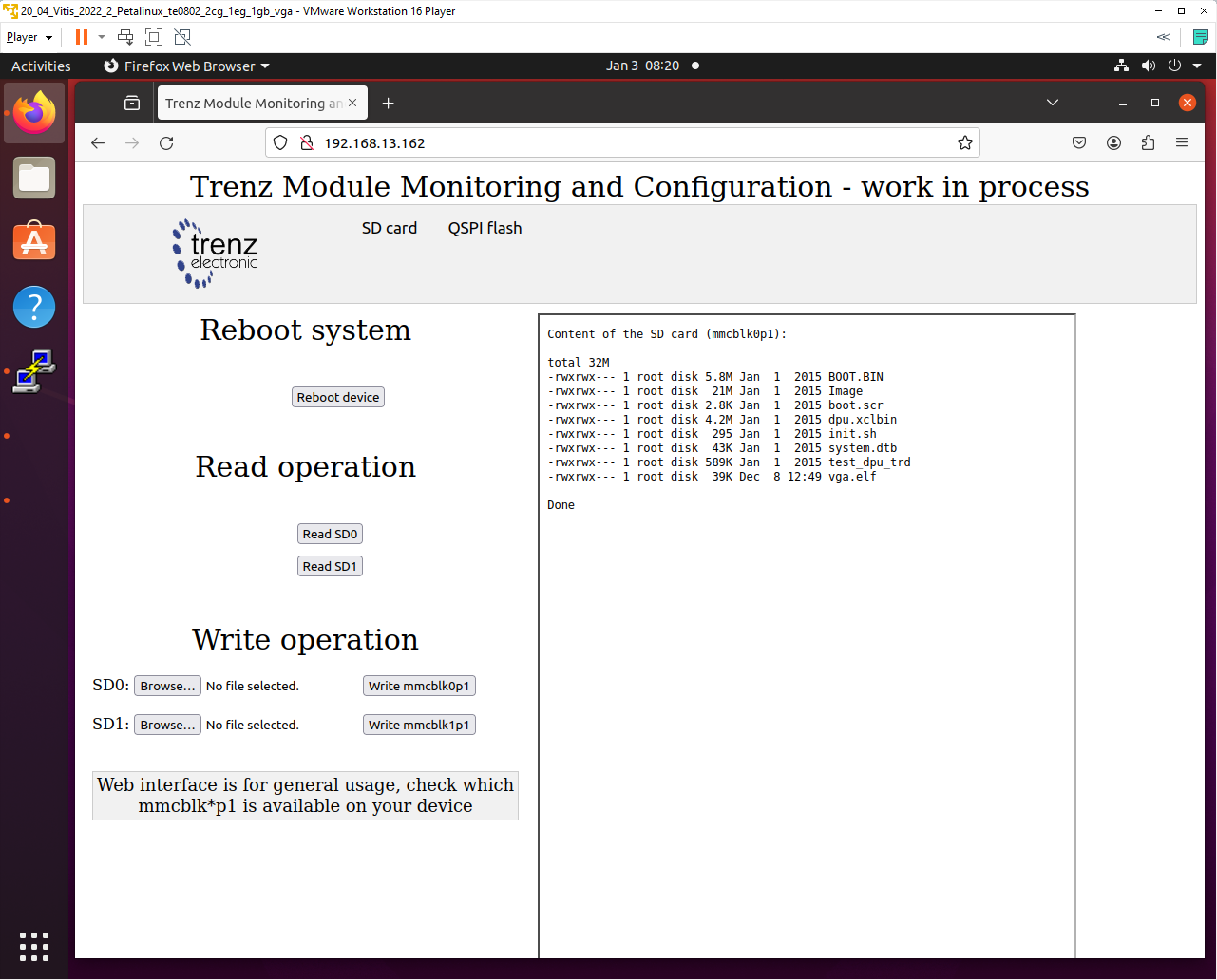
After reboot of the evaluation board, the network DHCP server assigns Ethernet address to the evaluation board.
If the network DHCP address assignment algorithm assigns the identical Ethernet address, the page can be refreshed and the connection is re-established again.
If the network DHCP address assignment algorithm assigns different Ethernet address, the connection has to be established on the new Ethernet address.
Remote Control from Ubuntu X11 Desktop.
The configured OS also supports X11 desktop on remote PC via Ethernet.
In remote PC in Ubuntu OS, in PuTTY terminal utility with ssh Ethernet connection to the board with enabled X11 forwarding.
Openning.
Log in to the evaluation board as user root with pswd root
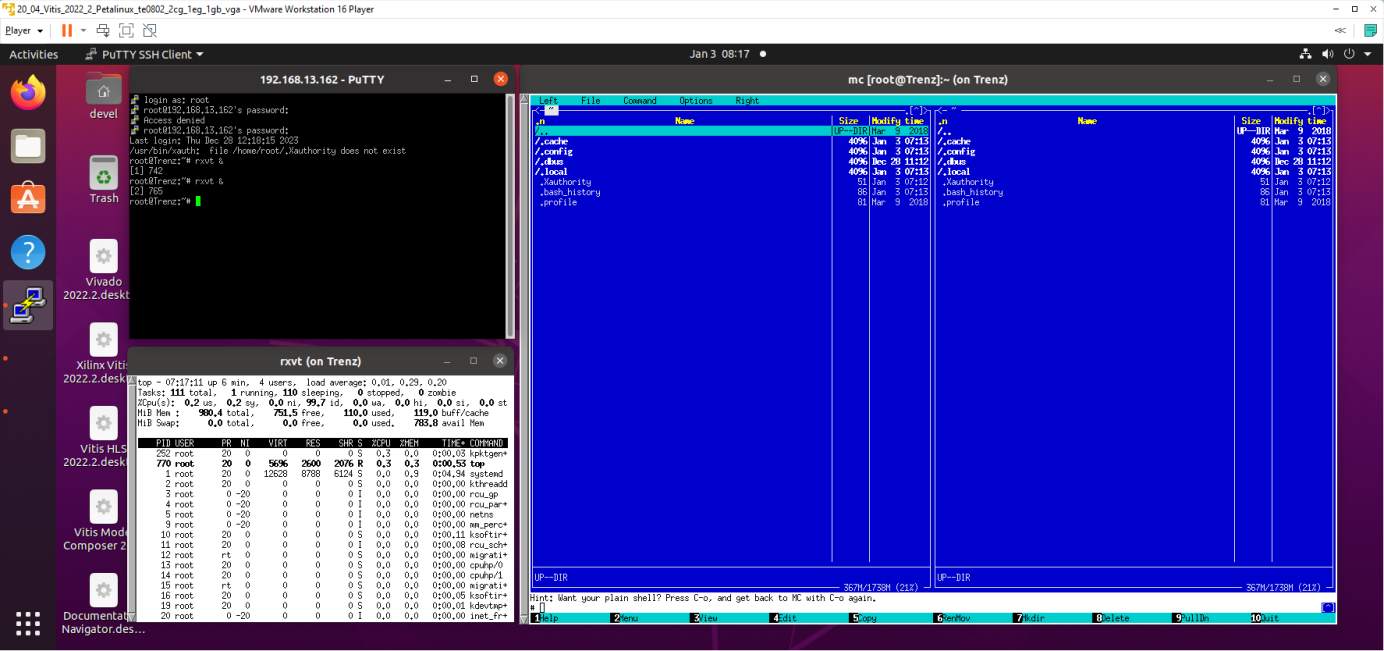
Start two rxvt terminal emulators by typing in PuTTY terminal:
root@Trenz:~# rxvt &
root@Trenz:~# rxvt &
In first rxvt terminal emulator window start utility
root@Trenz:~# top
In second rxvt terminal emulator start
root@Trenz:~# mc
You can see two applications running on the evaluation board with output on the remote desktop. Remote PC kbd and mouse are used for control of these applications.
Closing.
On remote PC, close top utility by Ctrl-C. Stop mc utility by F10.
Close open terminal emulators by typing exit or by mouse click on x icon in the right top corner of terminal emulator window. Close PuTTY connection by typing exit or by mouse click on x icon in the right top corner of PuTTY window.
Remote Control in x-session-manager on Ubuntu X11 Desktop.
The configured OS also supports x-session-manager on X11 desktop on remote PC connected via Ethernet to the evaluation board.
Opening.
In remote PC in Ubuntu OS, start PuTTY terminal utility with ssh Ethernet connection to the board with enabled X11 forwarding.
Log in to the evaluation board as user root with pswd root
In PuTTY terminal, start x-session-manager by typing:
root@Trenz:~# x-session-manager &
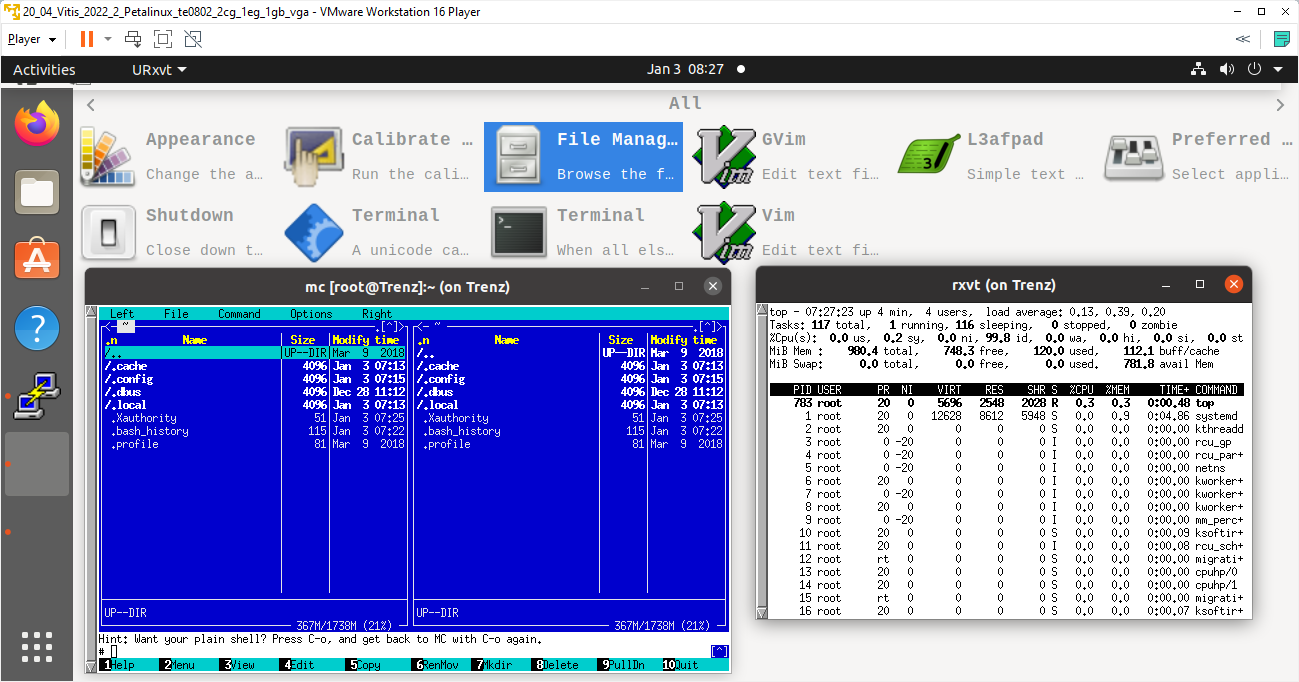
The desktop (displayed on the VGA display of the evaluation board) is also displayed in the remote PC X11 desktop. Start two rxvt terminal emulators by typing in PuTTY terminal:
sh-5.1# rxvt &
sh-5.1# rxvt &
In first rxvt terminal emulator window start utility top
In second rxvt terminal emulator start mc
You can see two applications running on the evaluation board with output on the remote desktop. Remote PC kbd and mouse are used for control of these applications.
Closing.
On remote PC, close top utility by Ctrl-C. Stop mc utility by key F10.
Close open terminal emulators by typing exit or by mouse click on x icon in the right top corner of terminal emulator window. Close PuTTY connection by typing exit or by mouse click on x icon in the right top corner of PuTTY window.
Display Test Pattern and Test USB Camera
Complete video chain can be tested with output to the X11 desktop.
To display the test pattern, use this gstreamer command:
sh-5.1# gst-launch-1.0 videotestsrc ! ximagesink
Video output is directed to the remote X11desktop.
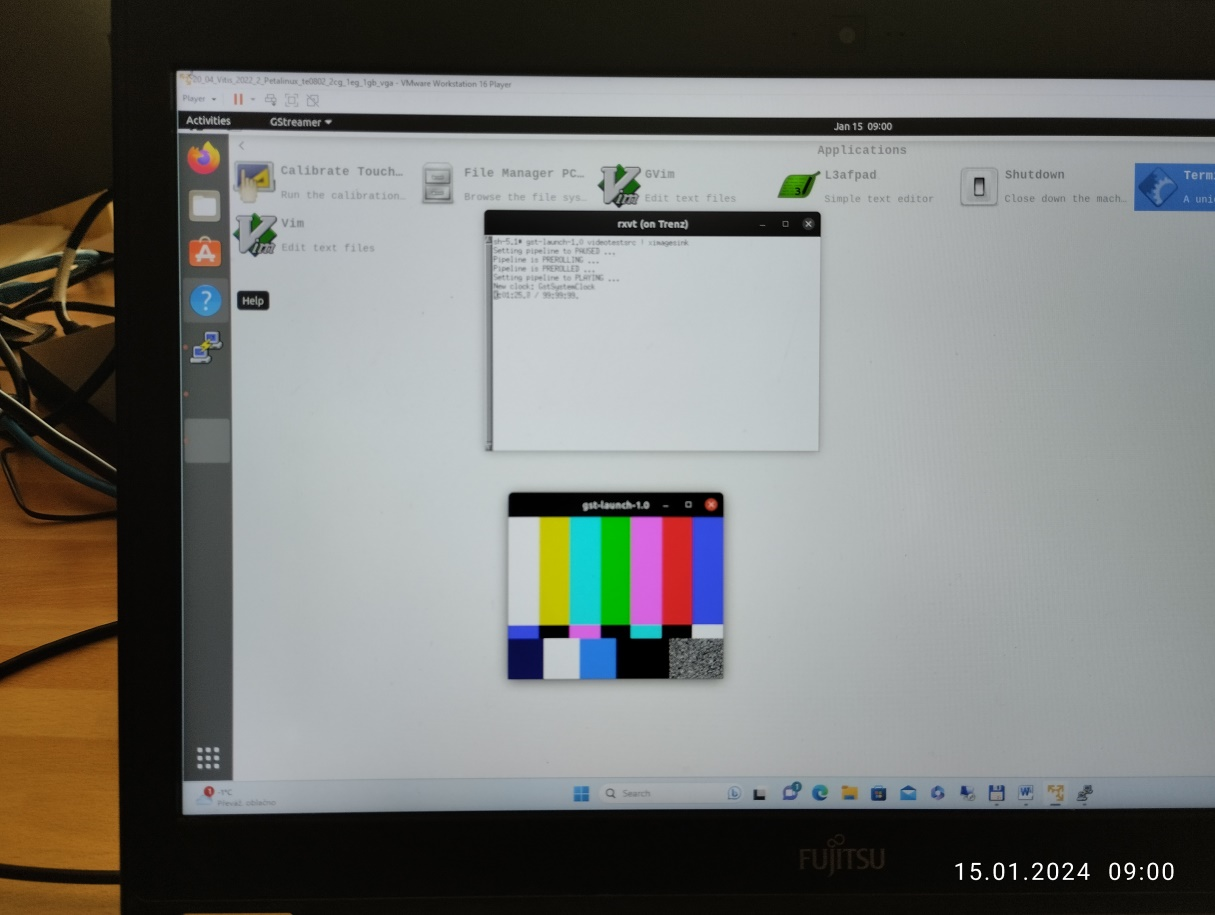
Test pattern is displayed on remote PC X11 desktop
Measured Vitis AI 3.0 Performance on Systems
- Performance in frames per second [FPS],
- Power consumption in [W],
- End to end performance in (int8) Giga operations per second [GOPs].
TE0820-03-04EV-1EA Module ID=23, TE0701-06, DPU (B4096)
Vitis AI 3.0 examples | Performance input from camera e2e (-t 1) [FPS] | Power w input from camera (-t 1) [W] | Performance input from file e2e (-t 3) [FPS] | Power with input from file e2e (-t 3) [W] | GigaOps input from file e2e (-t 3) [Gops] |
Face detection Model: pt_face-mask-detection_512_512_0.67G_3.0 | 30.0 | 10.0 | 113 | 9.8 | 75.7 |
Vehicle make Model: pt_vehicle-make-classification_VMMR_224_224_3.64G_3.0 | 30.0 | 10.5 | 167 | 13.6 | 607.9 |
Vehicle type Model: pt_vehicle-type-classification_CarBodyStyle_224_224_3.64G_3.0 | 30.0 | 10.5 | 167 | 13.6 | 607.9 |
Vehicle color Model: pt_vehicle-color-classification_VCoR_224_224_3.64G_3.0 | 30.0 | 10.5 | 167 | 13.6 | 607.9 |
General classification Model: pt_resnet50_imagenet_224_224_8.2G_3.0 | 30.0 | 11.9 | 59.6 | 13.0 | 488.7 |
General classification Model: pt_resnet50_imagenet_224_224_0.3_5.8G_3.0 | 30.0 | 11.5 | 69.2 | 12.7 | 401.3 |
General classification Model: pt_resnet50_imagenet_224_224_0.4_4.9G_3.0 | 30.0 | 11.2 | 73.8 | 12.4 | 361.6 |
General classification Model: pt_resnet50_imagenet_224_224_0.5_4.1G_3.0 | 30.0 | 11.0 | 81.1 | 12.2 | 332.5 |
General classification Model: pt_resnet50_imagenet_224_224_0.6_3.3G_3.0 | 30.0 | 10.7 | 91.1 | 11.9 | 300.6 |
General classification Model: pt_resnet50_imagenet_224_224_0.7_2.5G_3.0 | 30.0 | 10.6 | 99.6 | 11.5 | 249.0 |
Measurement conditions:
- TE0820-03-04EV-1EA module (4EV-1E device, 2GB DDR4), with 12V FAN on TE0701-06 carrier board
- DPU in B4096 configuration
- USB WWW colour camera logi 720p, Logitech, 1280x720p30, 30 FPS
- Remote X11 desktop
- Power supply 12V/5A
- Power measured at the 230V power plug
Older Vitis AI Versions
Not available
Overview
Content Tools