This tutorial [2] describes configuration and compilation for TE0950 board with AMD DPUCZDX8G in configuration B2304 implemented on PL part of the Versal device in Vitis 2023.2.1 toolchain.
This tutorial [2] requires creation of extensible platform setup as described in tutorial TE0950, Vitis 2023.2.1, Extensible Platform [1].
The target system is TE0950-02 (with Versal xcve2302 ES1 device) or TE0950-03 (with Versal xcve2302 device).
The TE0950 extensible bring up script are using Linux make utility.
The board configuration files are identical with [6], [7] for the Versal device.
The Artix device is using the bring up scripts and board configuration files [6], [8].
Description of the AMD DPUCZDX8G can be find in AMD product guide PG338 [9].
Requirements
Download package TE0950_2023_2_1_dpuczdx8g.zip accompanying this tutorial from:
The archive TE0950_2023_2_1_dpuczdx8g.zip contains package necessary for integration and test of the AMD DPUCZDX8G on TE0950 extensible platform [1].
The package for the DPUCZDX8G can be also downloaded from:
https://github.com/Xilinx/Vitis-AI/tree/3.0/dpu
The description of this github page contains table with list of supported targets. Use the line dedicated to the DPUCZDX8G for MPSoC and Kria K26 devices. It contains link for download of the programmable logic based DPU, targeting general purpose CNN inference with full support for the Vitis AI ModelZoo. It supports either the Vitis or Vivado flows for 16nm Zynq® UltraScale+™ platforms. Click on the Download link in the column: Reference Design
This will result in download of file:
~/Downloads/DPUCZDX8G_VAI_v3.0.tar.gz
It contains directory
~/Downloads/DPUCZDX8G_VAI_v3.0
Copy this directory to the directory:
~/work/DPUCZDX8G_VAI_v3.0
It contains HDL code for the DPUCZDX8G and also source files and project files to test the DPUCZDX8G.
Installation of Vitis AI 3.0 DPUCZDX8G template for Vitis
We have to make these template project files visible for the vitis -classic tool. Copy the directory
~/work/DPUCZDX8G_VAI_v3.0
to the directory
/home/<user>/.Xilinx/Vitis/2023.2/vitis_examples/DPUCZDX8G_VAI_v3.0
In case of <user>=devel
/home/devel/.Xilinx/Vitis/2023.2/vitis_examples/DPUCZDX8G_VAI_v3.0
The vitis -classic tool will see this platform template, now.
Create and Build Vitis Design
Create new directory te0950_test_dpu_trd to test Vitis extendable flow example test_dpu trd
~/work/dpucv2dx8g-trd-2023.2/te0950_test_dpu_trd
Current directory structure:
~/work/dpucv2dx8g-trd-2023.2/te0950_platform
~/work/dpucv2dx8g-trd-2023.2/te0950_pfm
~/work/dpucv2dx8g-trd-2023.2/te0950_test_vadd
~/work/dpucv2dx8g-trd-2023.2/te0950_test_dpu_trd
Change working directory:
$cd ~/work/dpucv2dx8g-trd-2023.2/te0950_test_dpu_trd |
|---|
In Ubuntu terminal, start vitis –classic version of Vitis tool by:
$ vitis -classic -workspace . & |
|---|
Configure Project for the Vitis Extensible Flow with DPU
Select File -> New -> Application project. Click Next.
Skip welcome page, if it is shown.
Click on [+ Add] icon and select the custom extensible platform te0950_300_pfm[custom] in the directory:
~/work/dpucv2dx8g-trd-2023.2/te0950_pfm/te0950_pfm/export/te0950_300_pfm
We can see available PL clocks and frequencies. 300 MHz clock was set as the default in the platform creation process.
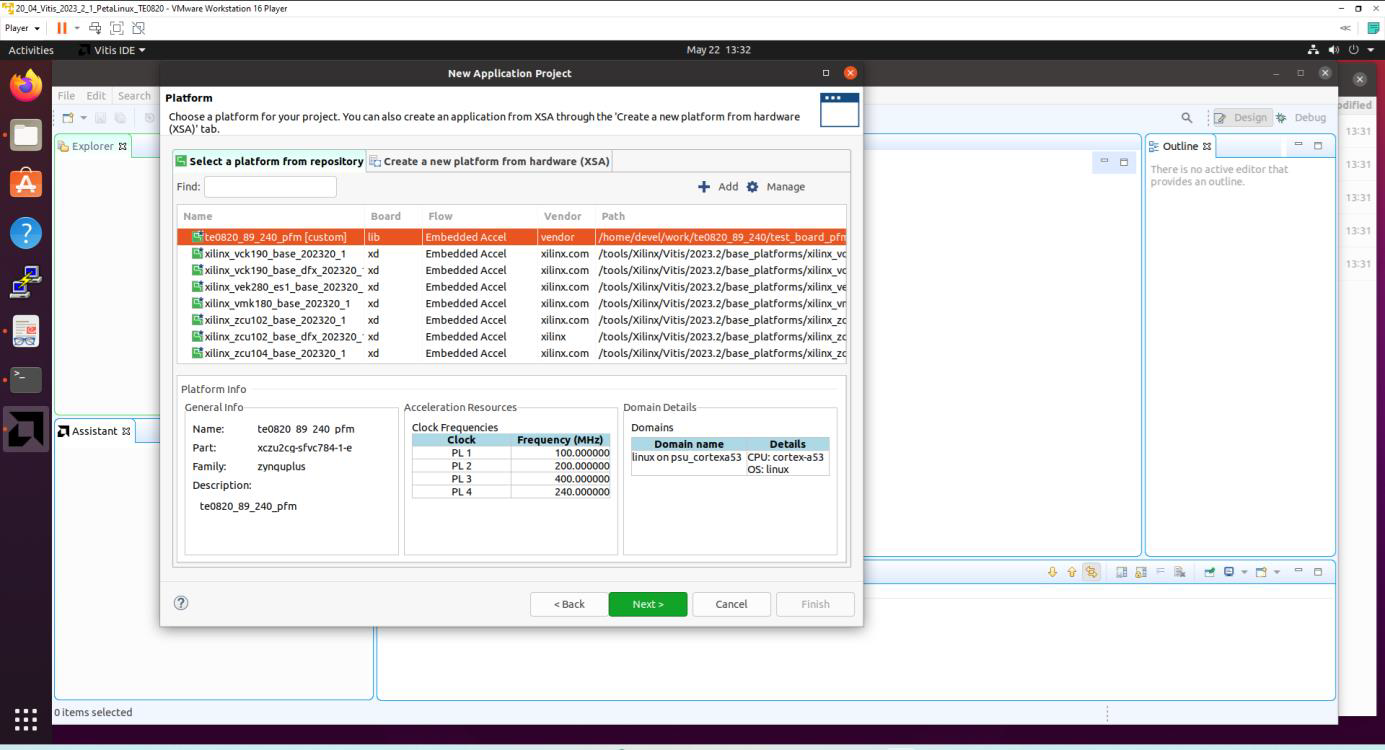
Click Next.
In Application Project Details window type into Application project name:
test_dpu_trd
Click Next.
In Domain window type (or select by browse):
“Sysroot path”:
~/work/dpucv2dx8g-trd-2023.2/te0950_pfm/sysroots/cortexa72-cortexa53-xilinx-linux
“Root FS”:
~/work/dpucv2dx8g-trd-2023.2/te0950_platform/sw/te0950/images/linux/rootfs.ext4
“Kernel Image”:
~/work/dpucv2dx8g-trd-2023.2/te0950_platform/sw/te0950/images/linux/Image
Click Next.
In Templates window, if not done before, update Vitis IDE Examples and Vitis IDE Libraries
In “Find”, type: dpu to search for the DPU Kernel (RTL Kernel) example.
Select: DPU Kernel (RTL Kernel)
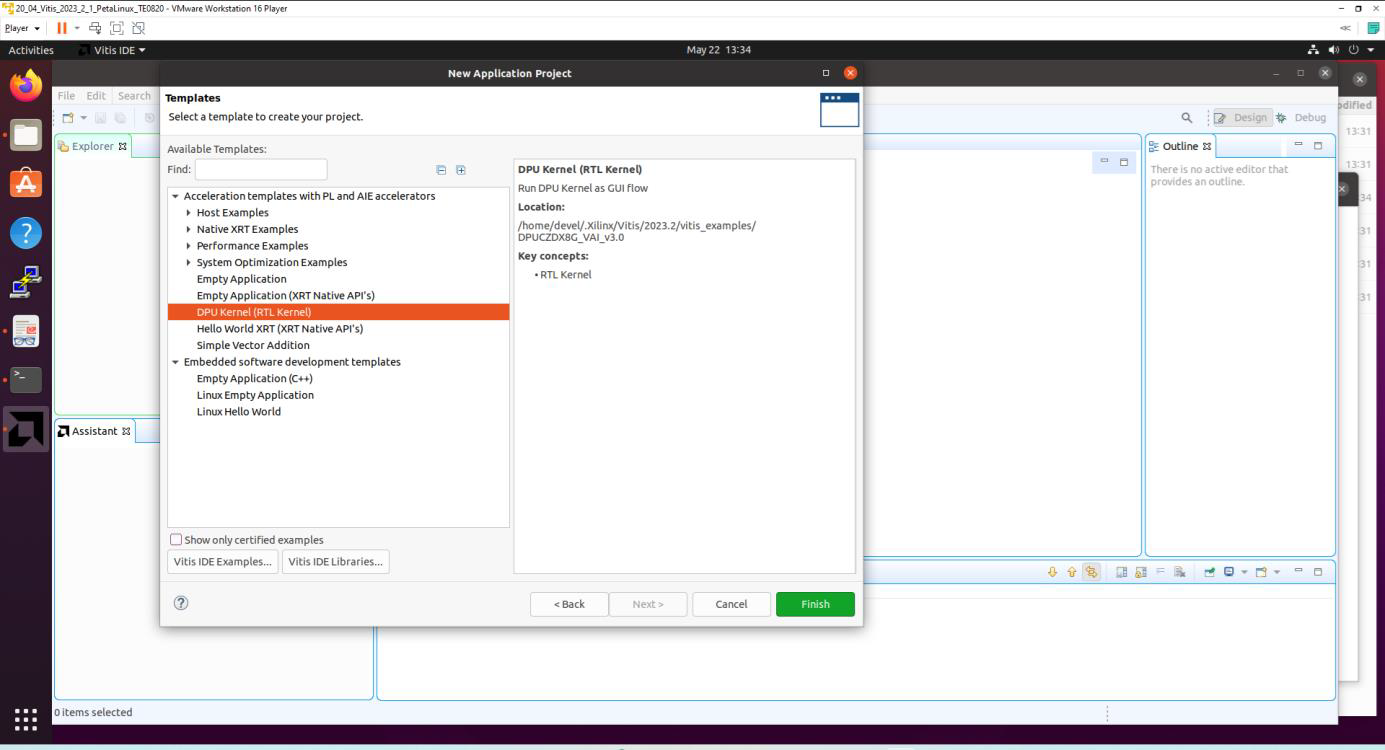
Click Finish
New project template is created.
In dpu_trd window menu Active build configuration switch from SW Emulation to Hardware
File dpu_conf.vh located at dpu_trd_kernels/src/prj/Vitis directory contains DPU configuration.
Modify in file dpu_conf.vh DPU size by replacement of
`define B4096
to
`define B2304
Modify in file dpu_conf.vh use of URAM by replacement of
`define URAM_DISABLE
to
`define URAM_ENABLE
Go to dpu_trd_system_hw_link and double click on dpu_trd_system_hw_link.prj
Remove sfm_xrt_top kernel from binary container by right clicking on it and choosing remove.
Reduce number of DPU kernels to one.
Configure Connection of DPU kernel
On the same tab right click on dpu and choose Edit V++ Options
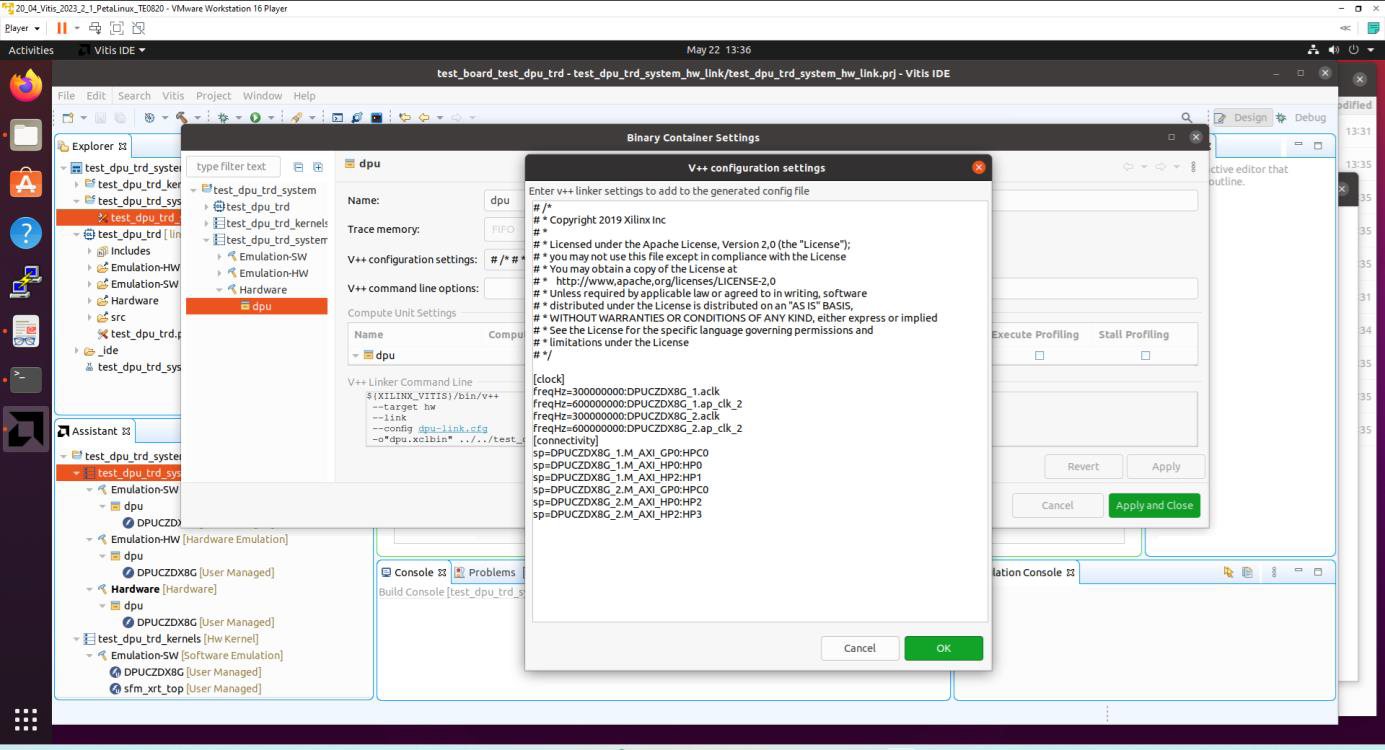
Click "..." button on the line of V++ Configuration Settings and modify configuration.
Source for the secondary clock ap_clk_2 needed for the AMD DPUCZDX8G with frequency 400 MHz does not exist in the platform.
It will be automatically created by the Vitis extensible flow.
[clock] freqHz=200000000:DPUCZDX8G_1.aclk freqHz=400000000:DPUCZDX8G_1.ap_clk_2 [connectivity] sp=DPUCZDX8G_1.M_AXI_GP0:DDR sp=DPUCZDX8G_1.M_AXI_HP0:DDR sp=DPUCZDX8G_1.M_AXI_HP2:DDR |
|---|
Build the test_dpu_trd project.
Right Click on:
dpu_trd_system
and select in the opened sub-menu: Build project
Compilation takes some time.
Created extended HW with integrated DPU with configuration B2304 can be open and analysed in Vivado 2023.2.1
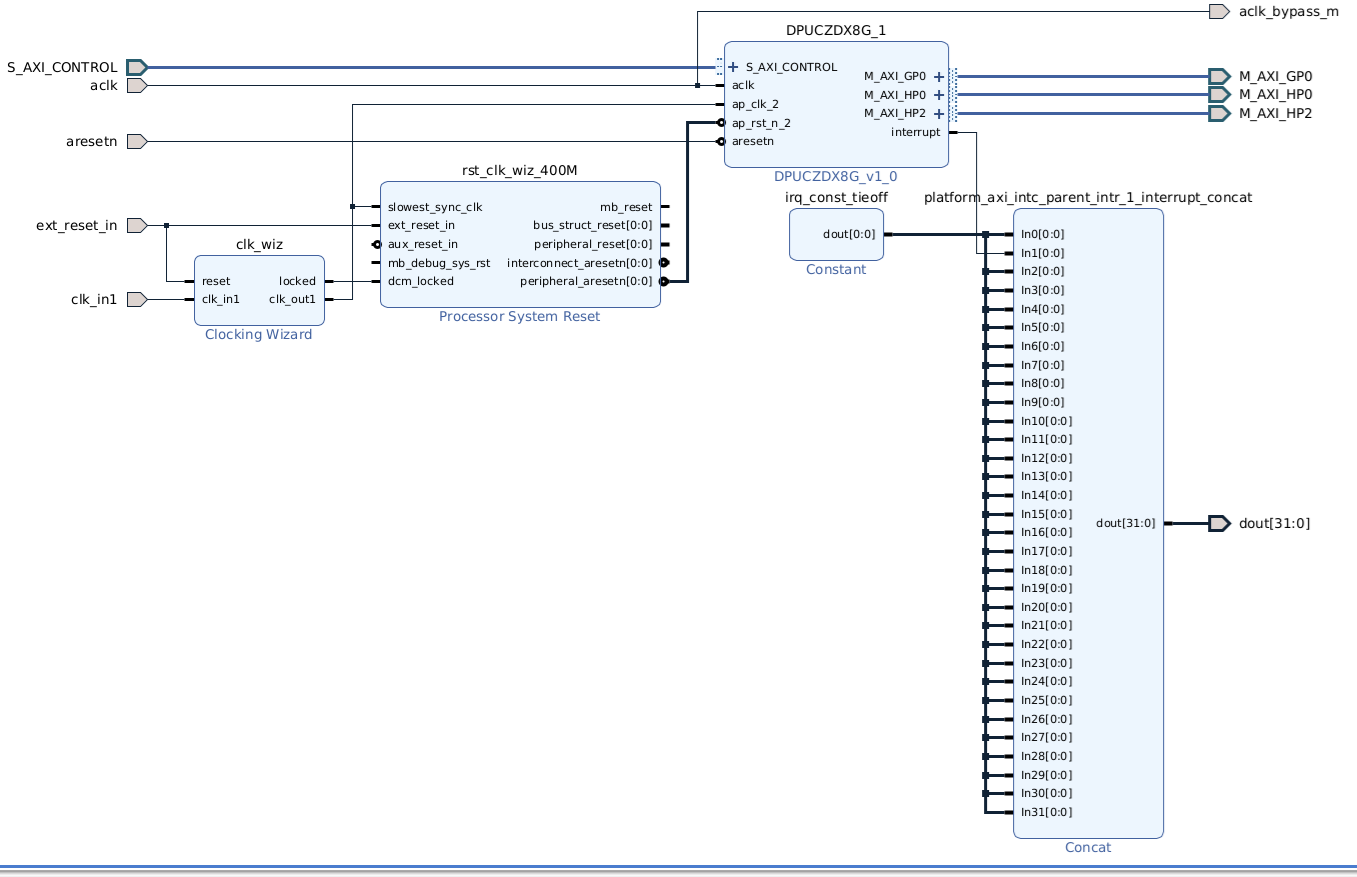
test_dpu_trd vitis region. Primary clock 200 MHz and created secondary clock 400 MHz.
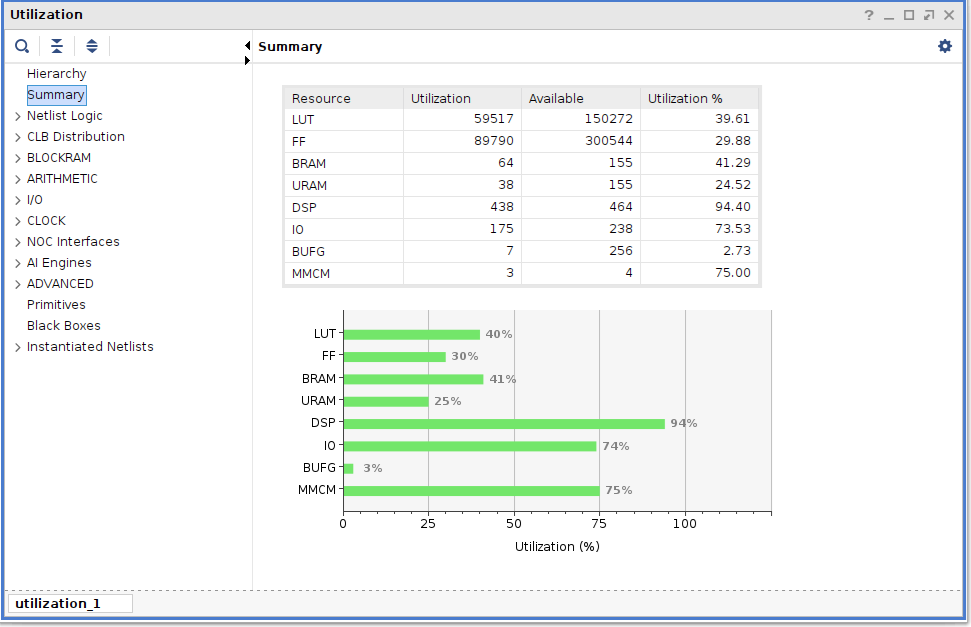
Utilisation of design with AMD DPUCZDX8G in B2304 configuration and 200 MHz/400 MHz clocks.
Prepare SD card with test_dpu_trd
Write sd_card.img to SD card using SD card reader.
The sd_card.img file is output of the compilation and packing by Vitis. It is located in directory:
~/work/dpucv2dx8g-trd-2023.2/te0950_test_dpu_trd/dpu_trd_system/Hardware/package
In Windows 10 (or Windows 11) PC, install program Win32DiskImager for this task. Win32 Disk Imager can write raw disk image to removable devices. https://win32diskimager.org/
Boot the board and open terminal on the board either by connecting serial console connection, or by opening ethernet connection to ssh server on the board, or by opening terminal directly using window manager on board. Continue using the embedded board terminal.
Detailed guide how to run embedded board and connect to it can be found in Run Compiled Example Application for Vector Addition.
Resize EXT4 Partition
Check ext4 partition size by:
sh-5.1# cd / sh-5.1# df . Filesystem 1K-blocks Used Available Use% Mounted on /dev/root 564048 398340 122364 77% / |
|---|
Resize partition
sh-5.1# resize-part /dev/mmcblk1p2 |
|---|
Check ext4 partition size again, you should see:
root@Trenz:~# df . -h Filesystem Size Used Available Use% Mounted on /dev/root 6.1G 390.8M 5.4G 7% / |
|---|
The available size would be different according to your SD card size.
Set path to Xilinx Firmware:
sh-5.1# export XLNX_VART_FIRMWARE=/run/media/mmcblk1p1/dpu.xclbin
Test the Integrated AMD DPUCZDX8G
The integrated DPU can be tested by command:
sh-5.1# xdputil query
Command and reply (DPU configuration B2304):
sh-5.1# xdputil query
{
   "DPU IP
       "DPU Core Count":
       "IP version":"
       "generation timestamp":"2023-02-21 21-30-00",
       "git commit id":"7d32c41",
       "git commit time":2023022121,
       "regmap":"1to1 version"
},
"VAI Version":{
    "libvart-runner.so":"Xilinx vart-runner Version: 3.5.0-b7953a2a9f60e23efdfced5c186328dd1449665c 2023-10-12-22:27:54 ",
     "libvitis_ai_library-dpu_task.so":"Advanced Micro Devices
vitis_ai_library dpu_task Version: 3.5.0-b7953a2a9f60e23efdfced5c186328dd1449665c 2023-06-29 03:20:28 [UTC] ",
     "libxir.so":"Xilinx xir Version: xir-b7953a2a9f60e23efdfced5c186328dd1449665c 2023-10-12-21:35:10",
     "target_factory":"target-factory.3.5.0 b7953a2a9f60e23efdfced5c186328dd1449665c"
},
"kernels":[
    {
        "AIE Frequency (Hz)":999999990,
        "DPU Arch":"DPUCZDX8G_ISA1_B2304
        "DPU Frequency (MHz)":300,
        "IP Type":"DPU",
        "Load Parallel":2,
        "Load augmentation":"enable",
        "Load minus mean":"disable",
        "Save Parallel":2,
        "XRT Frequency (MHz)":300,
        "cu_addr":"0xa4000000",
        "cu_handle":"0xaaaacce83410",
        "cu_idx":0,
        "cu_mask":1,
        "cu_name":"DPUCZDX8G:DPUCZDX8G_1",
		"device_id":0,
        "fingerprint":"0x101000056010405",
        "name":"DPU Core 0"
      }
   ]
}
sh-5.1#
Test resnet50_pt model
The DPUCZDX8G_ISA1_B2304 can be tested with AI 3.0 resnet50_pt model precompiled for the V2304 configuration.
Copy precompiled AI 3.0 resnet50_pt model files accompany ing this application note:
md5sum.txt
meta.json
resnet50_pt.prototxt
resnet50_pt.xmodel
to directory
~/app/model/
Test resnet50_pt model by command
sh-5.1# xdputil benchmark resnet50_pt.xmodel 1
Result of test
WARNING: Logging before InitGoogleLogging() is written to STDERR
I20241201 10:54:04.661651   732 test_dpu_runner_mt.cpp:477] shuffle results for batch...
I20241201 10:54:04.662307   732 performance_test.hpp:73] 0% ...
I20241201 10:54:10.662499   732 performance_test.hpp:76] 10% ...
I20241201 10:54:16.662724   732 performance_test.hpp:76] 20% ...
I20241201 10:54:22.662886   732 performance_test.hpp:76] 30% ...
I20241201 10:54:28.663053   732 performance_test.hpp:76] 40% ...
I20241201 10:54:34.663265   732 performance_test.hpp:76] 50% ...
I20241201 10:54:40.663456   732 performance_test.hpp:76] 60% ...
I20241201 10:54:46.663619   732 performance_test.hpp:76] 70% ...
I20241201 10:54:52.663787   732 performance_test.hpp:76] 80% ...
I20241201 10:54:58.663937   732 performance_test.hpp:76] 90% ...
I20241201 10:55:04.664126   732 performance_test.hpp:76] 100% ...
I20241201 10:55:04.664187   732 performance_test.hpp:79] stop and waiting for all threads terminated....
I20241201 10:55:04.684818   732 performance_test.hpp:85] thread-0 processes 2233 frames
I20241201 10:55:04.684854   732 performance_test.hpp:93] it takes 20649 us for shutdown
I20241201 10:55:04.684870   732 performance_test.hpp:94] FPS= 37.2027 number_of_frames= 2233 time= 60.0226 seconds.
I20241201 10:55:04.684912   732 performance_test.hpp:96] BYEBYE
Test PASS.
sh-5.1#
Compilation of AI 3.0 models for the DPUCZDX8G_ISA1_B2304 is described in [4].
References
- TE0950, Vitis 2023.2.1, Extensible Platform
- TE0950, Vitis 2023.2.1, Integration of DPUCZDX8G
- TE0950, Vitis 2023.2.1, Integration of DPUCV2DX8G
- TE0950, Vitis 2023.2.1, AI 3.0 Models for DPUCZDX8G
- TE0950, Vitis 2023.2.1, AI 3.5 Models for DPUCV2DX8G
- AMD Versal™ AI Edge Evalboard with VE2302 device, 8 GB DDR4 SDRAM, 15 x12 cm
https://shop.trenz-electronic.de/en/TE0950-03-EGBE21C-AMD-Versal-AI-Edge-Evalboard-with-VE2302-device-8-GB-DDR4-SDRAM-15-x12-cm?path=Trenz_Electronic/Development_Boards/TE0950/Reference_Design/2023.2/test_board - TE0950 Basic Linux Example archive for Vivado 2023.2.1, build 4, from 31.05.2024 - Versal device
https://shop.trenz-electronic.de/trenzdownloads/Trenz_Electronic/Development_Boards/TE0950/Reference_Design/2023.2/test_board/
TE0950-test_board-vivado_2023.2-build_4_20240531092954.zip - TE0950 Basic Linux Example archive for Vivado 2023.2.1, build 4, from 31.05.2024 - Artix device
https://shop.trenz-electronic.de/trenzdownloads/Trenz_Electronic/Development_Boards/TE0950/Reference_Design/2023.2/test_board/
TE0950-test_board_artix-vivado_2023.2-build_4_20240531084104.zip - DPUCZDX8G for Zynq UltraScale+ MPSoCs Product Guide (PG338)
Introduction • DPUCZDX8G for Zynq UltraScale+ MPSoCs Product Guide (PG338) • Reader • AMD Technical Information Portal
Older Vitis AI Versions
Not available
Table of contents
Overview
Content Tools