Overview
ZynqMP PS Design with Linux Example and simple frequency counter to measure SI5338 Reference CLK with Vivado HW-Manager.
Wiki Resources page: http://trenz.org/te0820-info
Key Features
- Vitis/Vivado 2025.2
- PetaLinux 2025.2
- Yocto (AMD EDF)
- SD
- ETH
- USB
- I2C
- RTC
- FMeter (CLK Frequency measurement)
- MAC from EEPROM
- Modified FSBL for SI5338 programming (Vitis IDE, Yocto and PetaLinux patch)
Revision History
Release Notes and Known Issues
| Issues | Description | Workaround | To be fixed version |
|---|---|---|---|
| Yocto startup-App | Due to the requirements of the EU Cyber Resilience Act (CRA), the application 'startup' (automatic execution of init.sh from SD card at boot) has been deactivated in the Yocto reference design. | For development purposes only: add 'startup' to the rootfs (IMAGE_INSTALL) and set STARTUP_ALLOW_REMOVABLE_INIT = "1". Do not use this in production images. | -- |
| USB UBoot | Scanning USB Device failed with "WARN endpoint is halted" |
| Solved with 2025.2 update |
| QSPI Flash | Partition mtd1 is to small for image.ub |
| Solved with 20241125 update |
| Uboot: Ethernet not present | Ethernet in Uboot cannot be used due to no MAC address set (Error: ethernet@ff0e0000 address not set.) | please set CONFIG_NET_RANDOM_ETHADDR in petalinux-config -c u-boot as a side effect, MAC address will be random in Linux also | 2023.2 version |
| Xilinx Software | Incompatibility of board files for ZynqMP with eMMC activated between 2021.2 and 2021.2.1 patch, see AMD Forum Request | use corresponding board files for the Vivado versions | -- |
| Uboot did not start | Effected Design: TE0820-test_board-vivado_2020.2-build_5_20210601084124.zip TE0820-test_board_noprebuilt-vivado_2020.2-build_5_20210601092528.zip | Use older version, this will be fixed as soon as possible | Solved with 20220124 update |
| Flash access on Linux | Device tree is not correct on Linux | add compatibility to "compatible “jedec,spi-nor”" | Solved with 20180524 update |
| USB UART Terminal is blocked / SDK Debugging is blocked | This happens only with 2017.4 Linux , when JTAG connection is established on Vivado HW Manager. | Do not use HW Manager connection, or if debugging is necessary:
| Solved with 20180206 update |
Known Issues
Requirements
Software
| Software | Version | Note |
|---|---|---|
| Yocto EDF | rel-v2025.2 | required for Linux (Yocto flow, recommended) |
| AMD Vivado | 2025.2 |
|
| AMD Vitis | 2025.2 | required for
|
| PetaLinux | 2025.2 | required for Linux (PetaLinux flow, alternative; scheduled for deprecation in 2026.2) |
| SI ClockBuilder Pro | --- | optional |
Software
Hardware
Basic description of TE Board Part Files is available on TE Board Part Files.
Complete List is available on "<project folder>\board_files\*_board_files.csv"
Design supports following modules:
Design supports following carriers:
Important: See restrictions on usage with 7 Series Carriers: 4 x 5 SoM Carriers
| Carrier Model | Notes |
|---|---|
| TE0701 | |
| TE0703* |
|
| TE0705 | |
| TE0706 | |
| TEB0707 | |
| TEBA0841 |
|
| TEF1002 |
*used as reference
Hardware Carrier
Additional HW Requirements:
| Additional Hardware | Notes |
|---|---|
| USB Cable for JTAG/UART | Check Carrier Board and Programmer for correct type |
| XMOD Programmer | Carrier Board dependent, only if carrier has no own FTDI |
| Cooler | It's recommended to use cooler on ZynqMP device |
Additional Hardware
Content
For general structure and of the reference design, see Project Delivery - AMD devices
Design Sources
| Type | Location | Notes |
|---|---|---|
| Vivado | <project folder>\block_design <project folder>\constraints <project folder>\ip_lib <project folder>\board_files | Vivado Project will be generated by TE Scripts |
| Vitis | <project folder>\sw_lib | Software templates and YAML configuration (platform and applications) for automatic Vitis platform and app generation |
| Yocto | <project folder>\os\yocto | Trenz-specific Yocto layer 'meta-trenz-amd' containing board-specific configuration and recipes |
| PetaLinux | <project folder>\os\petalinux | PetaLinux template with current configuration |
Design sources
Additional Sources
| Type | Location | Notes |
|---|---|---|
| SI5338 | <project folder>\misc\Si5338 | SI5338 Project with current PLL Configuration |
| init.sh | <project folder>\misc\sd\ | Additional Initialisation Script for PetaLinux (not available in Yocto, see Known Issues) |
Additional design sources
Prebuilt
File | File-Extension | Description |
|---|---|---|
| BIF-File | *.bif | File with description to generate Bin-File |
| BIN-File | *.bin | Flash Configuration File with Boot-Image (Zynq-FPGAs) |
| BIT-File | *.bit | FPGA (PL Part) Configuration File |
| Boot Script-File | *.scr | Distro Boot Script file |
| DebugProbes-File | *.ltx | Definition File for Vivado/Vivado Labtools Debugging Interface |
| Diverse Reports | --- | Report files in different formats |
| Device Tree | *.dts | Device tree (2 possible, one for u-boot and one for linux) |
| Hardware-Platform-Description-File | *.xsa | Exported Vivado hardware description file for Vitis and PetaLinux |
| LabTools Project-File | *.lpr | Vivado Labtools Project File |
| OS-Image | *.ub | Image with Linux Kernel (On Petalinux optional with Devicetree and RAM-Disk) |
| Software-Application-File | *.elf | Software Application for Zynq or MicroBlaze Processor Systems |
| WIC-File | *.wic | Common disk images for use with board-specific EDF boot firmware. Image format produced by Yocto’s wic tool, used for SD-card and eMMC boot images |
Prebuilt files (only on ZIP with prebuilt content)
Download
Reference Design is only usable with the specified Vivado/Vitis/Yocto/PetaLinux version. Never use different versions of AMD software for the same Project.
Reference Design is available on:
Design Flow
Reference Design is available with and without prebuilt files. It's recommended to use TE prebuilt files for first launch.
Trenz Electronic provides a tcl based built environment based on AMD Design Flow.
See also:
The Trenz Electronic FPGA Reference Designs are TCL-script based project. Command files for execution will be generated with "_create_win_setup.cmd" on Windows OS and "_create_linux_setup.sh" on Linux OS.
TE Scripts are only needed to generate the vivado project, all other additional steps are optional and can also executed by AMD Vivado/Vitis GUI. For currently Scripts limitations on Win and Linux OS see: Project Delivery Currently limitations of functionality
Caution! Win OS has a 260 character limit for path lengths which can affect the Vivado tools. To avoid this issue, use Virtual Drive or the shortest possible names and directory locations for the reference design (for example "x:\<project folder>")
_create_win_setup.cmd/_create_linux_setup.sh and follow instructions on shell:
_create_win_setup.cmd/_create_linux_setup.sh------------------------Set design paths---------------------------- -- Run Design with: _create_win_setup.cmd/_create_linux_setup.sh -- Use Design Path: <absolute project path> -------------------------------------------------------------------- -------------------------TE Reference Design--------------------------- -------------------------------------------------------------------- -- (0) Module selection guide, project creation...prebuilt export... -- (1) Create minimum setup of CMD-Files and exit Batch -- (2) Create maximum setup of CMD-Files and exit Batch -- (3) (internal only) Dev -- (4) (internal only) Prod -- (c) Go to CMD-File Generation (Manual setup) -- (d) Go to Documentation (Web Documentation) -- (a) Start design with unsupported Vivado Version (beta) -- (x) Exit Batch (nothing is done!) ---- Select (ex.:'0' for module selection guide):
- Press 0 and enter to start "Module Selection Guide"
- Create project and follow instructions of the product selection guide, settings file will be configured automatically during this process.
optional for manual changes: Select correct device and AMD install path on "design_basic_settings.cmd" and create Vivado project with "vivado_create_project_guimode.cmd"
Note: Select correct one, see also Vivado Board Part Flow
Create hardware description file (.xsa file) for Yocto/PetaLinux project and export to prebuilt folder
run on Vivado TCL (Script generates design and export files into "<project folder>\prebuilt\hardware\<short name>")TE::hw_build_design -export_prebuilt
Using Vivado GUI is the same, except file export to prebuilt folder.
- Build Linux, choose one of the following options:
- Yocto (AMD EDF), recommended
- Set up and configure your EDF Yocto Project with exported .xsa-file, see Embedded Linux Development with Yocto and AMD EDF
- use Trenz-specific Yocto layer 'meta-trenz-amd' from "<project folder>\os\yocto"
- use exported .xsa file from "<project folder>\prebuilt\hardware\<short name>" . Note: HW Export from Vivado GUI creates another path as default workspace.
- BOOT.bin, boot.scr, image.ub and the SD card image (*.wic) are generated by the Yocto build, the Vitis step below is not required. Prebuilt files of the reference design are located in "<project folder>\prebuilt\os\yocto\images" and "<project folder>\prebuilt\os\yocto\bootbin\<short name>"
- Set up and configure your EDF Yocto Project with exported .xsa-file, see Embedded Linux Development with Yocto and AMD EDF
- PetaLinux, alternative
- Create and configure your PetaLinux project with exported .xsa-file, see PetaLinux KICKstart
- use TE Template from "<project folder>\os\petalinux"
use exported .xsa file from "<project folder>\prebuilt\hardware\<short name>" . Note: HW Export from Vivado GUI creates another path as default workspace.
The PetaLinux toolset is scheduled for deprecation in the 2026.2 release. Users are advised to adopt AMD EDF and its Yocto Project based workflows.
- Copy PetaLinux build image files to prebuilt folder
- copy u-boot.elf, system.dtb, bl31.elf, image.ub and boot.scr from "<plnx-proj-root>/images/linux" to prebuilt folder
"<project folder>\prebuilt\os\petalinux\<ddr size>" or "<project folder>\prebuilt\os\petalinux\<short name>"
- copy u-boot.elf, system.dtb, bl31.elf, image.ub and boot.scr from "<plnx-proj-root>/images/linux" to prebuilt folder
- Create and configure your PetaLinux project with exported .xsa-file, see PetaLinux KICKstart
- Yocto (AMD EDF), recommended
- Generate Programming Files with Vitis (required for the PetaLinux flow and for bare-metal applications)run on Vivado TCL (Script generates applications and bootable files, which are defined in "<project folder>\sw_lib")
TE::sw_run_vitis -all
The script creates the Vitis IDE workspace (platform and applications) in "<project folder>\workspace\ide" and opens the Vitis IDE. See Vitis IDE
- Alternative for the PetaLinux flow: Generate Programming Files with PetaLinux, see PetaLinux KICKstart
Launch
Programming
Check Module and Carrier TRMs for proper HW configuration before you try any design.
Reference Design is also available with prebuilt files. It's recommended to use TE prebuilt files for first launch.
AMD documentation for programming and debugging: Vivado/Vitis/SDSoC-AMD Software Programming and Debugging
Note: Depending on CPLD Firmware and Boot Mode settings, QSPI boot with Linux image on SD or complete SD Boot is possible.
Get prebuilt boot binaries
- _create_win_setup.cmd/_create_linux_setup.sh and follow instructions on shell:
- Press 0 and enter to start "Module Selection Guide"
- Select assembly version
- Validate selection
Select create and open delivery binary folder
Note: Folder "<project folder>/_binaries_<Article Name>" with subfolder "boot_<app name>" for different applications will be generated
Yocto prebuilt files are located in:
- "<project folder>\prebuilt\os\yocto\bootbin\<short name>": BOOT.bin (specific for each module variant)
- "<project folder>\prebuilt\os\yocto\images": boot.scr, image.ub and SD card image te0820-sdimage.wic (common for all module variants)
QSPI-Boot mode
PetaLinux
Option for Boot.bin on QSPI Flash and image.ub, and boot.scr on SD or USB.
- Connect JTAG and power on carrier with module
Open Vivado Project with "vivado_open_existing_project_guimode.cmd" or if not created, create with "vivado_create_project_guimode.cmd"
run on Vivado TCL (Script programs BOOT.bin on QSPI flash)TE::pr_program_flash -swapp u-boot TE::pr_program_flash -swapp hello_trenz (optional)
To program with Vitis/Vivado GUI, use special FSBL (fsbl_flash) on setup
- Copy image.ub, and boot.scr on SD or USB
- use files from "<project folder>\_binaries_<Article Name>\boot_linux" from generated binary folder, see: Get prebuilt boot binaries
- or use prebuilt file location, see "<project folder>\prebuilt\file_location.txt"
- Set Boot Mode to QSPI-Boot and insert SD or USB.
- Depends on Carrier, see carrier TRM.
Yocto
QSPI boot is currently not supported by the Yocto flow of this reference design (QSPI partitions and U-Boot QSPI settings are not considered yet).
The Yocto BOOT.bin from "<project folder>\prebuilt\os\yocto\bootbin\<short name>" can be programmed to the QSPI flash manually, but this is intended for experienced users only. Check the image size and the QSPI partitioning.
SD-Boot mode
Yocto
- Write the SD card image te0820-sdimage.wic to the SD card, e.g. with Rufus
- use file from "<project folder>\prebuilt\os\yocto\images"
- The image contains the partitions for the boot files and the root file system.
- Copy BOOT.bin for your module variant to the FAT boot partition of the SD card
- use file from "<project folder>\prebuilt\os\yocto\bootbin\<short name>"
- Set Boot Mode to SD-Boot.
- Depends on Carrier, see carrier TRM.
- Insert SD-Card in SD-Slot.
PetaLinux
- Copy image.ub, boot.scr and BOOT.bin on SD
- use files from "<project folder>\_binaries_<Article Name>\boot_linux" from generated binary folder, see: Get prebuilt boot binaries
- or use prebuilt file location, see "<project folder>\prebuilt\file_location.txt"
- Set Boot Mode to SD-Boot.
- Depends on Carrier, see carrier TRM.
- Insert SD-Card in SD-Slot.
JTAG
Not used on this example.
Usage
- Prepare HW like described on section Programming
- Connect UART USB (most cases same as JTAG)
Select SD Card as Boot Mode (or QSPI - depending on step 1)
Note: See TRM of the Carrier, which is used.
Starting with Petalinux version 2020.1, the industry standard "Distro-Boot" boot flow for U-Boot was introduced, which significantly expands the possibilities of the boot process and has the primary goal of making booting much more standardised and predictable.
The boot options described above describe the common boot processes for this hardware; other boot options are possible.
For more information see Distro BootPower On PCB
Linux
- Open Serial Console (e.g. putty)
- Speed: 115200
select COM Port
Win OS, see device manager, Linux OS see dmesg |grep tty (UART is *USB1)
Linux Console:
Note: Wait until Linux boot finished
You can use Linux shell now.
i2cdetect -y -r 0	(check I2C 0 Bus)
dmesg | grep rtc	(RTC check)
udhcpc				(ETH0 check)
lsusb				(USB check)
Option Features
- Webserver to get access to Zynq
- insert IP on web browser to start web interface
- init.sh scripts (PetaLinux only)
- add init.sh script on SD, content will be loaded automatically on startup (template included in "<project folder>\misc\sd")
- Not available in Yocto due to the EU Cyber Resilience Act (CRA), see Known Issues
- Webserver to get access to Zynq
Vivado HW Manager
Open Vivado HW-Manager and add VIO signal to dashboard (*.ltx located on prebuilt folder)
- Monitoring:
- SI5338_CLK0 Counter:
- Set radix from VIO signals to unsigned integer.
Note: Frequency Counter is inaccurate and displayed unit is Hz - SI5338 CLK is configured to 200MHz by default.
- Set radix from VIO signals to unsigned integer.
- SI5338_CLK0 Counter:
PCB REV03 Design:
- User LED, see: TE0820 CPLD#LED
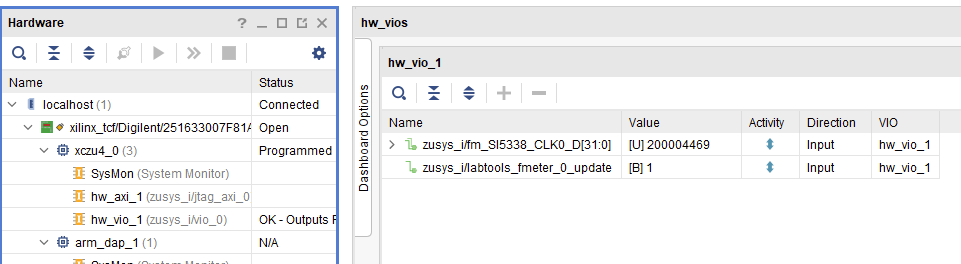
Vivado Hardware Manager
System Design - Vivado
Block Design

Block Design PCB REV03
PS Interfaces
Activated interfaces:
| Type | Note |
|---|---|
| DDR | |
| QSPI | MIO |
| SD0 | MIO |
| SD1 | MIO |
| I2C0 | MIO |
| I2C1 | EMIO |
| UART0 | MIO |
| GPIO0 | MIO |
| SWDT0..1 | |
| TTC0..3 | |
| GEM3 | MIO |
| USB0 | MIO, USB2 only |
Constraints
Basic module constraints
_i_bitgen_common.xdc
set_property BITSTREAM.GENERAL.COMPRESS TRUE [current_design]
set_property BITSTREAM.CONFIG.UNUSEDPIN PULLNONE [current_design
Design specific constraints
_i_io.xdc
set_property PACKAGE_PIN K9 [get_ports {SI5338_CLK0_D_clk_p[0]}]
set_property IOSTANDARD LVDS [get_ports {SI5338_CLK0_D_clk_p[0]}]
set_property DIFF_TERM TRUE [get_ports {SI5338_CLK0_D_clk_p[0]}]

set_property PACKAGE_PIN H1 [get_ports {x0[0]}]
set_property IOSTANDARD LVCMOS18 [get_ports {x0[0]}]
set_property PACKAGE_PIN J1 [get_ports {x1[0]}]
set_property IOSTANDARD LVCMOS18 [get_ports {x1[0]}]
Software Design - Vitis
For Vitis project creation, follow instructions from:
Application
Template location: "<project folder>\sw_lib\sw_apps\"
zynqmp_fsbl
TE modified 2025.2 FSBL
General:
- Modified Files: xfsbl_main.c, xfsbl_hooks.h/.c, xfsbl_board.h/.c (search for 'TE Mod' on source code)
- Add Files: te_xfsbl_hooks.h/.c (for hooks and board)
- General Changes:
- Display FSBL Banner and Device Name
Module Specific:
- Add Files: all TE Files start with te_*
- Si5338 Configuration
- ETH+OTG Reset over MIO
zynqmp_pmufw
AMD default PMU firmware.
hello_trenz
Hello Trenz is an AMD Hello World example as endless loop instead of one console output.
u-boot
U-Boot.elf is generated with PetaLinux. Vitis is used to generate Boot.bin.
Software Design - Yocto
Yocto is a flexible, layer-based build system for creating customized Linux distributions. Unlike PetaLinux, there is no single config file that contains all system settings. Instead, the configuration is distributed across several components, for example:
- Device Tree: hardware-specific configuration such as peripherals, interfaces, memory, and device settings
- Machine configuration: definition of the target machine and its hardware- and SoC-specific build configuration
- Recipes: configuration and build instructions for components such as U-Boot, the Linux kernel, applications, and packages
- Layer configuration: layer dependencies and build-related configuration
The basic concept is to provide a generic Trenz-specific software base in the meta-trenz-amd layer. This layer contains the required settings and configurations for the supported hardware, including the basic U-Boot, Linux kernel, and root filesystem configuration. The machine configuration is then used to select and combine the appropriate configuration for the respective board.
Customers can use the meta-trenz-amd layer as the basis for their own software configuration and create a separate customer-specific Yocto layer on top of it.
Do not modify meta-trenz-amd directly. Create a customer-specific layer that extends and overrides the Trenz configuration.
This approach provides a clear separation between the generic Trenz configuration and customer-specific adaptations.
For information on Custom Hardware Development with the AMD Embedded Development Framework (EDF) and instructions on how to set up and bring up Yocto, please refer to:
U-Boot
The following configuration represents the default U-Boot configuration provided by Trenz in the meta-trenz-amd layer.
The configuration can be viewed using the Yocto menuconfig interface. From the Yocto build directory "<project folder>/os/yocto/build", run:
MACHINE=te0820 bitbake -c menuconfig u-boot-xlnx
The corresponding Trenz configuration file is located at:
- <project folder>/os/yocto/meta-trenz-amd/recipes-bsp/u-boot/u-boot-xlnx/files/te0820/bsp.cfg
The following settings are included in the Trenz U-Boot configuration:
- MAC from eeprom together with uboot and device tree settings:
- CONFIG_ENV_OVERWRITE=y
- Boot Modes:
- CONFIG_SD_BOOT=y
- CONFIG_ENV_IS_IN_FAT is not set
- CONFIG_ENV_IS_IN_NAND is not set
- CONFIG_ENV_IS_IN_SPI_FLASH is not set
- Identification
- CONFIG_IDENT_STRING=" TE0820"
menuconfig interface can be used to inspect, test, and modify the U-Boot configuration. Changes made in menuconfig apply to the current Yocto build. To make such changes persistent and include them in a customer-specific configuration, the resulting configuration must be saved and integrated into the customer's own Yocto layer.Device Tree
The following code block shows the Device Tree and therefore the hardware-specific configuration of the module.
<project folder>\os\yocto\meta-trenz-amd\recipes-bsp\device-tree\files\te0820\system-user.dtsi
/* TE0820 board-specific device tree customizations for Linux.
* Ported from PetaLinux meta-user/recipes-bsp/device-tree/files/system-user.dtsi.
*/
#include <dt-bindings/clock/xlnx-zynqmp-clk.h>
/*-------------------- SD0 eMMC ----------------*/
&sdhci0 {
bus-width = <8>;
};
/*-------------------- SD1 sd2.0 ----------------*/
&sdhci1 {
disable-wp;
no-1-8-v;
};
/*-------------------- USB 2.0 only ----------------*/
&usb0 {
status = "okay";
clock-names = "bus_clk";
clocks = <&zynqmp_clk USB0_BUS_REF>;
assigned-clocks = <&zynqmp_clk USB0_BUS_REF>;
};
&dwc3_0 {
dr_mode = "host";
};
/*------------------ ETH PHY --------------------*/
&gem3 {
phy-handle = <&phy0>;
nvmem-cells = <ð0_addr>;
nvmem-cell-names = "mac-address";
/delete-property/ local-mac-address;
phy0: phy0@1 {
device_type = "ethernet-phy";
reg = <1>;
};
};
/*-------------------- QSPI ---------------------*/
&qspi {
num-cs = <2>;
flash@0 {
compatible = "jedec,spi-nor";
reg = <0>, <1>;
parallel-memories = /bits/ 64 <0x10000000 0x10000000>;
spi-rx-bus-width = <4>;
spi-tx-bus-width = <4>;
spi-max-frequency = <108000000>;
#address-cells = <1>;
#size-cells = <1>;
};
};
/*------------------ I2C --------------------*/
&i2c0 {
eeprom: eeprom@50 {
compatible = "microchip,24aa025", "atmel,24c02";
reg = <0x50>;
#address-cells = <1>;
#size-cells = <1>;
eth0_addr: eth-mac-addr@FA {
reg = <0xFA 0x06>;
};
};
};
Kernel
The following configuration represents the default Linux kernel configuration provided by Trenz in the meta-trenz-amd layer.
The configuration can be viewed using the Yocto menuconfig interface. From the Yocto build directory "<project folder>/os/yocto/build", run:
MACHINE=te0820 bitbake -c menuconfig linux-xlnx
The corresponding Trenz configuration file is located at:
- <project folder>/os/yocto/meta-trenz-amd/recipes-kernel/linux/linux-xlnx/te0820/bsp.cfg
The following settings are included in the Trenz Linux kernel configuration:
Only needed to fix JTAG Debug issue:
CONFIG_CPU_FREQ is not set
The menuconfig interface can be used to inspect, test, and modify the Linux kernel configuration. Changes made in menuconfig apply to the current Yocto build. To make such changes persistent and include them in a customer-specific configuration, the resulting configuration must be saved and integrated into the customer's own Yocto layer.
Rootfs
There are two image recipes under meta-trenz-amd/recipes-extended/images:
- edf-linux-disk-image.bbappend: extends the AMD EDF
edf-linux-disk-imagerecipe with Trenz-specific configuration and content. It generates the Linux disk image (*.wic). - te-image-initramfs.bb: standalone Trenz recipe that builds a small initramfs, which is packaged together with the Linux kernel and Device Tree into
image.ub.
edf-linux-disk-image.bbappend
TE0820 specific settings in edf-linux-disk-image.bbappend:
IMAGE_INSTALL:append:te0820 = " \
    webfwu \
"

IMAGE_INSTALL:append:te0820 = " \
    e2fsprogs-mke2fs \
    util-linux \
    nfs-utils \
    run-postinsts \
    udev-extraconf \
    libdfx \
    u-boot-tools \
    bridge-utils \
"

IMAGE_FEATURES:append:te0820 = " \
    hwcodecs \
"
| Package | Description |
|---|---|
| Trenz applications | |
| webfwu | Web server application for Zynq access (pulls in busybox-httpd) |
| Migrated from PetaLinux rootfs_config | |
| e2fsprogs-mke2fs | Format ext2/3/4 partitions on the target |
| util-linux | Full Linux utilities instead of BusyBox applets |
| nfs-utils | Mount host work directory over NFS |
| run-postinsts | Run deferred postinstall scripts at first boot |
| udev-extraconf | Auto-mount SD card to /run/media |
| libdfx | Load PL bitstream and DTBO at runtime |
| u-boot-tools | Read and write U-Boot environment from Linux (fw_printenv / fw_setenv) |
| bridge-utils | Network bridging |
| Image features | |
| hwcodecs | Hardware codec support |
busybox-httpd is not added explicitly. It is pulled in automatically as a runtime dependency of webfwu.
te-image-initramfs.bb
This minimal RAM-based rootfs is packed into image.ub (FIT: kernel + dtb + ramdisk) for PetaLinux-style booting from the FAT partition of SD/eMMC.
PACKAGE_INSTALL is the list of packages that are actually installed into the rootfs. It is defined by default as
- ${IMAGE_INSTALL} ${ROOTFS_BOOTSTRAP_INSTALL} ${FEATURE_INSTALL}.
Therefore, IMAGE_INSTALL is only one part of PACKAGE_INSTALL.
In a bbappend file, it is recommended to extend IMAGE_INSTALL and leave PACKAGE_INSTALL untouched. But in Initramfs recipes PACKAGE_INSTALL is usually assigned directly. This keeps packages stable and prevents them from being changed globally by other layers. But ROOTFS_BOOTSTRAP_INSTALL must be listed manually, as shown below.
PACKAGE_INSTALL = " \
    base-files \
    base-passwd \
    netbase \
    systemd \
    shadow-base \
    update-alternatives-opkg \
    run-postinsts \
    busybox \
    linux-xlnx-udev-rules \
    fpga-manager-script \
    libdfx \
    i2c-tools \
    mtd-utils \
    e2fsprogs-mke2fs \
    dosfstools \
    "

IMAGE_FEATURES = ""
PACKAGE_EXCLUDE = "kernel-image-*"
BAD_RECOMMENDATIONS += "udev-hwdb"
IMAGE_FSTYPES = "cpio.gz cpio.gz.u-boot"
| Package | Description |
|---|---|
| Base system (from packagegroup-core-boot) | |
| base-files | Basic directory layout and files under /etc |
| base-passwd | /etc/passwd and /etc/group |
| netbase | /etc/protocols, /etc/services |
| systemd | Init system and device manager |
| shadow-base | Login and passwd tools; needed for the forced password change on first login |
| update-alternatives-opkg | Arbitrates commands provided by several packages (e.g. BusyBox vs. util-linux) |
| run-postinsts | Runs deferred postinstall scripts at first boot; removed automatically if there are none |
| busybox | Compact Linux utilities |
| Migrated from edf-linux-disk-image | |
| linux-xlnx-udev-rules | udev rules for AMD devices |
| fpga-manager-script | fpgautil: load PL bitstreams |
| libdfx | Load PL bitstreams and DTBOs at runtime |
| e2fsprogs-mke2fs | Format ext2/3/4 file system partitions |
| Additional tools | |
| i2c-tools | I2C debugging (i2cdetect, i2cget, i2cset) |
| mtd-utils | Read, erase and write QSPI and NAND flash |
| dosfstools | Create and repair FAT boot partitions (mkfs.vfat, fsck.vfat) |
Other settings in te-image-initramfs.bb:
| Setting | Description |
|---|---|
| IMAGE_FEATURES = "" | Keeps EXTRA_IMAGE_FEATURES from local.conf out of the ramdisk |
| PACKAGE_EXCLUDE = "kernel-image-*" | The kernel is part of image.ub, so this recipe builds a pure ramdisk; makes sure no other setting pulls the kernel image in |
| BAD_RECOMMENDATIONS += "udev-hwdb" | Skips the udev hardware database to reduce the size of image.ub |
| IMAGE_FSTYPES = "cpio.gz cpio.gz.u-boot" | cpio.gz is embedded in image.ub; cpio.gz.u-boot is a standalone ramdisk (boot.scr fallback path / JTAG boot) |
FSBL patch (alternative for vitis fsbl trenz patch)
See "<project folder>\os\yocto\meta-trenz-amd\recipes-bsp\embeddedsw"
te_* files are identical to files in "<project folder>\sw_lib\sw_apps\zynqmp_fsbl\src" except for the PLL files (SI5338) which depend on PLL revision. The PLL files may have to be copied again manually into the appropriate Yocto layer folder "<project folder>\os\yocto\meta-trenz-amd\recipes-bsp\embeddedsw\embeddedsw-source\<Version>\te0820\git\lib\sw_apps\zynqmp_fsbl\src"
Boot.scr patch
Trenz boot script, replaces the AMD EDF edf-linux-mmc-boot.cmd and adds FIT image (image.ub) boot and USB/JTAG boot support, see "<project folder>\os\yocto\meta-trenz-amd\recipes-bsp\u-boot\u-boot-edf-scr\common\"
boot.scr is generated automatically during the Yocto build. To customize the boot process, adapt edf-linux-mmc-boot.cmd in your customer-specific layer, see also Distro Boot.
QSPI patch
Linux kernel patch to read back the QSPI size from the flash instead of the device tree parameter (0001-parallel-memories-do-not-use-size-property.patch), see "<project folder>\os\yocto\meta-trenz-amd\recipes-kernel\linux\linux-xlnx\te0820\"
Applications
See "<project folder>\os\yocto\meta-trenz-amd\recipes-apps\"
webfwu
Webserver application suitable for Zynq access. Need busybox-httpd
Software Design - PetaLinux
For PetaLinux installation and project creation, follow instructions from:
Config
Start with petalinux-config or petalinux-config --get-hw-description
Changes:
- select SD default instead of eMMC:
- CONFIG_SUBSYSTEM_PRIMARY_SD_PSU_SD_1_SELECT=y
- add new flash partition for bootscr and sizing
- CONFIG_SUBSYSTEM_FLASH_PSU_QSPI_0_PART0_NAME="qspi-boot"
- CONFIG_SUBSYSTEM_FLASH_PSU_QSPI_0_PART0_SIZE=0xA00000
- CONFIG_SUBSYSTEM_FLASH_PSU_QSPI_0_PART1_NAME="qspi-image"
- CONFIG_SUBSYSTEM_FLASH_PSU_QSPI_0_PART1_SIZE=0x4000000
- CONFIG_SUBSYSTEM_FLASH_PSU_QSPI_0_PART2_NAME="qspi-bootenv"
- CONFIG_SUBSYSTEM_FLASH_PSU_QSPI_0_PART2_SIZE=0x40000
- CONFIG_SUBSYSTEM_FLASH_PSU_QSPI_0_PART3_NAME="qspi-bootscr"
- CONFIG_SUBSYSTEM_FLASH_PSU_QSPI_0_PART3_SIZE=0x80000
- CONFIG_SUBSYSTEM_FLASH_PSU_QSPI_0_PART4_NAME="qspi-spare"
- CONFIG_SUBSYSTEM_FLASH_PSU_QSPI_0_PART4_SIZE=0x3540000
- CONFIG_SUBSYSTEM_UBOOT_QSPI_FIT_IMAGE_OFFSET=0xA00000
- CONFIG_SUBSYSTEM_UBOOT_QSPI_FIT_IMAGE_SIZE=0x4000000
- Identification
- CONFIG_SUBSYSTEM_HOSTNAME="Trenz"
- CONFIG_SUBSYSTEM_PRODUCT="TE0820"
U-Boot
Start with petalinux-config -c u-boot
Changes:
- MAC from eeprom together with uboot and device tree settings:
- CONFIG_ENV_OVERWRITE=y
- CONFIG_NVMEM=y
- CONFIG_DM_RTC=y (needed for nvmem driver because of bug in uboot)
- Boot Modes:
- CONFIG_QSPI_BOOT=y
- CONFIG_SD_BOOT=y
- CONFIG_ENV_IS_IN_FAT is not set
- CONFIG_ENV_IS_IN_NAND is not set
- CONFIG_ENV_IS_IN_SPI_FLASH is not set
- CONFIG_BOOT_SCRIPT_OFFSET=0x4A40000
- Identification
- CONFIG_IDENT_STRING=" TE0820"
Change platform-top.h:
#include <configs/xilinx_zynqmp.h> #no changes
Device Tree
project-spec\meta-user\recipes-bsp\device-tree\files\system-user.dtsi
/include/ "system-conf.dtsi"
/ {
/*------------------ PS-PL CLK --------------------*/
fclk0: fclk0 {
status = "okay";
compatible = "xlnx,fclk";
clocks = <&zynqmp_clk PL0_REF>;
//clocks = <&zynqmp_clk 71>;
clock-names = "pl_clk0";
};
};
/*-------------------- SD0 eMMC ----------------*/
&sdhci0 {
// 1.8V
bus-width = <8>;
};
/*-------------------- SD1 sd2.0 ----------------*/
&sdhci1 {
// 3.3V
disable-wp;
no-1-8-v;
};
/*-------------------- USB 2.0 only ----------------*/
&usb0 {
status = "okay";
clock-names = "bus_clk";
clocks = <&zynqmp_clk USB0_BUS_REF>;
assigned-clocks = <&zynqmp_clk USB0_BUS_REF>;
};
&dwc3_0 {
dr_mode = "host";
};
/*------------------ ETH PHY --------------------*/
&gem3 {
phy-handle = <&phy0>;
nvmem-cells = <ð0_addr>;
nvmem-cell-names = "mac-address";
//required otherwise petalinux gives a static address here
/delete-property/ local-mac-address;
phy0: phy0@1 {
device_type = "ethernet-phy";
reg = <1>;
};
};
/*-------------------- QSPI ---------------------*/
&qspi {
num-cs = <2>;
flash@0 {
compatible = "jedec,spi-nor";
reg = <0>, <1>;
parallel-memories = /bits/ 64 <0x10000000 0x10000000>;
/* 0x10000000 = 256MB dual as maximum;
this is a proprietary property from u-boot/linux-xlnx. it is used in u-boot and does work if it is larger than the connected qspi, even though the displayed size if wrong
we implemented a linux patch that uses the size which is read back from the qspi itself
*/
spi-rx-bus-width = <4>;
spi-tx-bus-width = <4>;
spi-max-frequency = <108000000>; // max. frequency also depends on the QSPI chip
// here 108MHz for N25Q512A (Fast Read Quad IO STR, 8 Dummy Cycles, quad SPI protocol)
#address-cells = <1>;
#size-cells = <1>;
};
};
/*------------------ I2C --------------------*/
&i2c0 {
eeprom: eeprom@50 {
compatible = "microchip,24aa025", "atmel,24c02";
reg = <0x50>;
#address-cells = <1>;
#size-cells = <1>;
eth0_addr: eth-mac-addr@FA {
reg = <0xFA 0x06>;
};
};
};
Kernel
Start with petalinux-config -c kernel
Changes:
Only needed to fix JTAG Debug issue:
CONFIG_CPU_FREQ is not set
Rootfs
Start with petalinux-config -c rootfs
Changes:
- for web server app:
- CONFIG_busybox-httpd=y
- For additional test tools only:
- CONFIG_i2c-tools=y
- CONFIG_usbutils=y
- CONFIG_pciutils=y
- Use linux instead of busybox utiles
- CONFIG_util-linux=y
- For auto login:
- CONFIG_imagefeature-serial-autologin-root=y
FSBL patch (alternative for vitis fsbl trenz patch)
See "<project folder>\os\petalinux\project-spec\meta-user\recipes-bsp\embeddedsw"
Petalinux Troubleshoot#Petalinux2023.2
te_* files are identical to files in "<project folder>\sw_lib\sw_apps\zynqmp_fsbl\src" except for the PLL files (SI5338) which depend on PLL revision. The PLL files may have to be copied again manually into the appropriate petalinux folder "<project folder>\os\petalinux\project-spec\meta-user\recipes-bsp\embeddedsw\fsbl-firmware\git\lib\sw_apps\zynqmp_fsbl\src"
Boot.scr patch
Petalinux template with Trenz debug log prints, see "<project folder>\os\petalinux\project-spec\meta-user\recipes-bsp\u-boot"
boot.scr is generated automatically during the PetaLinux build. To customize the boot process, adapt the boot script template in this folder, see also Distro Boot.
QSPI patch
Petalinux patch to read back QSPI size from flash instead device tree parameter, see "<project folder>\os\petalinux\project-spec\meta-user\recipes-kernel\linux\linux-xlnx"
Applications
See "<project folder>\os\petalinux\project-spec\meta-user\recipes-apps\"
webfwu
Webserver application suitable for Zynq access. Need busybox-httpd
Additional Software
SI5338
File location "<project folder>\misc\Si5338\Si5338-*.slabtimeproj"
General documentation how you work with these project will be available on Si5338
Appx. A: Change History and Legal Notices
Document Change History
To get content of older revision got to "Change History" of this page and select older document revision number.
| Date | Document Revision | Authors | Description |
|---|---|---|---|
| |||
2025-05-12 | v.83 | John Hartfiel |
|
2024-11-27 | v.80 | Manuela Strücker |
|
| 2024-03-05 | v.79 | Manuela Strücker |
|
| 2024-02-23 | v.78 | Manuela Strücker |
|
| 2024-02-13 | v.77 | Markus Kirberg |
|
| 2023-06-22 | v.76 | Manuela Strücker |
|
| 2023-03-28 | v.75 | Manuela Strücker |
|
| 2022-09-28 | v.74 | Manuela Strücker |
|
| 2022-09-12 | v.73 | Manuela Strücker |
|
| 2022-09-06 | v.72 | Manuela Strücker |
|
| 2022-01-26 | v.70 | John Hartfiel |
|
| 2022-01-24 | v.68 | John Hartfiel |
|
| 2022-01-21 | v.67 | John Hartfiel |
|
| 2022-01-14 | v.66 | John Hartfiel |
|
| 2021-06-09 | v.65 | Manuela Strücker |
|
| 2021-06-01 | v.64 | John Hartfiel |
|
| 2020-05-07 | v.62 | John Hartfiel |
|
| 2020-04-08 | v.61 | John Hartfiel |
|
| 2020-03-25 | v.60 | John Hartfiel |
|
| 2020-01-21 | v.59 | John Hartfiel |
|
| 2020-01-14 | v.58 | John Hartfiel |
|
| 2019-12-19 | v.57 | John Hartfiel |
|
| 2019-10-29 | v.56 | John Hartfiel |
|
| 2019-08-09 | v.55 | John Hartfiel |
|
| 2019-06-19 | v.54 | John Hartfiel |
|
| 2019-04-01 | v.53 | John Hartfiel |
|
2018-09-21 | v.47 | John Hartfiel |
|
2018-10-31 | v.43 | John Hartfiel |
|
2018-09-12 | v.41 | John Hartfiel |
|
2018-07-11 | v.40 | John Hartfiel |
|
2018-07-06 | v.38 | John Hartfiel |
|
2018-06-19 | v.34 | John Hartfiel |
|
2018-02-13 | v.29 | John Hartfiel |
|
| 2018-02-06 | v.27 | John Hartfiel |
|
| 2018-01-29 | v.26 | John Hartfiel |
|
| 2018-01-24 | v.25 | John Hartfiel |
|
| 2018-01-10 | v.24 | John Hartfiel |
|
| 2017-12-20 | v.23 | John Hartfiel |
|
| 2017-11-21 | v.19 | John Hartfiel |
|
| 2017-11-20 | v.18 | John Hartfiel |
|
| 2017-11-13 | v.16 | John Hartfiel |
|
| 2017-11-06 | v.15 | John Hartfiel |
|
| 2017-10-23 | v.13 | John Hartfiel |
|
| 2017-10-19 | v.9 | John Hartfiel |
|
| 2017-09-11 | v.1 | Initial release | |
| All |
Document change history.
Legal Notices
Data Privacy
Please also note our data protection declaration at https://www.trenz-electronic.de/en/Data-protection-Privacy
Document Warranty
The material contained in this document is provided “as is” and is subject to being changed at any time without notice. Trenz Electronic does not warrant the accuracy and completeness of the materials in this document. Further, to the maximum extent permitted by applicable law, Trenz Electronic disclaims all warranties, either express or implied, with regard to this document and any information contained herein, including but not limited to the implied warranties of merchantability, fitness for a particular purpose or non infringement of intellectual property. Trenz Electronic shall not be liable for errors or for incidental or consequential damages in connection with the furnishing, use, or performance of this document or of any information contained herein.
Limitation of Liability
In no event will Trenz Electronic, its suppliers, or other third parties mentioned in this document be liable for any damages whatsoever (including, without limitation, those resulting from lost profits, lost data or business interruption) arising out of the use, inability to use, or the results of use of this document, any documents linked to this document, or the materials or information contained at any or all such documents. If your use of the materials or information from this document results in the need for servicing, repair or correction of equipment or data, you assume all costs thereof.
Product Disclaimer
Products (incl. Software and Firmware) are exclusively designed, manufactured, and distributed for industrial applications. They are not intended, authorized, or certified for use in critical safety applications, medical devices, aerospace, nuclear, life-support, traffic-control, military, or other environments where malfunction or failure could result in personal injury, death, or significant property or environmental damage.
Trenz Electronic GmbH (“Manufacturer”) excludes any liability for inappropriate use in such contexts. The Customer bears all responsibility for verifying suitability and compliance with applicable regulations when deploying in any critical-use scenario. The Customer also agrees to indemnify and hold harmless the Manufacturer from any third-party claims or liabilities arising from such use.
Copyright Notice
No part of this manual may be reproduced in any form or by any means (including electronic storage and retrieval or translation into a foreign language) without prior agreement and written consent from Trenz Electronic.
Technology Licenses
The hardware / firmware / software described in this document are furnished under a license and may be used /modified / copied only in accordance with the terms of such license.
Environmental Protection
To confront directly with the responsibility toward the environment, the global community and eventually also oneself. Such a resolution should be integral part not only of everybody's life. Also enterprises shall be conscious of their social responsibility and contribute to the preservation of our common living space. That is why Trenz Electronic invests in the protection of our Environment.
REACH, RoHS and WEEE
REACH
Trenz Electronic is a manufacturer and a distributor of electronic products. It is therefore a so called downstream user in the sense of REACH. The products we supply to you are solely non-chemical products (goods). Moreover and under normal and reasonably foreseeable circumstances of application, the goods supplied to you shall not release any substance. For that, Trenz Electronic is obliged to neither register nor to provide safety data sheet. According to present knowledge and to best of our knowledge, no SVHC (Substances of Very High Concern) on the Candidate List are contained in our products. Furthermore, we will immediately and unsolicited inform our customers in compliance with REACH - Article 33 if any substance present in our goods (above a concentration of 0,1 % weight by weight) will be classified as SVHC by the European Chemicals Agency (ECHA).
RoHS
Trenz Electronic GmbH herewith declares that all its products are developed, manufactured and distributed RoHS compliant.
WEEE
Information for users within the European Union in accordance with Directive 2002/96/EC of the European Parliament and of the Council of 27 January 2003 on waste electrical and electronic equipment (WEEE).
Users of electrical and electronic equipment in private households are required not to dispose of waste electrical and electronic equipment as unsorted municipal waste and to collect such waste electrical and electronic equipment separately. By the 13 August 2005, Member States shall have ensured that systems are set up allowing final holders and distributors to return waste electrical and electronic equipment at least free of charge. Member States shall ensure the availability and accessibility of the necessary collection facilities. Separate collection is the precondition to ensure specific treatment and recycling of waste electrical and electronic equipment and is necessary to achieve the chosen level of protection of human health and the environment in the European Union. Consumers have to actively contribute to the success of such collection and the return of waste electrical and electronic equipment. Presence of hazardous substances in electrical and electronic equipment results in potential effects on the environment and human health. The symbol consisting of the crossed-out wheeled bin indicates separate collection for waste electrical and electronic equipment.
Trenz Electronic is registered under WEEE-Reg.-Nr. DE97922676.
Table of contents
Overview
Content Tools